![Virtual House Tour Considerations Before Listing Your Property Online [2026]](https://rextheme.com/wp-content/uploads/2024/06/Virtual-House-Tour-Considerations-Before-Listing-Your-Property-Online.webp)
You already know a virtual house tour gets you more eyes on a listing. What most agents don’t realize is that an unprepared one can actively cost them deals
- Buyers scroll through,
- See nothing that answers their real questions,
- And move on to the next listing before your agent ever gets a call.
We see this pattern constantly across different types of real estate tours: the ones that convert aren’t the ones with the fanciest 360° camera.
They’re the ones where the seller or agent spent an hour thinking through what a buyer needs to see, in what order, before hitting publish.
A virtual house tour is only as good as the preparation behind it – the room staging, the shot placement, and the interactive setup that turns a walkthrough into something a buyer can act on.
This guide walks you through exactly what that preparation looks like, from getting each room camera-ready to setting up the hotspots and booking forms that turn a browser into an inquiry.
So let’s get started,
Quick Answer – Virtual House Tour Considerations
- Prep each room properly—clean, declutter, and light it well before shooting
- Use at least 4000×2000px 360° images to avoid blurry tours
- Add multi-scene navigation and a floor plan for natural movement
- Use hotspots to answer key buyer questions (size, features, inclusions)
- Embed a booking or contact form to capture leads instantly
- Final Verdict: Use WPVR to make your 360 photos of your house into a virtual tour easily and affordably.
Why Preparation Matters More Than the Camera
Most people think creating a virtual house tour starts with the camera. Which 360° camera to buy. Which app to use.
But in the home selling process, that’s not what makes the difference. The real impact happens before you ever start shooting.
If a room isn’t prepared properly, no camera can fix it. In fact, it often makes things worse.
- Empty spaces feel colder.
- Poor lighting looks dull and uninviting.
And when layouts aren’t clear, buyers don’t try to figure it out – they simply move on. That’s where the problem starts.
Because in the home selling process, attention is everything. Once a buyer feels confused, they don’t reach out to ask questions. They close the tab and look at another listing.
So skipping preparation doesn’t just affect how your tour looks. It directly affects whether a buyer stays, understands your property, and becomes a lead.
Preparing Your Home for a Virtual Tour, Room by Room
Preparing your home for a virtual tour starts with the same instincts as prepping for a real estate open house, but with one big difference: the camera shows everything at once. There’s no way to hide things later.
Before anything, you have to learn what not to fix before selling your house so that you can save wasted investment.
So, start with decluttering. Remove extra items, but don’t make the room completely empty. Buyers need some furniture to understand the size of the space.
Keep basic items like a bed, sofa, or dining table. Remove things like cables, personal photos, and clutter on counters.
Next is lighting. This is where most tours go wrong. Always shoot during the day.
Open the curtains and turn on all lights in the room. A dark room looks smaller and harder to understand. Buyers may not clearly see corners or layout.
Camera position is also important. Place the camera in the center of the room at normal eye level. This is how a person naturally sees your property. If you place it in the wrong spot, the room can look strange or confusing.
For small rooms or rooms with odd shapes, this matters even more. A simple, clear view helps buyers understand the space better.
Virtual House Tour Considerations Before You Shoot

Once your rooms are ready, there’s another step before you start shooting. This part is not about furniture; it’s about making sure your images work well inside the tour.
First, check image quality. Each 360° image should be at least 4000×2000px. If the quality is low, the tour will look blurry on larger screens. Many buyers view listings on desktop, so this matters.
If you’re using WPVR, you have more control here. You can enable proper image handling and compression so your tour loads faster without making images look too blurry.
Still, don’t rely only on compression- always start with high-quality images.
Next, plan which rooms to include. Not every room needs a 360° view. If multiple rooms look the same, you can skip some of them.
Focus on the important areas like the kitchen, main bedroom, living room, and any special features like a basement, patio, or pool. Too few scenes feel incomplete, but too many can make the tour slow and boring.
Finally, don’t forget outdoor areas. If your tour only shows inside, buyers will still have questions. Then you will question yourself why real estate buyers keep asking more questions.
Show the yard, driveway, or outside view so they get a full idea of your property. A simple, clear virtual house tour helps buyers understand your property better and keeps them interested longer.
Setting Up Your Tour So It Actually Converts
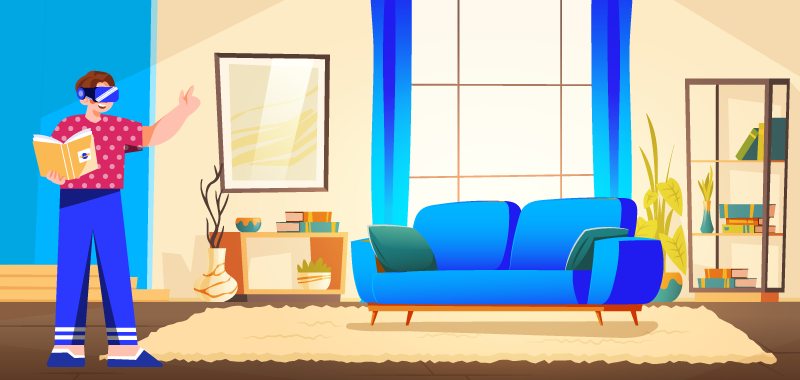
Good images get a buyer’s attention. The setup is what turns that attention into a phone call. This is the part of the process that’s easy to skip and the part that costs you the most leads when you do.
1. Hotspots
It replaces the questions a buyer would normally ask over the phone. Instead of wondering what the flooring material is or whether that appliance is included, a buyer clicks a hotspot inside the room and gets the answer immediately.
Setting up hotspots inside WPVR takes a few minutes per scene, and it’s the single feature most linked to buyers staying on a tour longer instead of clicking away after the first room.
2. Multi-scene navigation
It helps to connect your staged rooms into something that actually feels like a walkthrough, not a slideshow of disconnected images.
The Scene Gallery feature lets buyers jump directly to any room instead of clicking through every scene in order, which matters most for larger homes where nobody wants to navigate five rooms just to check the primary bathroom.
3. A floor plan
An interactive floor plan gives buyers the spatial context that individual 360° shots can’t.
It’s especially useful for immersive virtual property tours where your home has a layout that isn’t intuitive from room-by-room images alone – split levels, additions, or anything with an unconventional flow.
In fact it will incresae 52% more clicks of your property.
4. Booking Form:
A booking or contact form embedded directly inside your tour is the step most sellers forget entirely.
Keep the form inside your tour where interest is highest. This makes it easy to take action for your buyers right away.
Buyers can book a visit or ask questions instantly. No extra steps means more chances to get leads.
Virtual House Tour Tips for Making It Feel Real
Small details can make your virtual tour feel more like a real walkthrough. Without them, your tour may feel flat, like just clicking through photos.
Adding soft background music can make your tour feel more natural. It creates the same comfortable feeling as an in-person open house.
You can also add a short video in key areas like the kitchen. This helps you explain details that images alone can’t show.
Make sure mobile users can explore easily with gyroscope support. This lets them move their phone to look around instead of dragging.
These features are not required, but they make a big difference. They help your tour stand out and stay in the buyer’s mind longer.
Tips for High-Quality 360 Images for a Virtual House Tour

You’ve probably seen property listings that show empty rooms with basic photos. As a seller, you already know those images don’t always help buyers understand your property.
When you upload too many separate photos, buyers can get confused. They can’t easily picture how rooms connect or how the home actually feels.
That’s where a virtual house tour helps you stand out. It lets your buyer move through your home naturally without feeling lost.
1. Proper & Clean Decoration
When you prepare your luxury home tour, try to keep it clean but not empty. A completely empty space can feel cold and hard to imagine living in.
- Keep everything neat and simple
- Add basic furniture like a sofa, bed, or table
- Remove clutter and personal items
2. Set Up Appropriate Lighting
Lighting can completely change how your home looks in a tour. If your rooms are too dark, they may feel smaller than they really are.
- Avoid shooting at night if possible
- Open curtains to bring in natural light
- Turn on all necessary lights
3. Keep the Image Location in Mind
Think about where your buyer would naturally stand in the room. That’s usually the best place to position your camera.
- Capture a full view of the space
- Place the camera near the center of the room
- Keep it at eye level
4. Display Exceptional Features & Outdoors
Focus on what makes your property special. These are the details buyers will remember most.
- Show features like a pool, patio, or basement
- Include both indoor and outdoor areas
- Highlight anything unique about your home
5. Optimize the Photos
Don’t forget to check the images of the rooms before adding them to a tour. Check each image if they are good enough for creating a virtual tour. You can use 360 cameras to capture good images.
On top of that, you will need to take high-caliber images for your virtual house tour. As a matter of fact, you can even use an iPhone for great panorama images.
You can even use an iPhone or an Android app for your mobile. You’ll be able to take great images and optimize your photos without any prior experience at all.
How To Use A Virtual House Tour in Your WordPress Site
There are many virtual tour software available in the market. But one of the best Virtual Tour tools available is WPVR. It has both a Free and a Pro Version available.
WPVR is one of the most user-friendly virtual tour builders available. You can convert a 360 panoramic image into a virtual house tour within a few minutes.
It lets you optimize virtual tours for both smartphones and desktops. Make the tour load time and transitions fit for the clients.
Also, the WPVR Pro Version will help you make a comprehensive virtual house tour with all the necessary elements you need.
Must-Have Features of a Virtual House Tour
Here are the features that will help you to create an engaging virtual house tour:
1. Hotspots
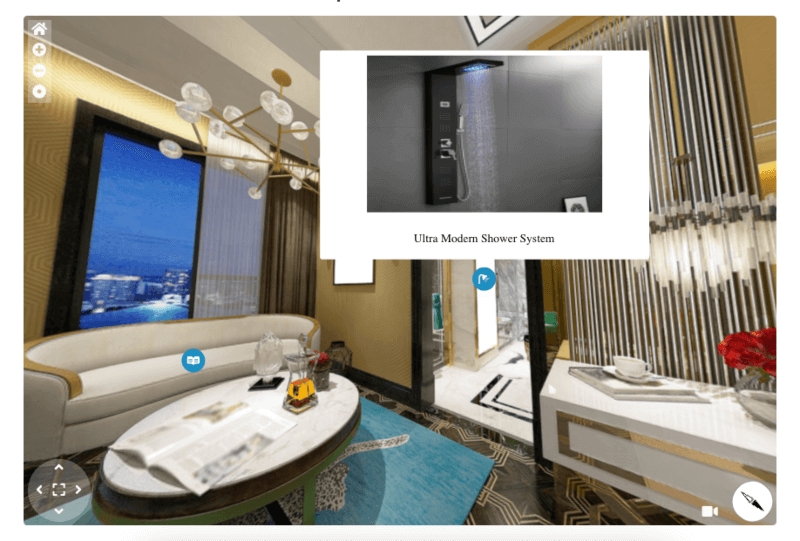
The first and foremost thing is to add hotspots to your virtual house tour. Hotspots are usually used to pinpoint an element with details, change scenes, or add a product/contact form to a tour.
Imagine you have cabinets in a house for different uses. You’ll be able to give details of each cabinet with images or videos using hotspots in a virtual tour.
2. Gyroscope
Increase the comfort of your potential buyers by offering a virtual house tour on smartphones.
With the Gyroscope Feature enabled, your clients can check out the house through smartphones whenever they want.
3. Scene Gallery
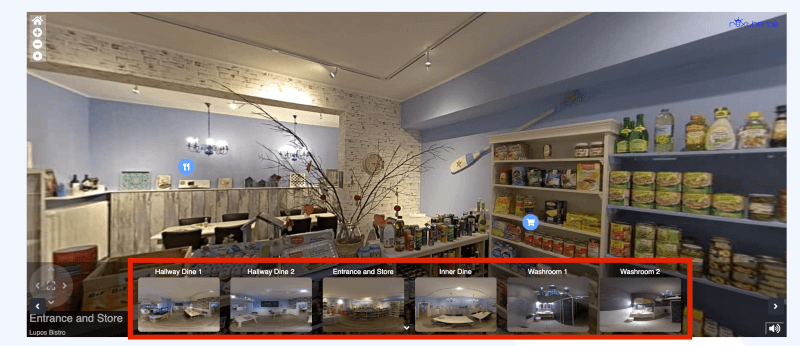
Each house has its own uniqueness with multiple rooms. With the Scene Gallery feature, add the individual room scenes into a single virtual house tour.
Your clients will enjoy the 360 tours of each room distinctly. Scene Gallery feature displays all the rooms in a gallery section.
Your clients don’t have to look here and there to go from one room to another. They can switch to any scene from the gallery within seconds.
4. Compass
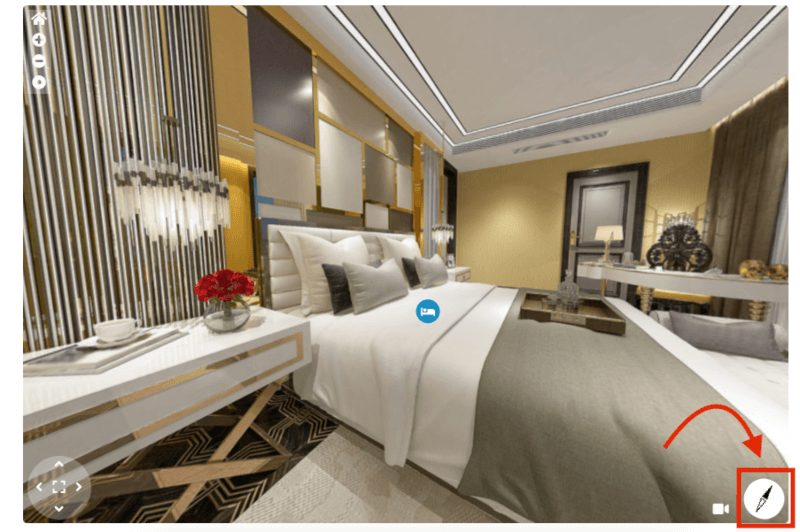
Many house buyers prefer the north view of a house, whereas many like the east view. They can determine the side of a window or door in a room using the virtual house’s compass feature.
5. Company Information
Your clients need to know about your agency and real estate company before making any purchasing decision.
With this feature, showcase your company logo as well as give a brief description of your company.
6. Explainer Videos
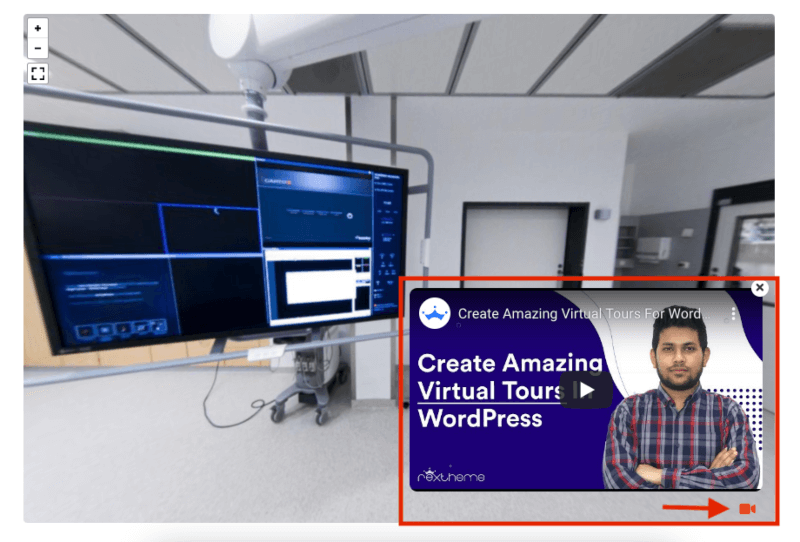
Explainer Video is the video that your clients can enjoy when they’re taking the house tour.
This feature will let you add a video inside the tour. You can explain the unique attributes of a house and what your clients will gain by purchasing that particular house, and all the details you want.
So your users will be able to take the tour and watch the video at the same time.
You can also add tour background music, zoom controls, and many other attributes to a virtual house tour.
Conclusie
A virtual house tour only works if it answers your buyer’s questions clearly. If they can understand your layout and property easily, they’ll stay longer and trust your listing more.
Getting views feels good, but what you really want is showings. A simple, easy-to-follow tour helps your buyer feel ready to take that next step.
Take time to prepare your rooms and keep your images clear and bright. Add hotspots, a floor plan, and a booking option so buyers don’t feel lost.
If you’re using WordPress, WPVR can make this process much easier for you. You can upload images, connect scenes, and publish your tour without stress.
01. Can I make a virtual house tour myself before listing a property?
Yes, you can create a virtual tour using a 360° camera or even your smartphone. The tools are simple and widely available today. What matters more is preparing your home properly before you start.
02. What is the cheapest way to create a real estate virtual tour?
You don’t need expensive platforms to get started. Affordable tools like WordPress plugins can help you build a tour easily. This makes it possible to create a professional-looking tour on a small budget.
03. What do I need to create a 360° virtual tour for my listing?
You need clear images, good lighting, and simple software to connect scenes. A basic setup with a camera and clean rooms is enough. Keeping things simple helps buyers understand your property better.
04. Do virtual house tours actually help to sell my home faster?
Yes, they allow buyers to explore your home before visiting. This builds confidence and filters serious buyers. As a result, you’re more likely to get quality inquiries.
05. How do I add a virtual tour to my website by myself?
If you use WordPress, plugins make the process very easy. You can upload images and connect rooms without technical skills. Then you can publish your tour directly on your listing page.

Wow, these are amazing stuff.
Hi Hemanth, thank you for valuable comment. We are glad to hear that you liked our article.