Your buyer is moving from another state. They’ve been through the listing photos more than once, and then the message comes in.
Something like: “So if I walk in the front door, where’s the living room? And which bedroom is next to the stairs?”
You’ve already answered these questions, maybe twice. And to you, the layout makes perfect sense because you’ve actually walked through the house.
But for your buyer, it’s still just twenty separate photos. They still can’t quite figure out how everything fits together.
And that’s understandable. Almost nobody photographs the hallway.
Now you’re at the point where you’d normally suggest a showing date.
But think about it from your buyer’s perspective.
They have to book a flight just to see the property, and they’re still not sure how the rooms connect. It’s only natural for them to hesitate.
So before you book anything, the real question is simple: what can you send that finally shows them how the rooms connect?
Let’s look at what we’d send, in what order, and how their response can help you decide whether it’s worth booking the showing.
Quick Answer
What should I send my out-of-state buyer before booking a showing?
Send one message with four things: the floor plan, a walkthrough that starts at the front door (the listing’s 360 tour or a short video you record), three to five photos of the rooms they asked about, and an offer of a quick video call. End it with three questions. Their reply tells you whether to book.
TL;DR – The Quick Takeaway for Out-of-State Buyers
- Your buyer isn’t stuck on finishes. They’re stuck on how the rooms connect, which is exactly what a photo gallery can’t show.
- Send the map and the walk before you send a date: floor plan, walkthrough, a few key photos, and a call if they want one.
- It works on any listing, including ones that aren’t yours.
- Send it by text, as one message. That’s how most buyers prefer to hear from you, and they’ll open it on a phone.
- Three questions turn “Looks great!” into a reply you can act on.
- None of it replaces the inspection or the visit. It just makes the visit worth taking.
Disclosure: We build WPVR, a WordPress virtual tour plugin. We’ll bring it up in one section, where it genuinely saves a listing agent some work. Everything else here works without it.
First, which side of the deal are you on?
This matters because what you can send depends on your role.
If you’re the buyer’s agent, you’re working with other agents’ listings. You can’t change those listings, so you’ll have to work with what’s already there and add your own walkthrough.
But if you’re the listing agent, it’s a little different. You can add the floor plan and walkthrough to your listing page once, and every remote buyer who finds the property can use them.
So, find the situation that fits you and start there.
| Your situation | What’s really going on | Where to start |
|---|---|---|
| You’re the buyer’s agent, your client is relocating, and the homes belong to other agents | You can’t change those listings, so you’ll need to work with what’s available and add your own walkthrough | Check each listing for a floor plan or tour. If there isn’t one, ask the listing agent, then record your own walkthrough. |
| You’re the listing agent, and a remote buyer is asking about your property | You control the listing, so you can put everything together in one place | Add the floor plan and walkthrough to the listing page once. |
| Your buyer keeps asking the same questions about the layout after looking at the photos | The photos show the rooms, but they don’t explain how everything connects | Send the floor plan first, followed by a walkthrough that follows the route through the home. |
| Your buyer wants to make an offer without visiting the property | Understanding the layout is only one part of the decision | Send the full pack and discuss the inspection contingency before they make an offer. |
| The home has a simple layout, and your buyer can visit easily | The layout isn’t much of a concern here | Good photos and a floor plan may be all you need. |
Quick Answer:
Does this work if I’m the buyer’s agent and it’s not my listing?
Yes. You can’t add anything to someone else’s listing, and you don’t need to. Ask the listing agent for a floor plan or tour, record your own walkthrough, and send it as one pack.
Why can’t my out-of-state buyer work out the layout from listing photos?
Because a photo is a snapshot, and twenty photos are twenty separate snapshots, your buyer still has to figure out how all those separate rooms fit together.
And the parts that connect them, like the hallway, the doorway, or the turn at the top of the stairs, are usually missing from the photos. So your buyer is left guessing.
Think about the questions you get from remote buyers. They’re rarely about the countertops. They’re more likely to ask:
- Is the second bedroom next to the living room or down a separate hallway?
- Where’s the bathroom in relation to the bedrooms?
These aren’t questions about how a room looks. They’re about how the rooms connect.
And you’re seeing more buyers like this for a reason. In the first quarter of 2026, 19.1% of house hunters looked to relocate to another metro, the highest share Redfin has recorded since it started tracking in 2021.
Buyers themselves have also said that understanding the floor plan matters.
According to Zillow’s 2026 buyer survey:
- 52% said they’d wasted time viewing homes they would have skipped if they’d understood the floor plan first.
- 82% said they’re more likely to view a home if the listing has a floor plan they like.
Source: Zillow Consumer Housing Trends Report 2026
Now, you might be wondering whether buyers really care that much about a floor plan.
So here’s one of them, in their own words.
In a discussion on Reddit’s r/RealEstate, a buyer who had been scrolling through listings for months explained what would make them more likely to book a showing.
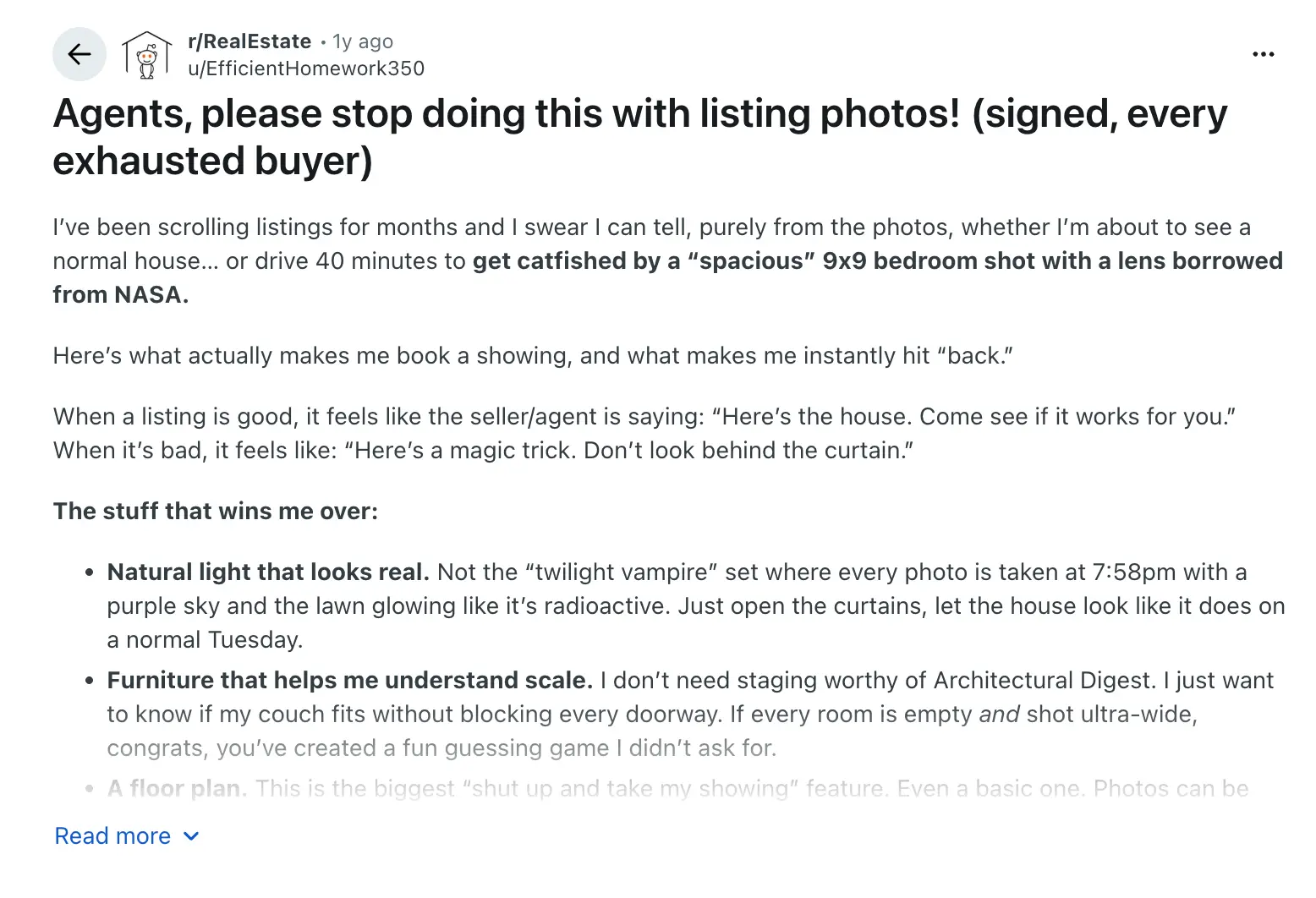
Their answer was simple: a floor plan.
As the buyer explained, photos can look great, but a floor plan answers the questions that photos often leave unanswered, such as where a hallway leads or why the kitchen seems so far away.
They even described a floor plan as the biggest feature that would convince them to book a showing.
Zillow’s research also found that the share of buyers who believed they could only understand a home’s layout in person fell from 80% in 2025 to 75% in 2026.
The takeaway is that listing photos can show buyers what a home looks like, but they don’t always help them understand how the rooms fit together. A floor plan can fill in that missing information before they decide whether to book a showing.
Quick Answer
Why doesn’t sending more photos fix it?
Because more photos are just more separate rooms. Your buyer’s question is about how those rooms connect: the hallway, the doorways, the stairs. A gallery can’t show that, however many shots it has. A floor plan and a walkthrough that starts at the front door can.
So what should you send before you book the showing?
Send four things in one message, in this order.
First, the floor plan, so they can see how the rooms are laid out. Then, a walkthrough they can open on their phone to follow the route through the home.
Next, three to five photos of the rooms they asked about. Finally, offer a short live call to answer any questions they still have.
Each one fills a gap the others leave. Here’s how they fit together.
| What to send | What it helps them understand | What it can’t show |
|---|---|---|
| Floor plan | Where each room is, which rooms share walls, and how to get from the front door to other rooms | How the space feels, the lighting, or the finishes |
| Walkthrough (360° tour or narrated route video) | How the rooms connect and what they can see from each doorway | Exact measurements, condition, smell, or noise |
| Three to five key photos | More detail about the rooms they asked about | Anything outside the frame |
| Live call (optional) | Answers to questions in real time, the street, and the view from a window | Anything they can’t see or ask about during the call |
Now let’s go through them one by one.
1. The floor plan
Start here, because it’s the map they’ll use while going through everything else. If the walkthrough is the walk, the floor plan helps them understand where they are.
Floor plans are often missing from listings, and that’s exactly where remote buyers run into problems. So if the listing doesn’t have one, don’t assume there isn’t one. Ask.
Action items: Does my buyer have a floor plan they can actually follow?
- Check the listing and MLS attachments for a floor plan.
- If there isn’t one, ask the listing agent. They may have one from the photographer that never made it online.
- Use the same room names in the floor plan, walkthrough, and photos so everything matches.
- If it’s a sketch rather than a measured drawing, make that clear. Nobody should plan furniture around a sketch.
Quick Answer
What if there’s no floor plan at all?
Sketch a simple room-to-room plan during your next visit. Mark the front door, show the route, and label it clearly as a sketch, not to scale.
It won’t give your buyer exact sizes, but it will show them something the photos can’t: where each room sits.
02. The walkthrough
This is the piece that does the heavy lifting.
Your buyer can follow the route through the home, starting at the front door, and see how each room connects to the next.
They can watch it at eleven at night, then watch it again on Saturday with their partner, without needing you on the line.
If the listing already has a 360° tour, send them the link. If it doesn’t, record your own walkthrough and follow the route someone would actually take through the home.
So, how far should you take it?
Here’s how one agent who does this every week handles it.
Andrew McManamon is a Michigan Realtor who works with a lot of out-of-state buyers. Here’s what he does:
- Records the full home and neighborhood
- Adds close-ups of anything worth a second look
- Puts everything in a shared folder for the buyer
- Stands in rooms to give buyers a sense of the space
McManamon’s view is that when your buyer can’t be there in person, you have to be their “eyes, ears, and nose”, not just someone who unlocks the door.
That’s the standard to aim for.
Now your Action items
- Start at the front door. Show the home the way your buyer would see it when visiting in person.
- Follow one continuous route. Cover the entry, main living space, kitchen, hallway, bedrooms, bathrooms, and then outside. Don’t jump around.
- Use consistent room names. Say each room’s name as you enter, using the same names as the floor plan.
- Pause in doorways. Turn slowly so your buyer can see what’s on either side.
- Give them a sense of scale. Stand in a room or two. It might feel a bit silly, but it works.
- Watch it back before sending. Check the video on your own phone first.
Quick Answer
Should I send a recorded walkthrough or just do a live call?
Send the recorded walkthrough first so your buyer can explore the home on their own, at their own pace.
Then offer a live call to answer any questions that come up.
That way, the call focuses on their questions instead of giving them their first look at the home.
03. Three to five key photos
Now, pick the photos that answer what your buyer actually asked, not just your favorite shots.
If they asked which bedroom is next to the stairs, send the photo taken from that bedroom’s doorway, looking toward the stairs.
And keep the photos honest. Some remote buyers have been burned by listing photos before they ever meet the agent.
Florida Realtors reported on Realtor Ryann Brier’s clients, who fell for what looked like a lakefront home, complete with Lake Michigan sunset photos.
But when they arrived, the home was across the road from the lake, and the view was partly blocked.
In Brier’s words, the home was “definitely not what they pictured.”
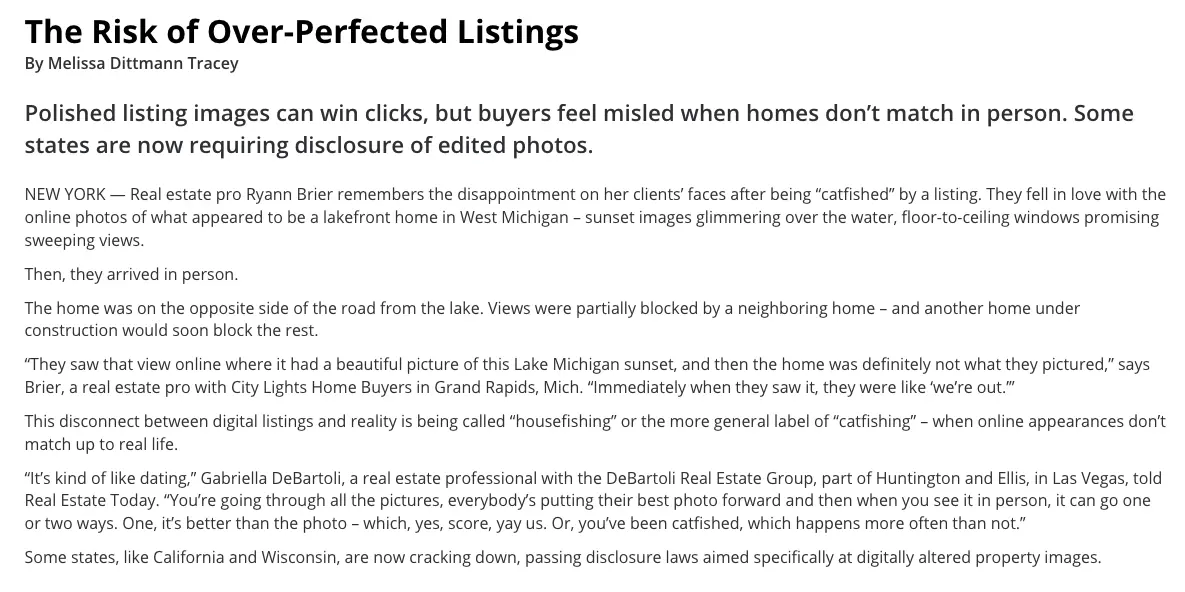
California requires disclosure when real estate listing photos have been digitally altered and access to the original, unaltered images under AB 723. Wisconsin is set to follow in 2027, requiring disclosure when digital alterations create a false or misleading impression under 2025 Wisconsin Act 69.
You didn’t edit those photos. But your buyer can’t tell your listing apart from the last one that let them down, especially when they’re four states away.
So keep it simple: real rooms, real light, clearly labeled.
Your Action items
- Choose photos that show doorways and the way into the next room, not just the room interiors.
- Caption each photo using the same room name as the floor plan and walkthrough.
- Leave out heavily edited or virtually staged images, or label them clearly if you include them.
- Include rooms the listing skipped. A missing room can leave buyers wondering what they’re not seeing.
Quick Answer
Can I send virtually staged photos?
You can, but label them as virtually staged and check your state’s rules. Some states require disclosures for digitally altered listing photos.
For a remote buyer, photos of the actual rooms can be more helpful because they show what the home really looks like.
04. An offer of a live call
A live call covers what recorded videos can’t: the street outside, the view from a window, or the sound of the road at five o’clock.
And buyers want this option. In Zillow’s 2026 survey, 32% of buyers said an agent had given them a video tour, while 39% said that’s how they’d ideally tour a home.
Action items: Am I offering the call in a way that helps?
- Offer the call in the same message, as an option rather than another step they have to take.
- Let your buyer direct the camera so they can see what matters to them.
- Show the outside, too: the street, the neighbors’ side, and the view from the main windows.
- Note anything they want to check again in person and add it to the showing agenda.
Quick Answer
When is a live call better than the walkthrough?
A live call works better when your buyer is close to booking and has specific questions, or wants to see something outside the house, like the street noise, the view, or the neighbors.
For a first look, the recorded walkthrough is better.
How should you send the pack?
Send everything in one text message, using links rather than attachments. That’s how most buyers prefer to hear from their agent anyway.
In Zillow’s 2026 survey, text was buyers’ favorite way to communicate with their agent (43%), and 80% searched for homes on a mobile website.
So assume your buyer will open the pack on their phone, probably in the evening.
It might seem like a small detail, but if the pack is split across a text, two emails, and a file that won’t open on a phone, your buyer might never look at all of it.
Your Action items
- Keep everything in one message. Send the floor plan, walkthrough, photos, call offer, and questions in that order.
- Use mobile-friendly links. Large attachments may not open properly when sent by text.
- Test every link. Open them on your own phone before you hit send.
- Stick to your buyer’s preferred channel. If they prefer email, send the same pack there rather than splitting it across text and email.
Quick Answer
Text or email?
Text, unless your buyer has told you otherwise. It keeps everything together and is how most buyers prefer to hear from their agent.
What do you ask them so the reply actually tells you something?
Ask three things: which room they opened first and which one they went back to, whether any room’s position surprised them or doesn’t fit how they live, and what they’d still need to see in person before making an offer.
Their answers tell you what matters most to them, what might be a dealbreaker, and what to focus on during the showing.
Without these questions, you might send the pack and get back, “Looks great!” Which doesn’t tell you much.
But with three specific questions, you get a short brief you can actually work with.
Question 1: Which room did you open first, and which did you go back to?
Buyers tend to look first at what matters most to them, then return to anything they’re unsure about.
If a buyer keeps going back to the hallway, for example, that tells you where to focus during the showing.
Question 2: Did any room’s position surprise you, or not fit how you live?
This is something the photos often fail to answer.
It can bring layout concerns to the surface early, such as a bedroom off the living room, a bathroom down a separate hall, or stairs in the middle of the home.
Much better to hear about those concerns now than when you’re already in the driveway.
Question 3: What would you still need to see in person before an offer?
This helps you turn the showing into a visit with a clear purpose.
Your buyer might want to check the light in the bedrooms or listen to the noise from the road. Their answer gives you a list of things to focus on during the visit.
It also helps set expectations that some things can only be confirmed in person.
What to copy into your message
Here’s everything for [address].
Floor plan: [link]
Walkthrough from the front door: [link]
Photos of the rooms you asked about: [link]
Take your time going through everything, then let me know:
- Which room did you open first, and which did you go back to?
- Did any room’s position surprise you or not fit how you live?
- What would you still need to see in person before making an offer?
Happy to do a quick video call, too, if that helps.
Quick Answer
What if they just reply “Looks great!”?
Ask one simple follow-up: “Which room did you spend the most time looking at?”
If they can’t answer, they may not have had a proper look through the pack yet. Offer a live call and walk through the home together.
How do you read the reply and decide whether to book?
Most replies fall into one of four patterns.
Specific rooms and things to check mean they’re ready to move forward. Vague praise means it’s worth offering a call first. A layout dealbreaker means you’ve both saved a trip. And no reply means following up once, then giving them some space.
Of course, this is a rule of thumb, not a measured result. You know your buyer better than any table does. But it gives you a clear next step for each type of reply, instead of another round of back-and-forth.
| The reply looks like | What it usually means | Your next step |
|---|---|---|
| They name specific rooms and list things to check in person | They understand the layout and are seriously considering the home | Book the showing and use their list as the agenda |
| “Looks great!” with no detail | They skimmed the pack or aren’t sure what to look for | Offer a live call before booking |
| They mention a layout dealbreaker, like “the bedrooms are too far from the living room for us” | The home doesn’t fit, and you’ve found out before anyone travels | Thank them and use what they’ve told you to filter the next homes |
| No reply after a couple of days | It may be a timing issue, not a lack of interest | Follow up once with one question, then wait |
Here’s what we believe. A showing should confirm what your buyer already understands about a home, not be the first time they see how the rooms fit together.
That’s our conviction, not a statistic.
And yes, it may mean a few fewer showings. But the ones you do book start from a much better place.
Quick Answer
Should I still book the showing if the reply is mixed?
Usually, yes, but plan the showing around their concern.
If they like most of the home but have doubts about one room’s position, make that room the first stop. Or check it together on a quick video call first, so nobody travels just to get an answer to one question.
How long should you wait, and when do you follow up?
Give them a day or two. Remote buyers may go through the pack in the evening or over the weekend, and many will want to share it with a partner before replying.
If you haven’t heard back after two days, follow up once with a single question. Don’t send the whole pack again.
There’s no study showing the perfect wait time, so treat this as a working habit, not a rule.
But Zillow’s 2026 survey offers a useful signal: after hiring an agent, 42% of buyers talk with their agent daily, while most of the rest talk weekly.
So if a buyer asked about a home and you haven’t heard from them for two days, one gentle follow-up makes sense.
Quick Answer
What should the follow-up say?
Ask one simple question about the home, like, “Did the layout work for you, or did something feel off?”
It’s easy to answer from a phone, and either answer gives you a clear next step.
What if your buyer wants to make an offer without ever seeing it?
It happens, and it can work. But layout is only one part of the risk.
Before writing the offer, talk through the inspection contingency, attend the inspection or join by video, and be honest about what the pack can’t show. A sight-unseen offer should still give the buyer a way out if the inspection finds a problem.
Buyers are also becoming more comfortable with the idea. In Zillow’s 2026 survey, 29% said they’d be very or extremely confident making an offer on a home they’d only seen through a 360° or virtual tour, up from 24% the year before.
Still, most buyers want to visit in person, and 69% included an inspection contingency in their final offer.
Andrew McManamon, the Michigan agent mentioned in the walkthrough section, makes an important point for nervous buyers: going under contract without seeing the home in person doesn’t mean being stuck, as long as the offer includes the right inspection contingency and the buyer understands the inspection period.
Quick Answer
Is a sight-unseen offer safe?
It can be, with an inspection contingency, an inspection you attend or join by video, and a clear understanding of what the walkthrough couldn’t show.
Terms and deadlines vary by state, so check your state’s requirements and consult your broker before writing the offer. This isn’t legal advice.
So do you need a virtual tour for any of this? Not always.
After all of that, you might expect us to say every listing needs a virtual tour. But no. A floor plan, a narrated walkthrough video, and a live call cover most of this on any listing, with no software at all. That’s the honest answer.
Where a tour on your own listing page really earns its place is when you’re the listing agent and several remote buyers are looking at the same home.
Instead of recording a fresh video and answering the same questions for each one, you build it once, and every buyer gets the same link.
And that’s the one place WPVR fits. WPVR is a 360° virtual tour plugin for WordPress, for real estate, hospitality, and agencies.
If your listing site runs on WordPress, it turns 360° photos into a tour that lives on your own listing page, not in someone else’s tour gallery.
Here’s how you’d set it up.
- Capture 360° photos of every room and the spaces between them. Include the entry, hallways, and landings, because those are the connections buyers ask about. A 360° camera or a panoramic camera app works for capture.
- Create the tour and connect the scenes. Add a hotspot at each doorway so the buyer can move from room to room, starting at the front door. The WPVR hotspot options also let you add short notes, like “stairs lead to two bedrooms.”
- Add the floor plan (paid plans). Pin each room on the plan so the buyer can click a room and jump straight to it. See the WPVR floor plan feature.
- Add a contact form inside the tour (paid plans). With the Fluent Forms add-on and the Fluent Forms plugin installed, your buyer can ask a question from the exact room it comes up in. The Fluent Forms integration guide walks you through it.
- Publish it on the listing page and test it on your phone. Walk the whole route, open the floor plan, and try the form before you share the link.
If you want to see the floor plan part first, you can watch this video: interactive floor plan walkthrough.
You can start with the free WPVR plugin on WordPress.org, which covers building tours with scenes and hotspots. Floor plans and the Fluent Forms add-on come with the paid plans.
As of October 28, 2026, the WPVR pricing page listed the one-site Starter plan at $99.99 per year, discounted to $69.99 with a 30% discount, and a 15-day money-back guarantee.
Now, let’s be straight about what you’d be publishing. WPVR makes interactive 360° panorama tours. It’s not a 3D scan, there’s no dollhouse view, and it doesn’t measure rooms.
Pages with lots of tours need some care with load time, and getting hotspots in the right place takes a bit of practice on your first listing.
Quick Answer
When is it worth putting a virtual tour on my own listing?
When you’re the listing agent and several remote buyers are looking at the same home. Instead of recording a new video and answering the same layout questions for each one, you build the tour once on the listing page and every buyer gets the same link.
For a single buyer, a floor plan and a recorded walkthrough are usually enough.
Three things agents tell themselves (and why they don’t hold up)
Most agents who skip the pack have a good reason, or at least one that sounds good on a busy day. Here are the three we hear most.
“My photos are good enough.”
They might be great. But great photos still show rooms one at a time. Your buyer’s question is about what’s between them, and 52% of buyers in Zillow’s 2026 survey said they’d wasted time on homes they’d have skipped with a clearer floor plan. Good photos and a clear layout aren’t the same thing.
“They’ll fly in anyway, so I’ll just show them then.”
Maybe. But if the layout doesn’t work for them, you’ve both lost a day, and they’ve paid for a flight to find out. A pack doesn’t stop serious buyers from coming. It just means the ones who come already know what they’re coming to confirm.
“I don’t have time to make a pack for every home.”
You don’t need to. Send packs only for the homes still in the running after they’ve seen the photos. And the template above does most of the writing. The first one takes the longest. After that, it’s mostly copying and pasting.
Quick Answer
What if my buyer says they’d rather just fly in and see it?
Then let them, and still send the pack first. It costs them nothing. If the layout doesn’t work, they’ll tell you before they book the flight. If it does, they’ll arrive knowing exactly what they want to check.
What won’t any of this show your buyer?
To be very direct: the pack doesn’t replace the visit. It shows how the rooms connect and what they look like. It won’t replace the home inspection, a feel for the street and neighborhood, or the moment your buyer checks size, light, noise, and condition for themselves. It just makes that visit worth taking.
Here’s what stays on the in-person list, whatever you send first:
- The inspection. A photo or a 360 view won’t show hidden structural, electrical or water problems. Only a qualified inspector can.
- The neighborhood. Rush-hour traffic, noise at night, the walk to the nearest shop.
- Scale and feel. Wide views can make a room feel bigger or smaller than it is. Ceiling height and how the light changes need a visit.
- Condition and finishes. Smell, sound, worn floors, how the doors and windows close.
And saying this in your message protects you too. A buyer who was told what the pack can’t show is far less likely to feel misled later.
Quick Answer
Should I tell my buyer what the pack can’t show?
Yes. Add one line to your message saying the walkthrough shows the layout, not the condition, the exact sizes or the neighborhood, and that the inspection and the visit cover those. A buyer who was told upfront is far less likely to feel misled later.
Here’s what to try this week
You don’t have to change the way you work overnight. Just try this with one buyer this week.
- Pick a remote buyer who’s been asking questions about the layout.
- Choose the home they’re most serious about.
- Get the floor plan, or ask the listing agent for one.
- Record a walkthrough, starting at the front door and naming each room as you go.
- Send everything in one text, along with the three questions, before suggesting a showing date.
- See how they respond, then use the table above to decide what to do next.
That’s it. Give it a try with one buyer and see how it goes.
And if you do try it, tell us how it went. We’d genuinely like to hear.
Frequently Asked Questions
Do I need permission to record a video walkthrough of someone else’s listing?
Ask first. Get the listing agent’s okay before you record, and through them, the seller’s, because it’s the seller’s home and some listings restrict photos and video. Keep personal items, security systems, and family photos out of the frame. If you record audio, check your state’s recording consent rules. This isn’t legal advice.
How long should a walkthrough video be?
Long enough to walk the whole route from the front door without cutting between rooms, and no longer. One continuous take keeps the layout clear. For a large home, split it into two clips, such as the main floor and upstairs, and name each one, so the buyer knows where they are.
What do I need to record a good walkthrough?
A phone is enough. Hold it horizontally, walk slowly, turn in each doorway, and say each room’s name. A small handheld stabilizer helps keep it smooth. A 360 camera is only worth it if you want a tour buyers can explore themselves, rather than a video they watch.
Can I do the showing live over FaceTime instead?
Yes, many agents do. It works best after the buyer has already seen the walkthrough, so the call is spent on their questions. Check your signal in every room beforehand, let them direct the camera, and show the street and the views from the windows too.
Summary of what we found
| # | Question | Answer | Source |
|---|---|---|---|
| 1 | Are more buyers relocating? | Yes. 19.1% of house hunters looked to relocate to another metro in Q1 2026, a record | Redfin via NMP |
| 2 | Do buyers waste trips on unclear layouts? | 52% say they viewed homes they’d have skipped with a clearer floor plan | Zillow 2026 |
| 3 | Do floor plans matter to buyers? | 82% are more likely to view a home with a floor plan they like | Zillow 2026 |
| 4 | Are buyers more comfortable judging from a screen? | Slightly. “Only in person” fell from 80% to 75% | Zillow 2026 |
| 5 | Are edited photos a real problem? | Yes. California now requires disclosure; Wisconsin follows in 2027 | Florida Realtors |
| 6 | Do buyers want video tours from agents? | 32% got one; 39% would ideally | Zillow 2026 |
| 7 | How should I send the pack? | By text: 43% of buyers prefer it | Zillow 2026 |
| 8 | Are buyers confident offering on a tour alone? | 29% very or extremely confident, up from 24% | Zillow 2026 |
| 9 | Do buyers still protect themselves? | 69% included an inspection contingency | Zillow 2026 |
| 10 | How do experienced agents handle remote buyers? | Full-home and neighborhood video, close-ups, shared folder, size references | Living In Michigan |
Question for you
Now we’d love to hear from you.
What do you usually send remote buyers before booking a showing?
If you have a system, what’s in it, and what questions do you ask? And if you’ve ever had a buyer fly in only to say, “This isn’t what I pictured,” what do you think could have made a difference?
Or just share what you thought while reading this. We read every comment.
Cheers!