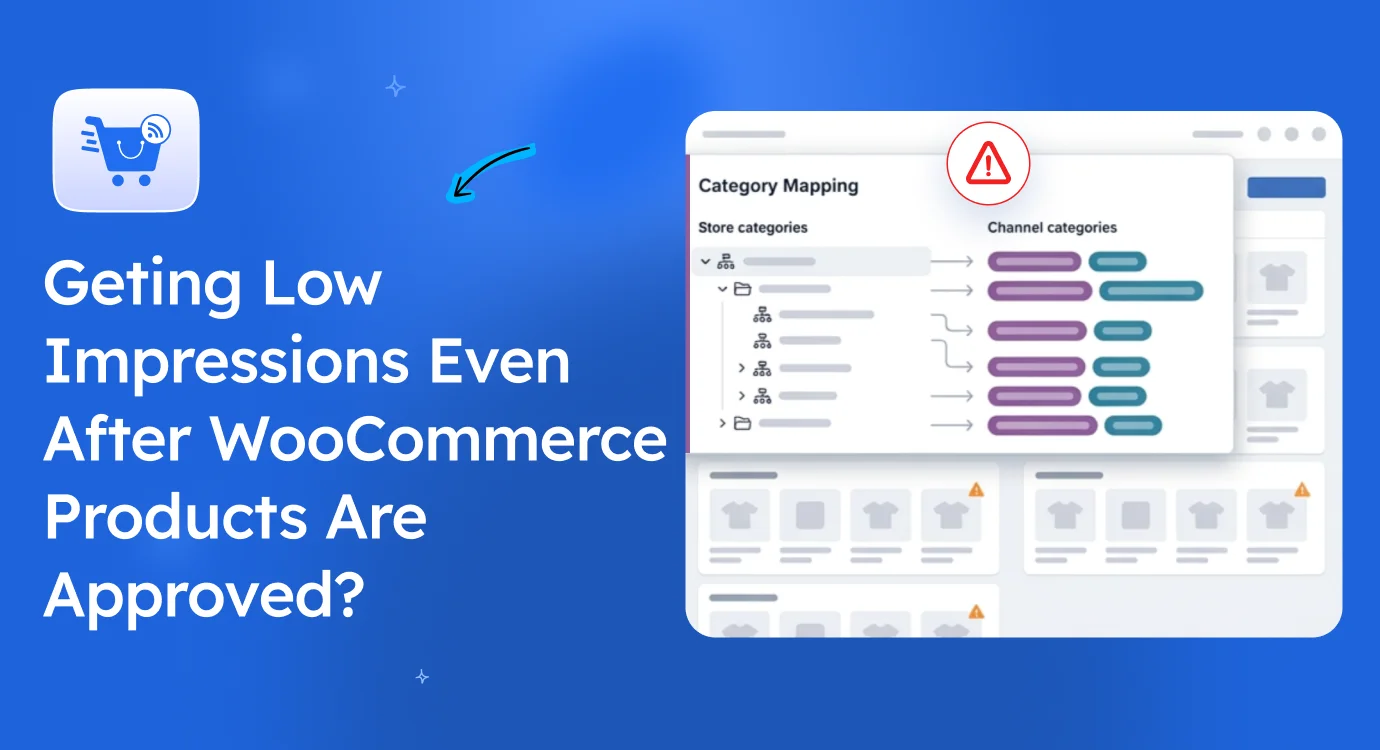
Have you ever wondered why your products barely get impressions, even though every listing looks perfectly fine?
At this point, most WooCommerce store owners take the wrong path:
- They start blaming competition and outbid everyone on ads (burning the budget fast).
- Or they keep tweaking titles, descriptions, and images, thinking the listing itself is weak.
But neither is the real issue.
The truth is, your products might be sitting in the wrong category context on each marketplace, and you wouldn’t know it from inside your store.
In fact, Baymard’s 2025 ecommerce benchmark found that 67% of mobile ecommerce sites still perform at a mediocre-to-poor level in category navigation.
If that’s the case for users, marketplace systems face an even harder time reading your product context correctly at scale.
In this guide, I’ll show you exactly why wrong product categorization hurts marketplace performance and how proper category mapping fixes it.
You Probably Recognize at Least One of These Signs
Before we get into the cause, take a quick look at what’s actually showing up in your store.
Most categorization issues don’t announce themselves. There’s no red alert in Merchant Center. No “your category is wrong” warning on Meta. Just quiet drops in performance that are easy to blame on something else.
Here’s what it usually looks like in real stores:
- Your products are approved on every marketplace, but impressions stay flat week after week.
- Some products are getting decent traffic. Others, in the same category, get almost no visibility and you can’t figure out why.
- Your products show up for searches that don’t match what you actually sell, while the high-intent searches you should be ranking for never trigger your listing.
- You’re spending on ads, but your ROAS keeps dropping even though your bids and creatives look fine.
- Whenever a marketplace updates its taxonomy, a chunk of your catalog silently drops out of relevant search pools.
If even one of these sounds familiar, the issue is almost never your product, your pricing, or your competition.
It’s how the marketplace is reading your category and where it’s deciding to place your product as a result.
And that’s where the gap actually starts.
Why Don’t Marketplaces Use Your WooCommerce Categories?
Here’s where the gap actually starts for you.
Inside WooCommerce, you build categories to keep your store organized. It helps you manage products, structure collections, and make browsing clean on your site. And for that use case, your setup works fine.
But once your products move into marketplaces, that structure stops being the reference point.
Platforms like Google Shopping, Meta, Pinterest, and TikTok Shop don’t care about your internal category setup. They run on their own taxonomy systems. They decide where your product sits based on their structure, not yours.
So what happens is simple.
Your product gets interpreted differently depending on how well it matches their category rules.
Take a basic example.
You list a product like this in WooCommerce:
Shoes > Sneakers
For your store, that’s clear. Nothing wrong there.
But Google Shopping might expect it in a more specific structure like:
Apparel & Accessories > Shoes > Athletic Shoes
Now both feel like they describe the same product, but they are not treated the same way by the marketplace system.
And this is the part most sellers miss.
It’s not about whether your category is “correct” in your store. It’s about whether it fits the marketplace’s structure closely enough for it to understand where your product belongs.
When it doesn’t match, your product still gets listed, but it doesn’t get placed in the right context.
This is also one of the most common reasons products approved on Google Shopping still get low impressions, even when everything in Merchant Center looks fine.
So even though everything looks fine inside WooCommerce, visibility drops outside of it simply because the categorization language is different on each marketplace.
How Does Wrong Product Categorization Affect Marketplace Visibility?
Once your products are live, everything usually looks fine.
But what changes silently is how often your products actually show up.
Baymard’s research shows a consistent pattern: when category structures are unclear or poorly organized, users struggle to find products even on well-built ecommerce sites. In other words, weak categorization reduces product discoverability.
Now apply that to marketplaces.
Wrong categorization doesn’t stop your listing. It limits where your product is allowed to appear.
Here’s what starts happening quietly:
- Your product gets fewer impressions because it enters the wrong search pools
- Search placement weakens because the product sits in an unrelated context
- Discoverability drops when shoppers browse category-based paths
- Ad systems misread product context and reduce relevance
- Recommendation engines stop grouping your product with similar items
- Audience targeting becomes less accurate due to weak category signals
Nothing breaks visibly.
But your reach slowly gets capped.
At this stage, most sellers assume something else is wrong, such as in ads, pricing, or competition. But the root issue often sits in categorization.
Most Sellers Notice Low Impressions Before Categorization Issues
At this point, you usually start reacting to numbers, not structure.
Most sellers assume low impressions come from competition, pricing, or ads. So they focus there first, while categorization stays unnoticed.
What actually happens is simple:
- Your products show up for irrelevant searches
- You miss high-intent searches your product should rank for
- Marketplace systems misread your product context
- Your listings get placed in broad or unrelated categories
For example, you may list a product correctly in your store, but on Google Shopping, it appears in a general category instead of a specific one. That shift directly affects visibility and who sees your product.
So even when your product is correct, placement is not.
That’s why impressions usually drop before you ever identify a categorization issue.
Marketplace Algorithms Depend on Structured Product Taxonomy
To understand this, you need to look at how marketplaces organize products.
They don’t use your WooCommerce structure. They use a system called product taxonomy, which is simply how they classify and group products across their platform.
This taxonomy decides what your product is and where it belongs.
It directly affects:
- Search accuracy
- Product recommendations
- Ad placement
- Product grouping
- Feed interpretation
When your product doesn’t align with this structure, the marketplace has less clarity on how to position it. And that reduces how often and where your product gets shown.
For Google specifically, this structure is called the Google Product Taxonomy and getting your products mapped correctly to it is one of the highest-impact things you can do. We covered the full process in this deeper guide on Google Product Category optimization.
Why This Problem Gets Worse as Your Product Catalog Grows
This connects directly to what you already know from the previous stage, once your catalog grows, manual product listing itself becomes harder to manage.
But here’s the part most sellers miss.
Even when listing gets automated, categorization doesn’t automatically stay consistent. It becomes another layer of work that quietly affects performance across marketplaces.
And it gets more complicated when you’re dealing with:
- hundreds of products
- multiple product categories
- multiple marketplaces
- different taxonomy systems in each platform
At this point, small categorization gaps don’t stay small. They multiply across your entire catalog and start affecting visibility at scale.
Why Does Manual Category Mapping Stop Working at Scale?
This is where things usually break in practice.
The same product can be classified differently depending on where you list it.
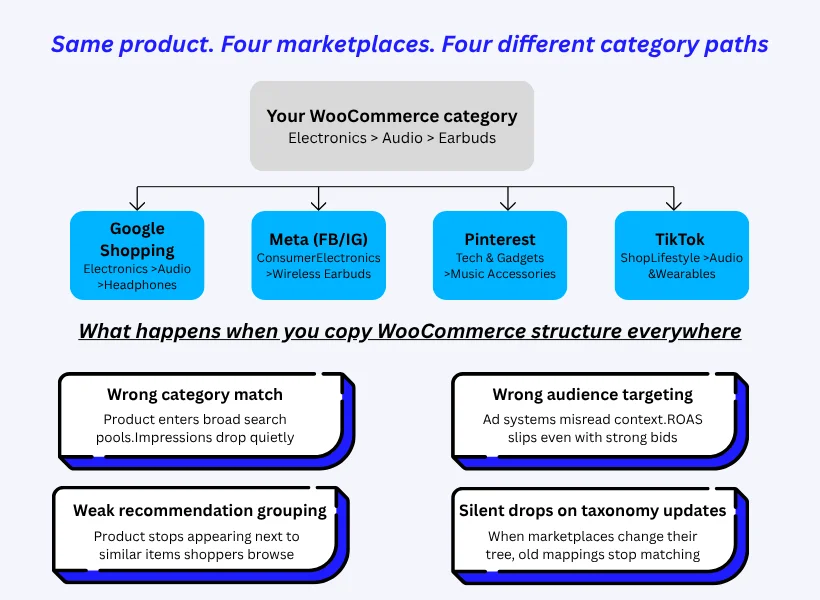
See It Side by Side: One Product, Four Marketplaces”
You already saw above that the same product can be classified differently depending on where you list it. But the gap becomes much easier to understand when you actually see it laid out.
Take a single product from your store, let’s say wireless earbuds. Inside WooCommerce, you probably have it under something simple like Electronics > Audio > Earbuds. Clean structure, easy to manage internally.
Now here’s how the same product needs to be mapped on four major marketplaces:
| Marketplace | Required Category Path | What This Channel Cares About |
|---|---|---|
| Google Shopping | Electronics > Audio > Headphones | Search-aligned taxonomy. Specific product type matters more than brand. |
| Meta (Facebook / Instagram) | Consumer Electronics > Wireless Earbuds | Product-feature grouping for catalog ads and shop browsing. |
| Tech & Gadgets > Music Accessories | Intent-based discovery. Lifestyle context drives the placement. | |
| TikTok Shop | Lifestyle > Audio & Wearables | Content-and-trend-driven structure. Broader, lifestyle-tilted grouping. |
Look! None of these matches your WooCommerce path exactly. And none of them match each other either.
Now look at what happens if you simply copy your WooCommerce category structure across all four platforms.
What Quietly Goes Wrong When You Don’t Adjust per Marketplace
The product gets listed everywhere but it doesn’t get placed correctly anywhere. And the side effects show up in four predictable ways:
- Wrong category match. Your product enters broader, less relevant search pools. So you get impressions from people not really looking for what you sell, and you miss the ones who are.
- Wrong audience targeting. Ad systems lean heavily on category signals to decide who sees your product. Misaligned category → weaker audience match → ROAS slips even when your bids and creatives are fine.
- Weak recommendation grouping. Marketplaces show “similar products” and “shoppers also bought” based on category context. If your earbuds are sitting under a generic Electronics bucket on Google instead of Headphones, they stop appearing next to the products buyers are actively comparing.
- Silent drops when marketplaces update their taxonomy. Google, Meta, and TikTok all update their product taxonomies regularly. If your mapping is locked to your WooCommerce structure, the day a platform refines its category tree, a chunk of your products quietly stops matching anything.
And here’s the part most sellers don’t see in time:
You won’t get a warning for any of this. There’s no error notification or “your category is wrong” alert. The only signal is performance and by the time the drop is visible in your impressions or ROAS, you’ve already lost weeks of visibility.
This is exactly why marketplace-specific category mapping isn’t optional once you’re listing on more than one channel. It’s the difference between being listed and being placed where buyers can find you.
Why Manual Category Mapping Becomes Difficult to Maintain
At the start, most sellers try to manage category mapping manually. It feels doable when the catalog is small.
So they usually rely on a few basic methods like:
- spreadsheet-based category mapping
- assigning categories one product at a time
- guessing the closest match per marketplace
- repeating the same WooCommerce structure across platforms
This works for a while. Until the catalog grows.
Then problems start stacking up:
- Inconsistent mapping across marketplaces as updates get missed
- Human error from repeated manual assignments
- Marketplace taxonomy updates that break old mappings
- Large catalog maintenance issues when product count increases
- Time consumption as updates take longer than expected
- Visibility inconsistency where some products perform and others don’t without a clear pattern
At this stage, category mapping stops being a simple task and turns into constant maintenance work.
And that leads to a simple question you need to answer for your own store:
Can manual categorization really keep up as your catalog keeps growing?
If you want further details on this question, read this- Manual Product Listing Isn’t Enough When Your Store Is Growing
The Smarter Approach: Marketplace-Specific Product Categorization
Once you see how manual mapping starts breaking, the direction becomes clearer.
Your categorization can’t stay locked to WooCommerce structure alone. It needs to adjust based on how each marketplace understands products.
That’s the shift.
Instead of forcing one category everywhere, you translate your product category for each marketplace based on its own taxonomy rules.
When you do this properly, you start improving key areas that directly affect performance:
- Product visibility increases because your product fits the right category context
- Feed accuracy improves since marketplaces read your product more correctly
- Search placement becomes more relevant to buyer intent
- Marketplace understanding gets clearer at a structural level
- Product discoverability improves across category-based browsing paths
The important part here is simple.
You are not changing your WooCommerce categories. You are translating them so each marketplace can correctly understand and place your product.
What Actually Changes Once Your Mapping Is Right
Once you stop forcing one structure everywhere and start translating your categories per marketplace, the change doesn’t show up as one big jump. It shows up across several quiet improvements that compound over the first 30 to 60 days.
Here’s what stores typically notice once mapping is corrected:
- Impressions recover within the first few weeks. Products that were sitting in broad or unrelated pools start entering the right search context, so they begin showing up for the queries they were always meant to match.
- CTR improves without changing the listing itself. Same title. Same image. Same price. But because the product is now appearing in front of higher-intent shoppers, more of them click.
- ROAS stabilises on existing ad campaigns. Ad systems read category context to decide who to show your product to. When the signal is clean, audience match improves, and you stop paying for impressions that were never going to convert.
- Recommendation placements come back. Your products start appearing next to genuinely similar items in “shoppers also bought” and “you may also like” sections, which is where a lot of marketplace traffic quietly originates.
- Marketplace taxonomy updates stop hurting you. Because your mapping is structured per platform instead of copied from WooCommerce, the next time Google or Meta updates its product tree, your products move with it instead of falling out.
None of these are dramatic on their own. But together, they shift your store from being listed to being placed where buyers actually search.
And that’s the real return on getting categorization right.
What Proper Category Mapping Actually Looks Like
Here’s how this plays out in real use.
You keep your WooCommerce structure as your base:
- WooCommerce: Electronics > Audio > Earbuds
This stays unchanged in your store. It still helps you manage your catalog internally.
But when you push this product to different marketplaces, the mapping shifts based on how each platform defines categories.
For example:
- Google Shopping: Electronics > Audio > Headphones
- Facebook / Meta: Consumer Electronics > Wireless Earbuds
Each platform interprets the same product slightly differently based on its taxonomy system and how it groups similar items.
So what changes is not your product structure, but the way it is presented to each marketplace.
And when this mapping is done correctly, your product lands in the right context everywhere instead of getting loosely categorized in a way that limits visibility.
So, How Do You Actually Manage This Across Every Marketplace?
Once your catalog starts growing, managing marketplace-specific categorization manually becomes messy very quickly.
You’re not just handling products anymore. You’re dealing with different marketplace rules, different category structures, and constant updates across platforms. At that point, keeping everything aligned by hand turns into an operational burden.
This is the exact problem Product Feed Manager (PFM) was built to handle. Instead of you adjusting categories for every marketplace by hand, PFM gives you a controlled system to translate your product data per platform, so categorization becomes something you set up once and scale.
Here’s how that plays out across the four pain points you’ve been dealing with.
A. When one category structure doesn’t fit four marketplaces
You already saw earlier that the same wireless earbud needs a different category path on Google, Meta, Pinterest, and TikTok Shop. Doing that translation manually, every time you add a product or a marketplace changes its taxonomy, is where most stores quietly fall behind.
PFM’s category mapping handles this layer for you. Instead of guessing categories each time you upload a product, you define how your WooCommerce categories should translate for each marketplace once, and the system applies it from there.
So for a single product like wireless earbuds, you’d set:
- A search-aligned structure for Google (Electronics > Audio > Headphones)
- A consumer-product grouping for Meta (Consumer Electronics > Wireless Earbuds)
- A broader, lifestyle-friendly category for TikTok Shop
- Pinterest’s intent-based path for discovery feeds
You’re not rebuilding your WooCommerce setup. You’re translating it so each marketplace can read your product the way its shoppers search.
B. When you have 300 products and no time to map them one by one
If you have 50 products, you can muscle through. At 300+ products across multiple marketplaces, you’ll either skip products entirely or end up with inconsistent mapping that quietly tanks visibility across your catalog.
Bulk mapping in PFM removes that bottleneck. You apply one category rule to a whole group of products at once instead of editing each one.
So if you have 300 audio accessories, you don’t map each one individually. You define the rule once, and it applies across the entire group. Same for shoes, apparel, home goods, anything where products share enough characteristics to follow the same mapping logic.
This is the difference between categorization being a one-time setup and an endless maintenance task.
C. When you’re tired of making the same categorization decision over and over
Every time you add a new product, the same questions come back.
- Which Google category does this fit?
- Which Meta grouping?
- Does the tag system carry over?
Most stores end up with inconsistent answers because the decision happens manually each time, and small differences compound across hundreds of products.
Rule-based categorization in PFM lets you set the logic once and let it run. You define conditions based on product type, attributes, tags, or any combination, and the system applies them automatically as products get added.
For example:
- If product tag = “wireless” and category = “audio” → map to “Wireless Earbuds” for Meta
- If product type = “shoes” and attribute = “running” → map to “Athletic Shoes” for Google
Instead of you making the same call every time, the rules carry the load. New products get categorized correctly the moment they hit your catalog, without the need of manual review
D. When listings are live but visibility still isn’t coming back
Even after you fix mapping at the category level, there’s one more layer that affects whether your products actually get placed correctly: how the rest of your feed structure speaks to each marketplace’s format.
Each marketplace reads product feeds differently. Google needs certain attributes in a specific structure. Meta expects another. Pinterest reads context fields you might not even have in your WooCommerce setup.
If your feed is inconsistent across platforms, marketplaces can’t fully understand where your product belongs, even when the category itself is correct.
PFM generates marketplace-specific feed structures for each platform you’re selling on. So instead of pushing one generic feed everywhere, each marketplace gets a feed that already speaks its own language.
That’s what brings the visibility loop full circle:
- Products land in the right category context
- Search relevance matches buyer intent
- Discoverability improves across category-based browsing paths
- Marketplace algorithms interpret your product data correctly
The point isn’t that PFM “automates feeds.” The point is that you stop fighting each marketplace individually and start giving each one what it actually needs to surface your products
Immediate Action Steps to Fix Product Categorization Issues
Now that you’ve seen how categorization affects visibility and how structured mapping fixes it, the next step is simple.
You start cleaning up what you already have in your store.
This is not theory anymore. It’s about what you can actually check and improve in your setup right now.
Here’s what you need to focus on:
- Audit products with low impressions Start with items that are live but not getting enough visibility. These usually point to categorization gaps first.
- Compare WooCommerce categories with marketplace taxonomy Check how your current structure aligns with Google Shopping, Meta, or other platforms you use. Look for mismatches.
- Identify inconsistent category mapping Find products that are mapped differently across marketplaces or not mapped at all.
- Review manually categorized products Focus on older products that were added before any structured system was in place. These often carry hidden errors.
- Create marketplace-specific mapping rules Instead of repeating one structure everywhere, define how each marketplace should interpret your categories.
- Use structured category mapping for large catalogs For bigger stores, move away from manual updates and rely on rule-based or bulk mapping systems.
- Monitor visibility after updates Track impressions and search placement after fixing categorization to see where improvements show up.
If Google Shopping is your primary channel, this also pairs well with the feed-level optimizations that affect how your products actually compete inside the marketplace once categorization is fixed.
At this stage, the goal is not to rebuild everything at once. It’s to correct category alignment step by step so your products start appearing in the right places across marketplaces.
Quick Self-Check: Is Product Categorization Hurting Your Visibility?
Before you move on, it helps to take a quick look at how your current setup is actually working in real conditions.
Most categorization issues don’t show up as errors. They show up as performance drops that are easy to ignore until they start stacking up. So this check is about being honest with what’s happening in your store right now.
Go through these points:
- Products are getting fewer impressions even though listings are active
- The same WooCommerce categories are used across all marketplaces without changes
- Products are showing up in searches that don’t match what you actually sell
- Categorization is still handled manually for most products
- Marketplace-specific taxonomy rules are not being applied consistently
If you are seeing “yes” on more than one of these, it usually means your categorization structure is not aligned with how marketplaces are reading your products.
And when that happens, visibility gets affected even when everything else in your setup looks fine.
FAQs
How do I know if categorization is the actual reason my products aren’t showing?
Look for the pattern, not a single symptom. Categorization issues usually show up as several quiet signs together: products approved but not getting impressions, listings showing up for searches that don’t match what you sell, performance dropping across multiple products in the same category at once, or a sudden drop after a marketplace updates its taxonomy.
If any of these are happening across more than one product, categorization is almost always the first place to check, before pricing, ads, or competition.
Do I need to change my WooCommerce categories to fix this?
No. Your WooCommerce category structure stays exactly as it is. It’s still useful for managing your store internally, collections, browsing, organization.
What changes is how those categories get translated when your product data goes to each marketplace. The mapping happens at the feed level, not at the store level. So you’re not rebuilding anything inside your store, you’re adding a translation layer between your store and each marketplace.
Can I use the same category mapping for Google Shopping and Meta?
No. Google Shopping uses Google Product Taxonomy. Meta uses its own consumer-electronics-style grouping. Pinterest uses intent-based discovery categories. TikTok Shop uses a lifestyle-driven structure.
The same product — wireless earbuds, needs a different category path on each platform to be placed correctly. If you copy one mapping across all marketplaces, at least three out of four will misread the product context and reduce its visibility.
Does fixing categorization help my paid ad campaigns too?
Yes — and often more than store owners expect. Ad systems on Google, Meta, and TikTok rely heavily on category signals to decide who should see your product. When your category is misaligned, the platform shows your ad to a broader, less relevant audience.
Once categorization is corrected, audience targeting tightens automatically. So even without changing your bids, creatives, or budget, ROAS typically stabilizes because the platform is now showing your ad to people who are more likely to convert.
Why does manual category mapping become difficult at scale?
As catalogs grow across multiple marketplaces, maintaining taxonomy consistency manually becomes time-consuming and error-prone.
Do different marketplaces use different category structures?
Yes. Google, Facebook, Pinterest, and TikTok Shop all use different taxonomy systems to classify products.

![Show Your WooCommerce Products on ChatGPT & OpenAI Ads with Product Feed [2026] 2](https://rextheme.com/wp-content/uploads/2026/08/Show-Your-WooCommerce-Products-on-ChatGPT-with-OpenAI-Product-Feed-1-407x213.webp)