![5 Best Panoramic Camera Apps for Your iPhone [2026]](https://rextheme.com/wp-content/uploads/2025/07/Best-Panoramic-Camera-Apps-for-Your-iPhone.png)
You’ve probably faced this… You try to capture a perfect panorama, but your iPhone messes it up.
- The horizon looks bent,
- people appear twice,
- and the photo just feels wrong.
Frustrating, right?
The problem is, the default iPhone camera isn’t built for accurate panoramas or true 360° shots. It can capture wide images (basically 180 degrees), but it can’t create a full 360° view on its own.
That’s where things get tricky. Because while iPhone hardware can support 360 photography,
You Need The Right App to Actually Make It Work
Without that, you’re stuck with distorted panoramas that don’t do justice to what you’re trying to capture.
That’s why this guide is here.
Instead of wasting time testing random apps, you’ll quickly find which panorama and 360 camera apps actually work and which ones to avoid.
In this guide, you’ll discover 7 of the best panorama 360 apps for iPhone and how you can turn those wide shots into a full 360° image or even an interactive virtual tour.
So let’s get started,
TL;DR – 5 Best Panoramic Camera Apps for iPhone
- Panoramic apps help you take wide, detailed photos that your iPhone’s default camera can’t.
- They’re perfect for landscapes, real estate, travel, or creating interactive virtual tours.
- You can shoot 360° photos without any extra gear
- Top 5 apps for high-quality results:
| App Name | Why It’s Best |
|---|---|
| Teleport 360-degree Camera | Best for simple, full 360° capture |
| PanoCut – Panorama Scroll Maker | Best for Instagram carousel panoramas |
| DMD Panorama | Best for fast, high-quality panoramic shots |
| Panorama 360 | Best for beginners who want quick results |
| Bimostitch | Best for powerful panorama stitching |
- Final Verdict: If you want to turn your panoramas into a virtual tour, I recommend using WPVR
What is the Panoramic Camera App & How Does It Work on iPhone
Think of a panoramic camera app helps to capture 360 degree images as a smarter version of your iPhone camera.
It takes multiple shots as you move your phone and stitches them into one clean, wide image without the usual distortion.
Instead of guessing, it uses your phone’s sensors to track movement, so everything lines up properly.
Many apps even let you capture full 360° views and turn them into interactive virtual tours.
Why Use a Panoramic Camera App instead of the iPhone’s Built-in Camera?
The built-in panorama tool on iPhone gets the job done in a pinch, but it has real limitations compared to a dedicated app.
Here are side-by-side comparisons:
| Feature | iPhone Built-in Panorama | Panoramic Camera Apps |
|---|---|---|
| Ease of Use | Requires steady hand & smooth motion | Often allows hands-free or guided capture |
| Image Quality | Decent, but prone to stitching issues | Higher quality with advanced stitching |
| Editing Tools | Very limited | Built-in editing, filters, and adjustments |
| 360° Capture | Not supported | Many apps support full 360° photo capture |
| Virtual Tour Creation | Not available | Some apps offer virtual tour creation tools |
| Creative Features | Basic panorama only | Timelapse, HDR, wide formats, and more |
| Stitching Accuracy | Sometimes distorted edges | Smarter alignment and blending for clean output |
| User Control | Minimal control | Requires a steady hand & smooth motion |
Taking panoramic photos with your iPhone can feel limiting, especially when you’re aiming for smooth, high-quality results. The built-in camera often struggles with stitching and edge distortion.
I’ve tested several apps while capturing travel shots, real estate scenes, and even trying out interactive virtual tours. Some apps were clunky, but a few stood out with smooth performance and helpful features.
In this guide, you’ll find 5 of the best panorama 360 apps for iPhone—great for anyone who wants better control, cleaner stitching, and a more reliable way to create stunning, wide-angle views.
Advantages of Using a Panoramic Camera App
Let’s have a look at some advantages you’ll have by using a panoramic camera app:
- Subscription Model: Some apps are free, others let you pay once or upgrade for extra features. You can start simple and explore more as you go. There’s something for every budget and goal.
- Immersive Landscapes: You get to capture the full beauty of wide scenes easily, whether it’s mountains, beaches, or city views. It helps you relive the moment later with more depth. Great for travel lovers who want more than just a regular photo.
- Easy Stitching: The app does all the hard work of blending multiple shots into one clean image. You don’t need steady hands or editing skills. Just follow the guide and enjoy a smooth final result every time.
- 360-Degree Images: The best IOS camera app lets you shoot all around you without any special gear. Perfect if you want to create simple VR-style panoramas. Great for virtual tours, travel diaries, or immersive social posts.
- Real Estate: If you’re showing off a home or rental, a panoramic photo makes the space feel bigger and more real. Buyers can explore every corner of a good location. It’s a smart way to stand out in property listings.
- Quick Sharing: You can share your photos straight to Facebook or your website without extra tools. Some apps even let you embed panoramas with one tap. It saves time and helps you show your work instantly.
- Offline Use: Many apps let you shoot panoramas even without internet. That means you won’t miss great moments in remote areas. Perfect if you love capturing cool spots while traveling or exploring.
- User Reviews: These apps are trusted by real users who’ve tested them in different situations. You can check ratings and know what works before downloading. It’s like having a recommendation before you try.
Top 5 Panoramic Camera Apps for iPhone
Here are 5 apps that I’ve chosen to provide in-depth information on quality & features to help you get 360 panoramic photos using an iPhone with the help of a 360 camera app for iPhone:
1. Teleport 360-degree Camera
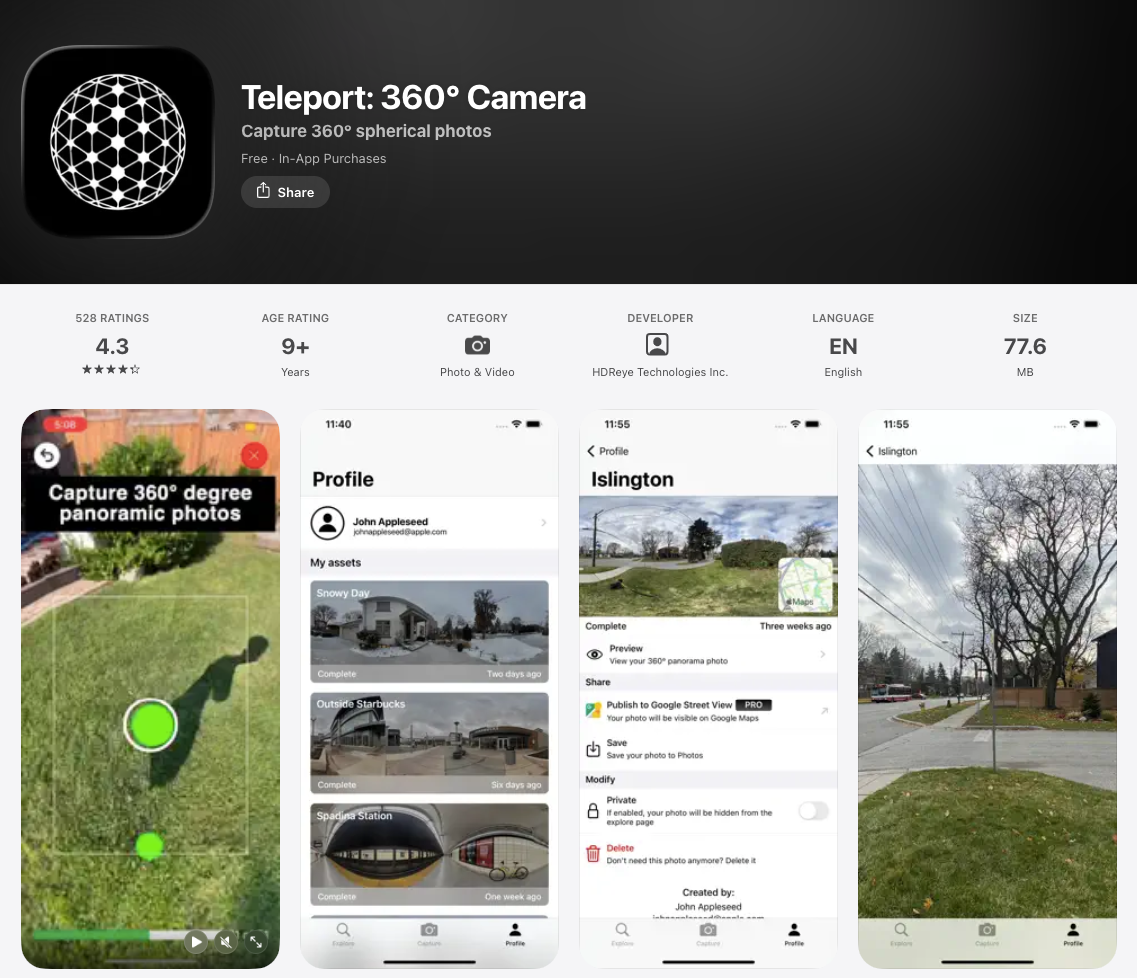
Teleport is built for one thing: capturing real 360° photos, not just wide panoramas.
You simply follow the on-screen steps, move your phone around, and the app handles the rest. It stitches everything into a full 360° view that you can explore just by tilting your phone or swiping.
For example, you are standing inside a room and want to show the whole space. Instead of a flat image, you can capture everything around you, so anyone viewing it can look in every direction.
If you want true 360° shots straight from your iPhone (without extra gear), this app makes it pretty easy.
Key Features of Teleport
- Full spherical 360° capture (not just panoramas)
- Fast stitching (around 30 seconds per capture)
- Explore page to check out community shots
- Vision Pro support for immersive viewing
- Option to publish to Google Street View (Pro)
Feedback From Teleport Users
| Positive Reviews | Negative Reviews |
|---|---|
| Very easy to crop and create carousel posts | Not designed for capturing 360° photos |
| Great for Instagram grid and feed planning | Limited use outside social media |
| Saves time with batch editing | Some advanced features need a subscription |
- Average User Rating: 4.3 stars out of 5
- Reviews: 528
- App link: Teleport – 360° Camera
2. PanoCut – Panorama Scroll Maker
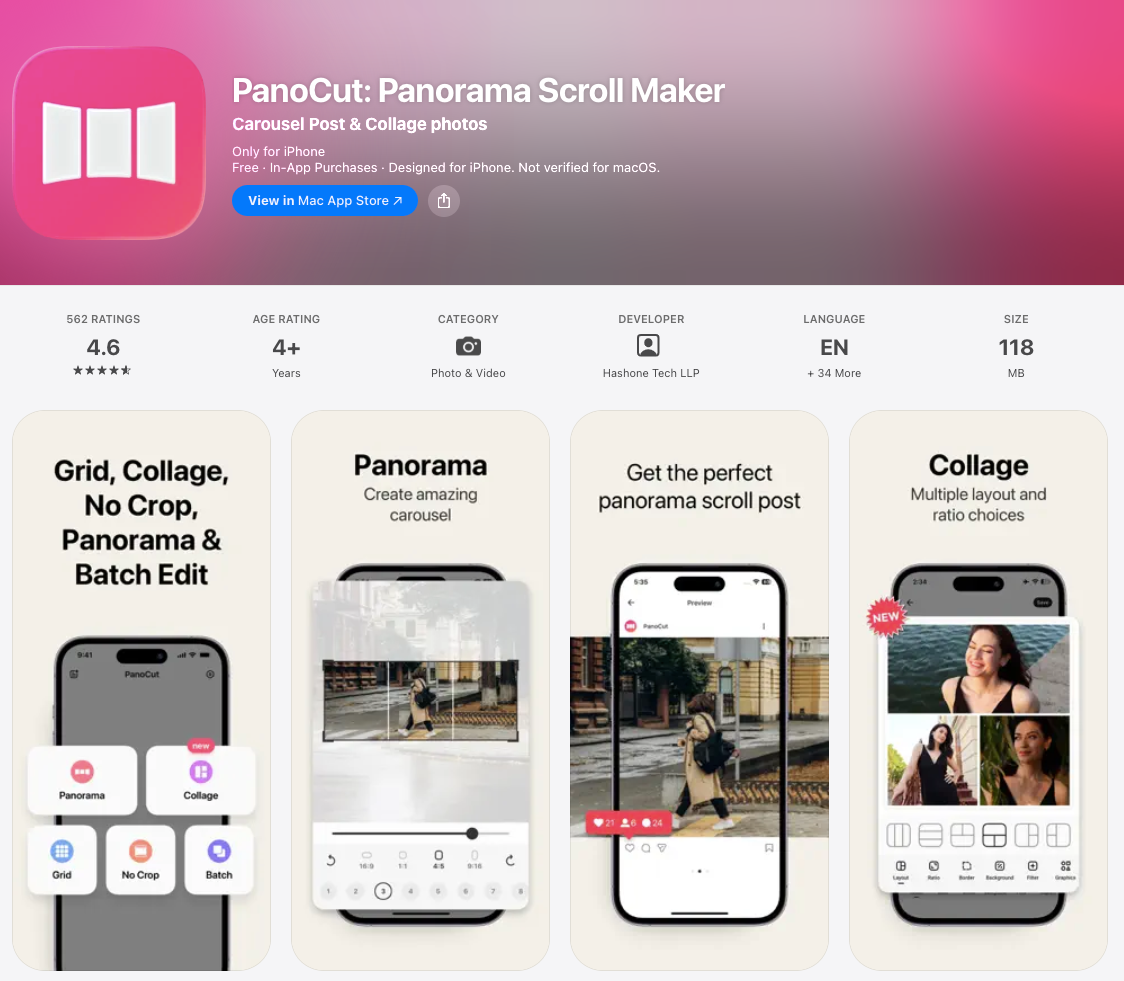
PanoCut is a bit different from other apps here. It’s not for capturing 360° photos – it’s for making your panoramas look amazing when you post them, especially on Instagram.
You take a wide shot first, then use PanoCut to turn it into a smooth, swipeable carousel. So instead of squeezing everything into one image, your audience can scroll through it naturally.
For example, you capture a wide beach or property view. Instead of posting one long image, you split it into multiple slides that flow perfectly when someone swipes, making it much more engaging.
If your goal is better-looking social posts, this app fits perfectly.
Key Features of PanoCut
- Splits panoramas into seamless carousel slides
- Grid maker and collage tools for Instagram layouts
- No-crop editing to keep images perfectly sized
- Batch editing for multiple photos at once
Feedback From PanoCut Users
| Positive Reviews | Negative Reviews |
|---|---|
| Very easy to crop and create carousel posts | Not designed for capturing 360° photos |
| Great for Instagram grid and feed planning | Limited use outside social media |
| Saves time with batch editing | Some advanced features need a subscription |
- Average User Rating: 4.6 stars out of 5
- Reviews: 562
- App link: PanoCut – Panorama Scroll Maker
3. DMD Panorama
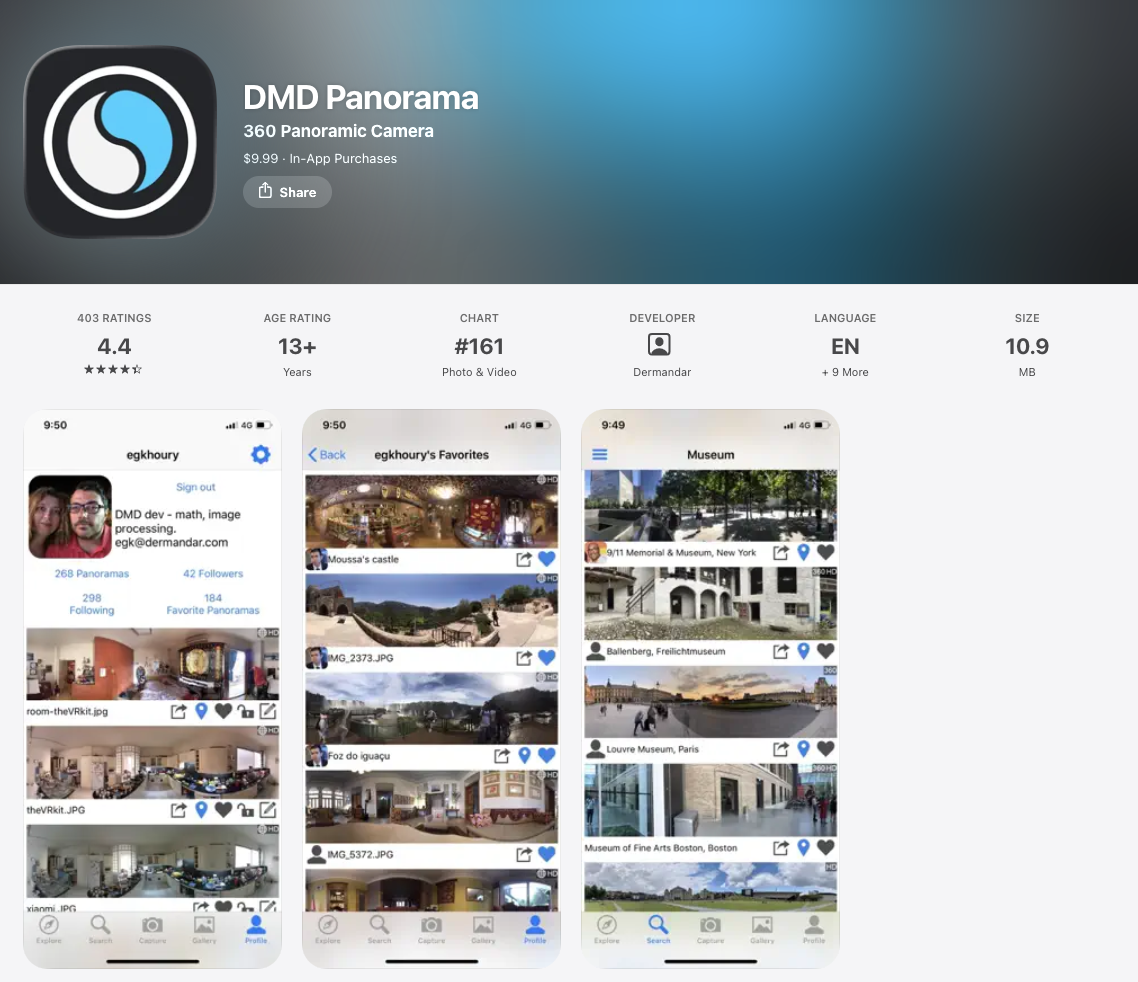
DMD Panorama feels like a more capable version of the iPhone’s built-in panorama mode.
Instead of just a wide horizontal shot, it lets you go further, capturing full 360° panoramas both horizontally and vertically for a more immersive result.
For example, you are standing on a hilltop and slowly turning your phone. The app uses your iPhone’s sensors to keep everything aligned, so the final image looks smooth and natural, not stitched together.
If you want higher-quality panoramas without extra gear, this is a solid pick.
Key Features of DMD Panorama
- Supports front camera for panoramic selfies
- Three exposure settings for better control
- Captures up to 100MP panoramas
- Uses ultra-wide lens (newer iPhones) for floor-to-ceiling shots
Notes: In the DMD Panorama app, selfie panorama mode unlocks after you capture and save 10 regular panoramas.
Feedback From DMD Panorama Users:
I have read all the reviews of DMD Panorama users that I got and summed up their feedback below:
| Positive Reviews | Negative Reviews |
|---|---|
| Takes great quality panoramic images in a very simple way. | Only shoots cylindrical panoramas, which limits creative flexibility. |
| Very quick to take pictures and then share or email to someone. | Only stitches the pictures you take directly within the app. |
| Allows use of flash, auto flash, or no flash; HDR can also be disabled. | Pictures are not automatically uploaded unless you explicitly request it. |
- Average User Rating: 4.4 stars out of 5
- Reviews: 403
- App Link: DMD Panorama
4. Panorama 360
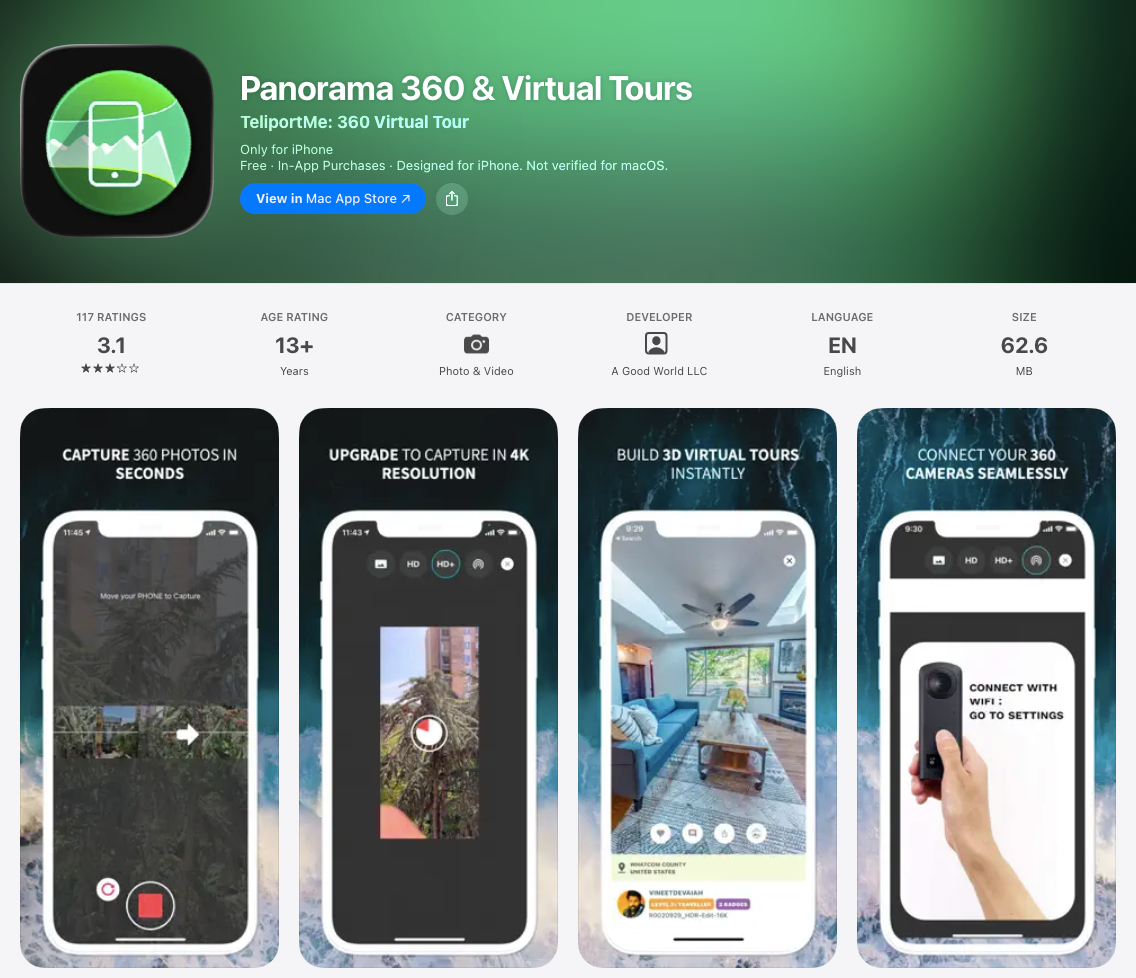
Panorama 360 keeps things simple – it’s built for quick, no-fuss 360° shots. If you just want to try a 360-degree camera app for iPhone without overthinking settings, this is a good place to start.
For example, you’re at a scenic spot and want a quick interactive view. You open the app, move your phone slowly, and it uses the gyro sensor to keep everything aligned; no complex setup needed.
If you want an app that combines great capture with editing and smooth sharing, Panorama 360 is a solid pick. It’s perfect for capturing cool moments or creating perfect panoramic photos wherever you go.
Key Features of Panorama 360
- Fast and easy capture
- Built-in 360° viewer
- Option to embed panoramas on your website or blog
- HD+ image quality
Feedback from Panorama 360 App Users:
Well, there are many fewer 1st hand reviews I got on this app than the DMD Panorama app.
I have jotted down the positives and also the negatives below:
| User’s Positive Reviews | Users Negative Reviews |
|---|---|
| The finished images come out of great quality. | Not good for spherical capture. |
| The app does what it advertises. | High learning curve. |
| No problems in taking pictures or rendering them into a 360-degree view. | Sharing comes with conditions. Can be shared if the app is installed on another device. |
- Average User Rating: 3.1 stars out of 5
- Reviews: 117
- App Link: Panorama 360 for iPhone.
5. Bimostitch
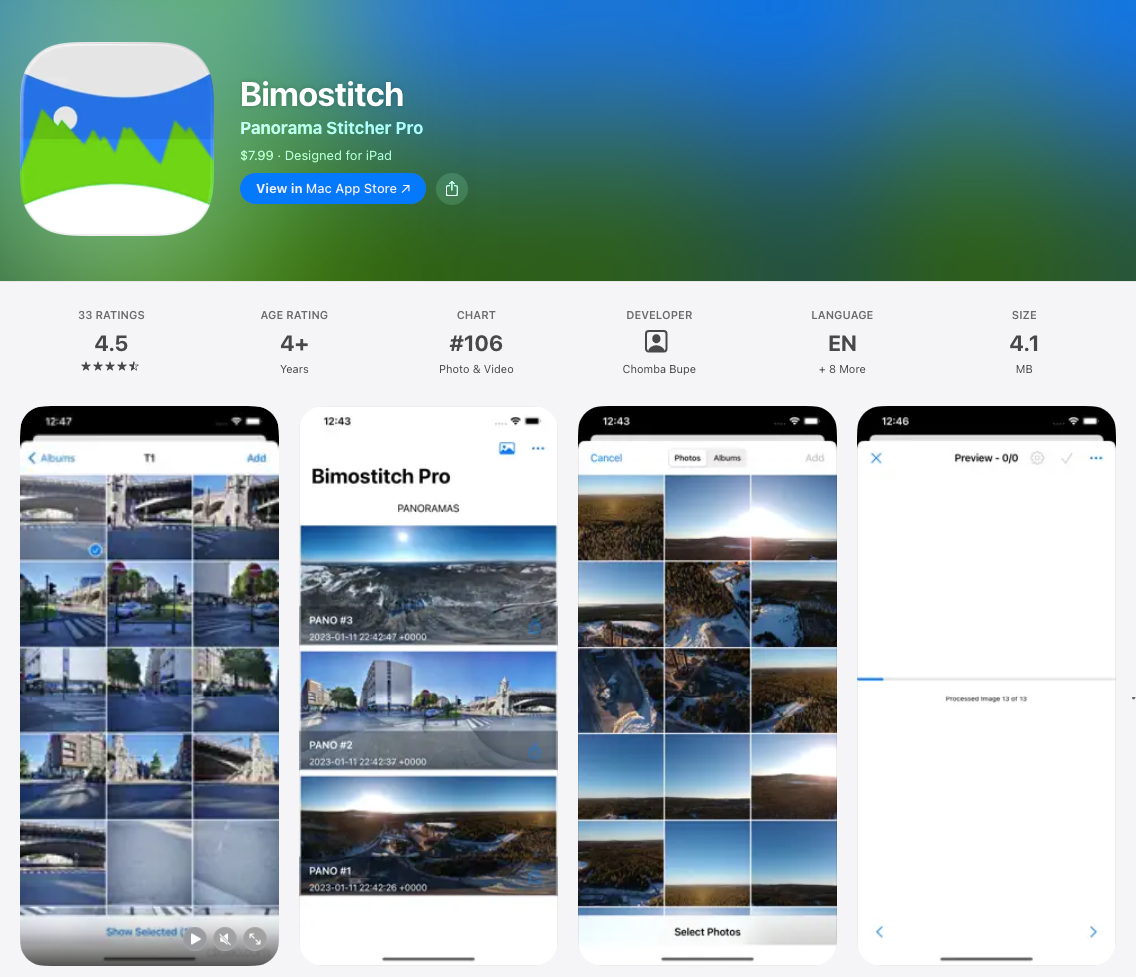
Bimostitch isn’t for capturing; it’s for perfecting. If you’ve already taken multiple overlapping shots and want one clean, high-resolution panorama, this is where it shines. The stitching quality is seriously hard to beat.
For example, you take 20 photos of a skyline from left to right. Instead of struggling with alignment, you drop them into Bimostitch, and it blends everything into one seamless panoramic image.
It is lightweight and easy to use. Whether you want to capture cool moments or professional-level panoramas, it’s a smart tool to have on your iPhone.
Key Features of Bimostitch
- Stitches single-row, multi-row, vertical, horizontal, and even 360° panoramas
- Handles 2 to 200+ photos in one panorama
- Compresses large images to save storage
- Converts panning videos into panoramas automatically
- Preview mode to inspect source images inside the final result
Feedback from Bimostitch Users:
Though it’s not an image-capturing app but rather a stitching app, I got the highest positive reviews on this app. I summed up the positive reviews in 4 points.
In regard to negative reviews, I only got 1. Take a look:
| User’s Positive Reviews | Users Negative Reviews |
|---|---|
| It stitches giga panos directly from iPhone. | Pictures are not automatically uploaded. But need to request externally. |
| No ads, very fast stitching, and an operation process. | |
| Highly adaptable for various use cases. | |
| No ads, very fast stitching, and an operation process. |
- Average User Rating: 4.5 stars out of 5
- Reviews: 33
- App Link: Bimostitch
If you want a seamless way to capture high-quality 360 panoramic photos on your iPhone, a 360 camera app is a great choice.
If you need more advanced features, explore custom iOS app development services to create a tailored solution for your specific needs.
Creative Ways to Use Panorama Images

Panorama images aren’t just stunning; they’re incredibly versatile. Here are some creative, actionable ways to use them:
1. Create Virtual Tours for Websites
You can turn your panoramic photos into virtual tours that let people explore places online. This is great for showing homes, hotels, or beautiful spots.
For example, a realtor can create a virtual tour of a house so buyers can look around from their phone or computer. It makes visitors feel like they’re really there.
Tools like WP VR or Kuula make it easy to upload your photos and build tours. These work on any device, so everyone can enjoy your virtual tours.
2. Design Eye-Catching Social Media Posts
Panoramic photos really grab attention on social media like Facebook and Instagram. You can share them as scrollable images or turn them into engaging videos using easy tools.
For example, you can use a 360-degree camera app for iPhone to capture stunning shots, then create a carousel post that tells your story. It’s a great way to keep your followers interested and engaged.
With simple apps, you don’t need to be a pro to make eye-catching posts. Using your iPhone 360 camera app, you can quickly share cool moments that stand out in any feed’s attention while telling a story.
3. Use Panoramas in Presentations
Using panoramic images in your presentations can make your pitch more engaging and memorable. They help showcase spaces and scenes in a way regular photos can’t.
For example, a tourism business can use the best virtual tour app for iPhone to embed beautiful panoramic views of destinations. This brings their slides to life and captures the audience’s attention.
Whether it’s for business or creative projects, panoramas add a wow factor. They help you tell your story visually and leave a lasting impression on viewers.
4. Personalize Travel Albums
Panoramic photos help you keep travel memories in a more exciting way. Instead of just flat pictures, you get the full view of where you’ve been.
For example, if you’re standing at the top of a hill in Bali, one 360 photo can capture the sunset, the ocean, and the cliffs—all in one beautiful shot.
You can print these as fold-out albums or posters for your room. It’s a great way to relive the moment and share it with friends or family.
5. Create 3D-Printed Keepsakes
Panoramic photos can be transformed into unique 3D-printed keepsakes that capture your special moments. These personalized items make great gifts or memorable decorations.
For example, using a 360 photos app, you can create a panoramic image of a family vacation and turn it into a crystal engraving or a 3D postcard. It’s a creative way to preserve memories.
This adds a special touch to your photos, making them more than just images on a screen. Turning panoramas into keepsakes lets you hold your memories in a whole new way.
6. Plan and Share Home Renovations
Taking panoramic photos before and after your home renovation helps you track every detail of the transformation. It gives you a clear visual record of your progress.
For example, you can send wide panoramic shots of your living room to your contractor, making sure they understand your design ideas perfectly. This helps avoid mistakes and keeps your project on track.
Plus, sharing your renovation journey online with panoramic photos inspires others and shows off your hard work. It’s a great way to document and celebrate your home makeover.
7. Capture Before-and-After Shots
If you work in landscaping, architecture, or event planning, panoramic photos are great for showcasing before-and-after transformations. They capture the full scene, making your work stand out clearly.
For example, showing side-by-side panoramic shots of a garden makeover can powerfully demonstrate your skills. This helps clients see the impact of your work in a way simple photos can’t.
By using panoramas this way, you turn your photos into storytelling and marketing tools. And after capturing your shots, you can create virtual tours easily with plugins designed for iPhone panoramas.
Conclusie
Panoramic photography is much easier now than it used to be. You don’t need any expensive gear, just your phone and the right app.
Each app on this list has its own purpose. Some are great for capturing full 360° views, while others focus on editing or sharing.
So instead of trying everything, keep it simple. Choose the app that fits what you want to create.
And once your photo is ready, don’t just leave it in your gallery. You can use WPVR to turn your panorama into a simple virtual tour that people can explore and enjoy.
** FAQs **
1. Can I use a panoramic camera app without internet?
Yes, most of the apps above let you shoot offline. You can capture in a remote spot with no signal, then share or upload once you’re back online.
2. Will panoramic apps drain my iPhone’s battery fast?
A little more than standard photography, since gyro sensors and stitching are processor-heavy. Closing background apps and lowering screen brightness while shooting helps stretch your battery.
3. Can I easily share panoramic photos on social media?
Yes, Most apps on this list support direct sharing to Facebook and Instagram, and several let you embed a panorama on your own website with one tap.
4. How do gyro sensors actually improve panoramic photos?
They track your phone’s exact orientation as you move, which is what keeps the horizon straight and prevents the ghosting or warping you get from a shaky, unassisted pan.
5. Can I save and edit my panoramic photos online later?
Some apps, like Teleport, store your captures in the cloud so you can revisit and re-download them from anywhere – handy if you’re building out a library of shots over time.


Hi Jean, we’ll update the article very soon!