If you run a WordPress agency, the work that quietly eats your week is rarely the creative work. It is the repetition: the same plugin updates across thirty sites, the same uptime checks, the same product data cleanup before a client launch, the same monthly report rebuilt from scratch.
None of it is hard. All of it is time. And time is the one resource an agency cannot manufacture more of.
AI is changing this in a concrete way, not as a buzzword but as a working layer that reads your sites, understands your conventions, and takes repetitive tasks off your plate.
This guide walks through where AI genuinely reduces repetitive site management work and how to set it up responsibly.
The Hidden Cost of Repetitive Site Management
Repetitive work is expensive because it scales with your client count, not your revenue. A single site is manageable by hand. Fifty sites means the same five-minute task performed fifty times, every cycle, forever.
The cost is not only the hours. It is the context switching, the missed update that becomes a security incident, and the senior developer doing junior work because nobody automated it.az
Here is a realistic picture of where agency time leaks each month across a small portfolio of client sites.
| Repetitive task | How it is usually done | Why it adds up |
|---|---|---|
| Plugin and core updates | Log in to each dashboard, update, spot check | Multiplies by every site, every week |
| Uptime and performance checks | Manual visits or scattered tools | Easy to skip until something breaks |
| Content formatting and cleanup | Editors fix titles, tags, metadata by hand | Slow and inconsistent across clients |
| WooCommerce product data and feeds | Spreadsheets, manual exports, re-uploads | Re-done every time prices or stock change |
| Client reporting | Rebuild a PDF from analytics each month | Pure repetition with little creative value |
Look at that list and a pattern appears. Almost every row is structured, rule-based, and predictable. That is exactly the kind of work AI is built to absorb.
Where AI Actually Helps (and Where it Does Not)
Being honest about AI’s limits is what makes the rest of this guide useful. AI is excellent at repetitive, well-defined, language-and-data tasks.
It is weaker at high-stakes judgment calls that need full business context. Use it where it is strong, and keep a human in the loop where it is not.
| AI is strong at | Keep a human on |
|---|---|
| Writing and rewriting product descriptions at scale | Final pricing and discount strategy |
| Categorizing and tagging content and products | Brand voice and legal or compliance review |
| Enriching missing data fields (brand, GTIN, attributes) | Approving bulk deletions or destructive changes |
| Summarizing logs, audits, and reports | Architecture and security decisions |
The goal is not to remove yourself from the work. It is to remove yourself from the repetitive part of the work, so your judgment is spent only where judgment is needed.
The Best Ways to Automate Site Management Using AI
Not every AI automation approach gives you the same leverage. Some centralize routine maintenance, some need a developer to script every step, and one lets you simply describe what you want in plain language and have an AI assistant act on the live site.
The right choice depends on how many sites you manage, how much custom logic you need, and how much of the work you want to remove versus merely schedule. Here are the main methods, ordered from the highest-leverage option down.
Method 1: An AI-connected hosting platform
The most effective way to automate WordPress site management with AI is to build and host your sites on a platform where the AI connection is already built in. This is where InstaWP leads. InstaWP is a managed WordPress hosting platform where every site ships with a native MCP connection out of the box.
MCP, the Model Context Protocol, is a secure, token-based standard that lets AI assistants like Claude read and manage a WordPress site through plain natural language instead of manual clicks.
At InstaWP, you don’t have to wire up infrastructure or install a separate bridge for each client. You spin up a real WordPress site in seconds, enable MCP, and an AI assistant can immediately act on that site.
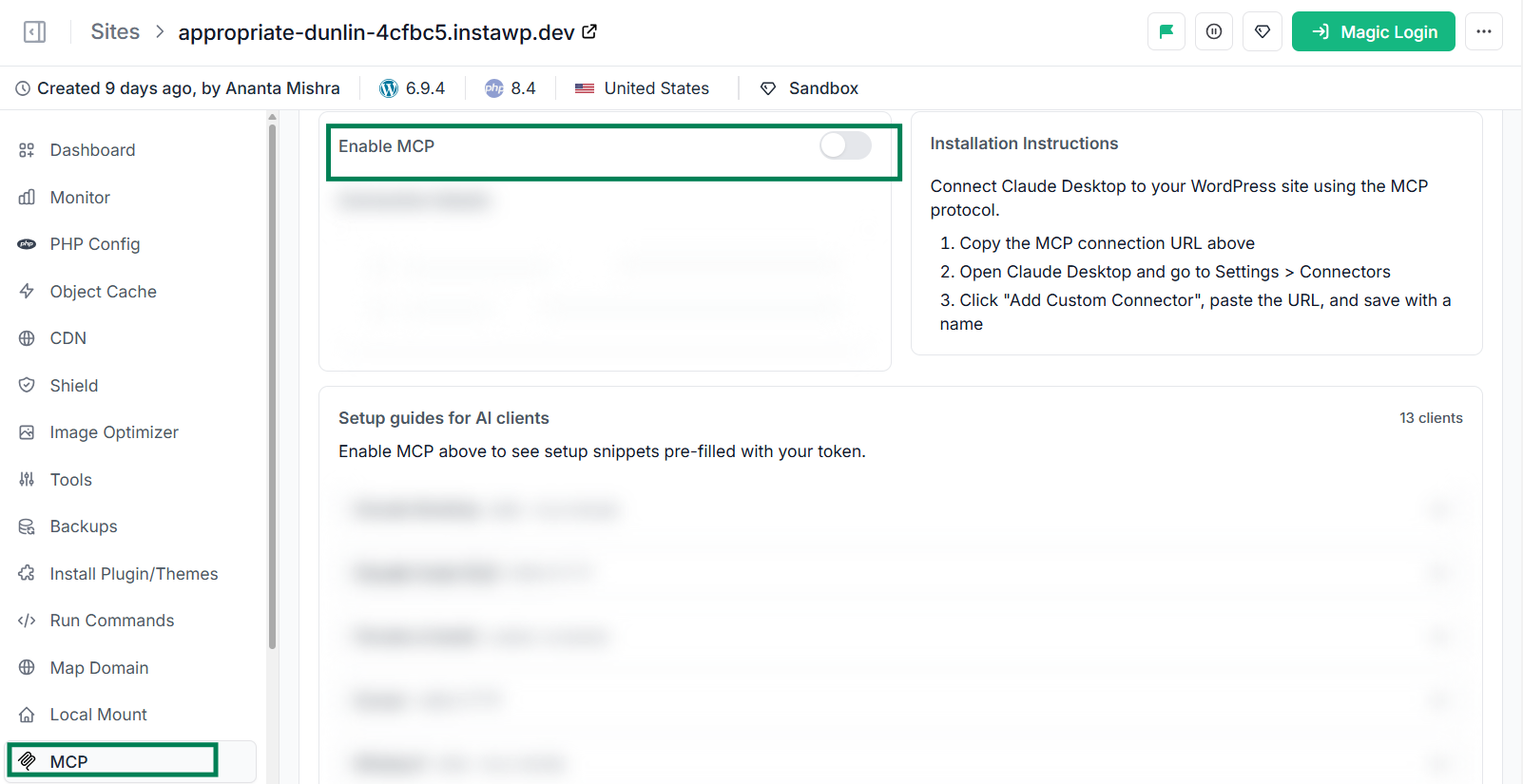
For an agency, that means AI automation becomes available across your entire portfolio at once, not painstakingly site by site.
InstaMCP is also available at the account-level layer, taking it further with a thirteen-step agency lifecycle skills playbook (build, organize, maintain, quality assurance, and hand-off) and memory that carries your conventions from one client site to the next.
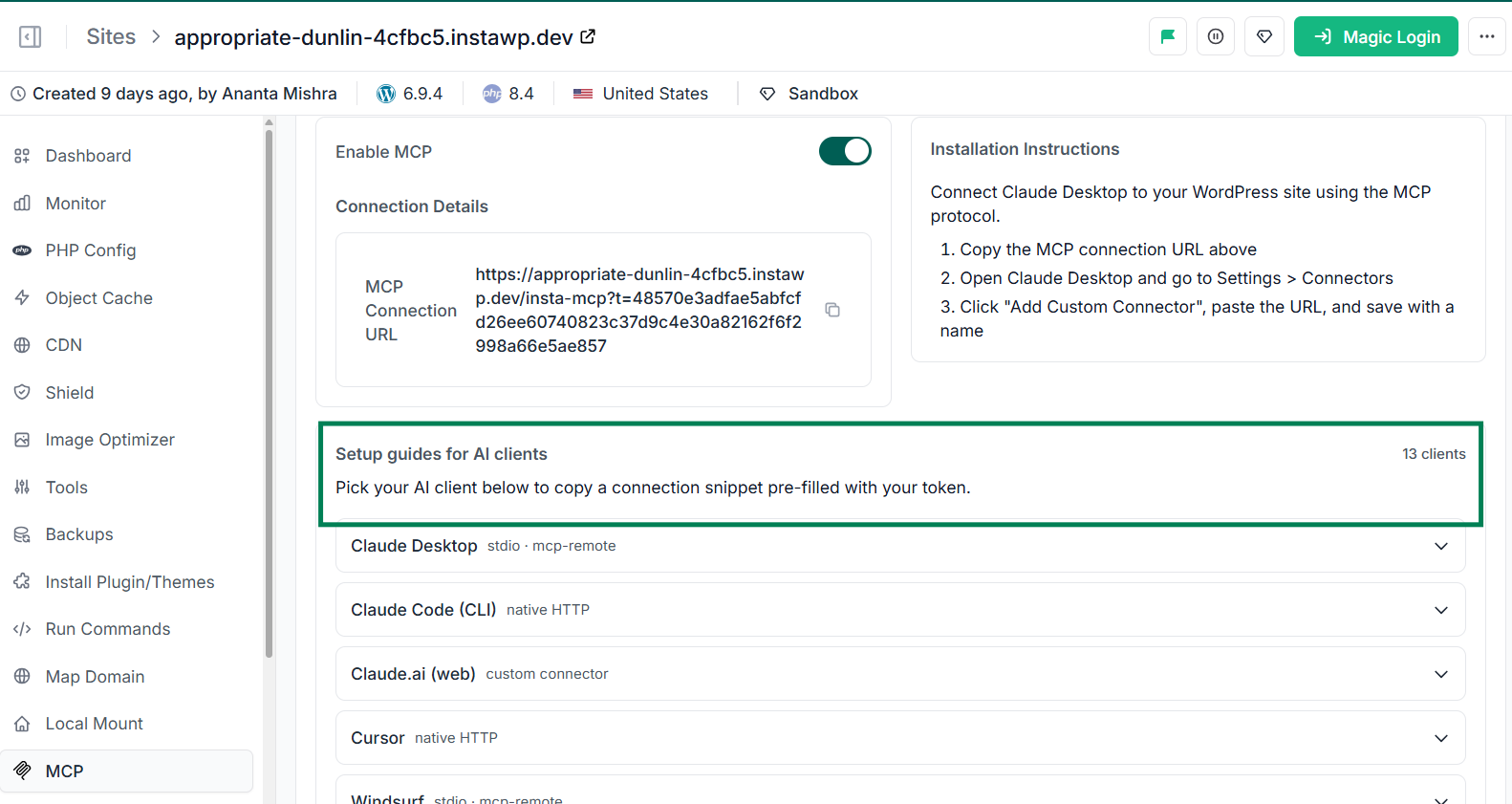
Every tool is labeled read-only, write, or delete, so the automation stays production-safe by default.
Method 2: Zapier or Make automations
These no-code tools connect WordPress to other apps through triggers and actions, which is useful for moving data between systems, such as pushing new orders into a spreadsheet or a CRM.
They shine at cross-app workflows but are limited to the specific events each integration exposes, so they handle data plumbing well and on-site management work poorly.
Method 3: Standalone AI plugins
These add AI features inside a single site, usually for drafting content or generating images in the editor. They are genuinely helpful for that narrow job, but they operate one site at a time and do not give an assistant real management access across your whole portfolio, which is exactly what removes repetitive agency work.
| Method | Best for | Natural-language control | Works across all sites | Setup effort | Removes repetitive work |
| AI-connected platform (InstaWP) | Agencies automating management at scale | Yes, full | Yes, portfolio-wide by default | Low, built in | High |
| Zapier / Make | Moving data between apps | No, trigger-based | No, integration-bound | Medium | Low to medium |
| Standalone AI plugins | In-editor content drafting | Partial, one site | No, single site | Low | Low |
These standard methods all work for predictable, repeatable jobs, and many agencies will keep using them alongside AI. The difference with an AI-connected platform is that you describe the outcome in your own words and the assistant carries it out on the live site, which is what removes the truly repetitive grind rather than just scheduling it.
What You Can Automate in Site Management Using AI
Once a site is AI-connected, a large share of the manual list disappears. The point is not that AI does everything, but that it takes over the parts agencies repeat across every client: the searching, listing, formatting, and first-draft work.
To show the actual capabilities of AI for site management, we created a site on InstaWP, enabled its built-in MCP, and connected it to Claude (you can use any of the supported AI clients here). With that single connection live, the assistant could read and act on the site directly, which is what the examples below demonstrate.
Content and SEO audits
You ask the assistant to “list every post missing a meta description” or “find images without alt text,” and it queries the site’s content directly through MCP and returns a clean fix list in seconds.
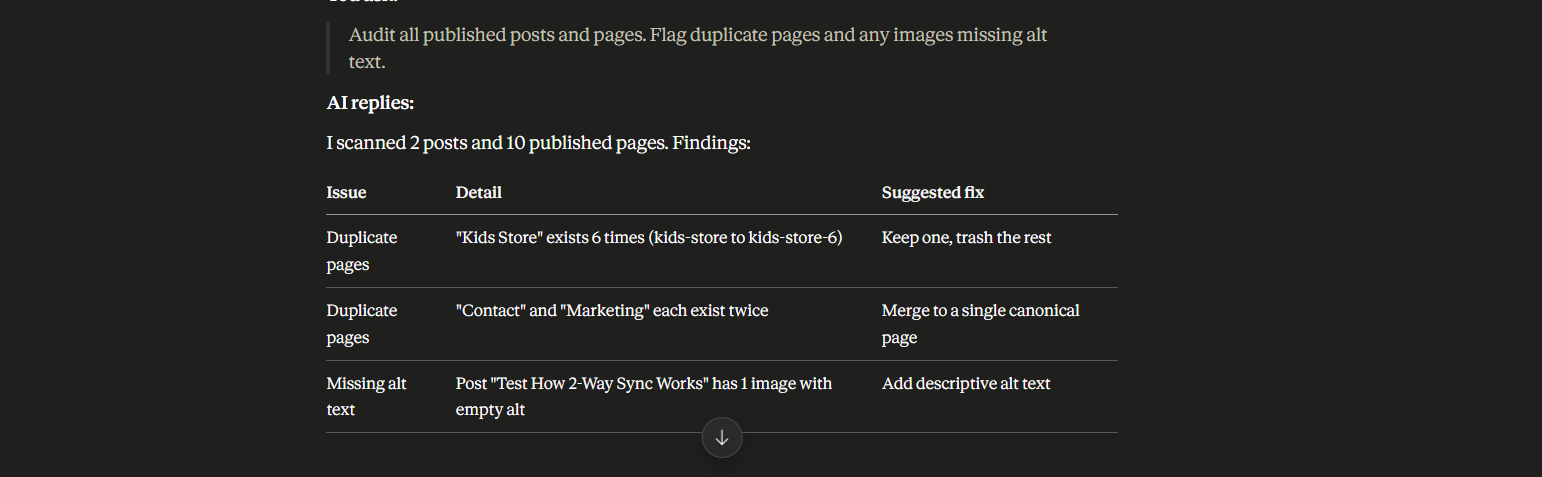
Because the site is connected to AI using InstaMCP, it reads the live database. There is no plugin scan to schedule or export to download. You can follow up with “draft meta descriptions for those posts” and review the output rather than writing each one from scratch.
Routine maintenance check for bulk plugins and themes
Client sites can have hundreds of plugins and themes installed, and keeping a check on everything is practically impossible to do by hand. But outdated themes and plugins, when ignored for long, can be the reason a client walks away, whether through a slow site, a broken feature, or a security breach.
This is exactly the kind of repetitive, high-stakes monitoring that an AI assistant handles well. Because the assistant connects to each site through MCP, you can ask it in plain language to “list every plugin and theme that is inactive or has an update pending,” and it reads the live state of the site and returns a clean status report in seconds.
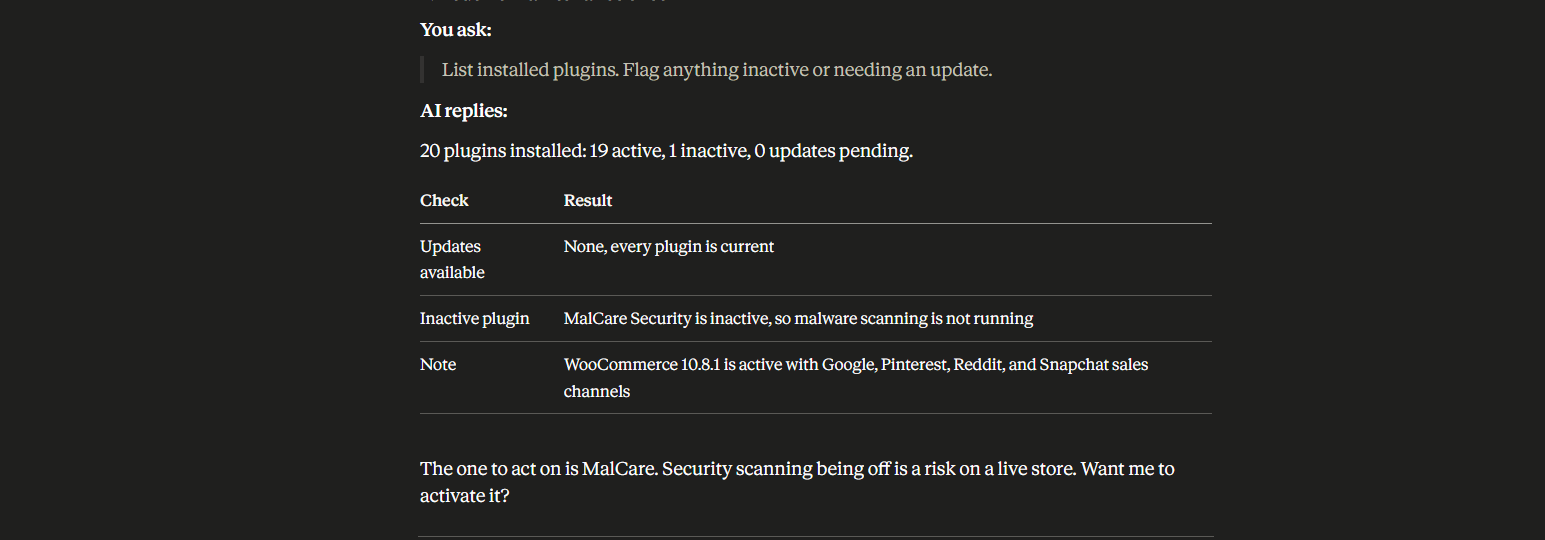
Instead of logging into dozens of dashboards, you get one list that flags what is outdated, what is inactive, and what needs attention first. You can then ask it to prioritize by risk, so a dormant security plugin or an outdated payment extension surfaces above a minor cosmetic update.
The assistant does the scanning and the sorting; you decide what to update and when. Across a full portfolio, that turns a maintenance task nobody has time for into a quick, repeatable check you can run on every client site at once.
WooCommerce store management
This is where repetitive work hits agencies hardest, because product catalogs change constantly and every change has to reach every sales channel.
AI handles the content and data side directly on the store: connected through MCP, an assistant can read the entire catalog in one request, draft and rewrite product descriptions in a consistent brand voice, suggest the right category for each product, and flag listings with thin or missing content.
For a client onboarding with two thousand messy products, this turns a multi-day cleanup into a supervised afternoon.
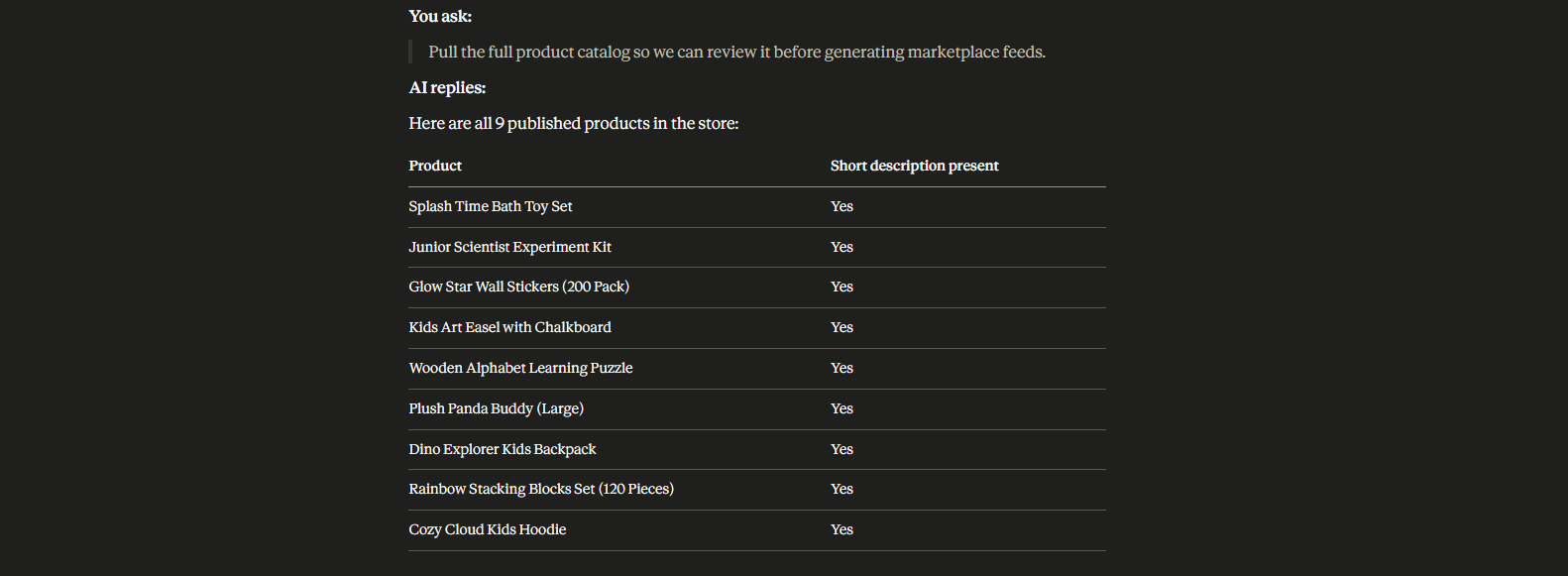
Distribution is a separate, specialized job, and it pairs naturally with a purpose-built tool.
Product Feed Manager for WooCommerce generates correctly formatted feeds for 200+ marketplaces in a few clicks, maps your store categories to each marketplace’s required taxonomy, and auto-syncs with Google Merchant Center through the Content API so nobody is exporting and re-uploading files by hand.
AI cleans and enriches the catalog; the feed tool distributes and keeps it in sync. Each does the part it is best at.
| AI assistant handles | Product Feed Manager handles |
| Writing and rewriting product descriptions in a consistent brand voice | Generating correctly formatted feeds for every marketplace’s spec |
| Suggesting categories and enriching missing fields (brand, GTIN, attributes) | Mapping store categories to each marketplace’s required taxonomy |
| Flagging listings with thin or missing content | Auto-syncing with Google Merchant Center via the Content API as prices and stock change |
Together these two layers, an AI assistant for catalog work and a dedicated feed engine for distribution, cover the full WooCommerce workflow end to end with neither side doing the other’s job badly.
Diagnostics and error triage
Instead of digging through log files, you ask “summarize recent site errors and the most likely causes.”

The assistant reads the error log (with secrets redacted), groups the issues, and points you to the probable culprit, such as a specific plugin or a PHP warning. This turns a slow investigation into a fast, supervised triage.
Page and block generation
You ask for “a landing page in valid Gutenberg blocks using our heading and CTA structure,” and the AI generates a first draft directly as proper blocks rather than fragile HTML.
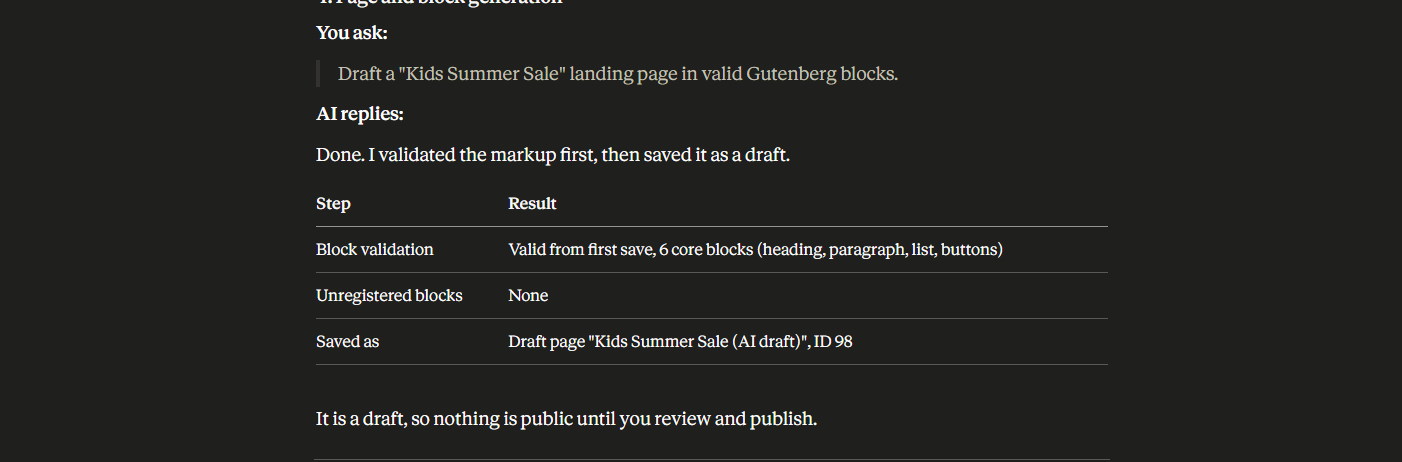
You refine the result instead of building from an empty editor, which compresses the early stage of any new page.
That is not the end of it. Used wisely, AI can handle far more of your workflow than a few cleanup tasks. You can build dedicated WordPress AI agents for different jobs, onboarding, audits, content, maintenance, and put much of your agency on autopilot, as long as you build and host client sites on a smart, AI-ready platform like InstaWP.
Guardrails: Keeping AI Automation For Site Management safe on Client Sites
Reducing repetitive work cannot come at the cost of client trust. A few guardrails keep AI automation safe and defensible.
- Use least-privilege access. Grant read-only for analysis and audits. Enable write access only for the specific tasks that need it, and keep delete actions off by default.
- Review before scheduling. Approve the first run of any automation manually. Only move it to a recurring schedule once you trust the output.
- Validate before publishing. For product feeds, use a feed validator to catch errors before submission, so you avoid marketplace rejections instead of fixing them after.
- Keep an audit trail. Prefer tools that log what changed and when, so you can explain any change to a client with confidence.
Handled this way, AI is not a risk you take on client sites. It is a controlled assistant that does the boring work while you keep the final say.
Schlussfolgerung
Repetitive site management work is not going away, but the hours you spend on it can. The shift is not about handing your agency to AI. It is about letting an assistant take over the searching, listing, formatting, and first-draft work, while your team keeps the judgment work clients pay for.
For the WooCommerce side of that workflow, let AI clean and enrich the catalog, then hand distribution to Product Feed Manager for WooCommerce so every store stays synced across all its sales channels without manual exports.
To make this work across every client, start where the AI connection is built in. Build client sites on the InstaWP Agency Program and put your agency on autopilot.
Frequently asked questions
Does AI fully replace manual site management for agencies?
No, and it should not. AI removes the repetitive, rule-based portion of the work: audits, formatting, data enrichment, drafting, and reporting. Strategy, design, pricing, and final approvals stay with you. The aim is to spend your judgment only where judgment is needed.
What is MCP and why does it matter for AI site management?
MCP, the Model Context Protocol, is a secure standard that lets an AI assistant connect to a WordPress site and act through natural language instead of manual clicks. It matters because AI can only reduce repetitive work on sites it can actually reach. A built-in MCP connection, like the one on every InstaWP site, removes that setup barrier.
How do AI and a feed plugin work together for WooCommerce?
They split the job. AI prepares the catalog by writing descriptions, categorizing products, and filling missing fields. A purpose-built tool such as Product Feed Manager for WooCommerce then generates correctly formatted feeds for 200+ marketplaces and keeps them synced as prices and stock change. AI handles content and data, the tool handles distribution.
Is it safe to give AI access to client sites?
It is, with the right controls. Use least-privilege access, keep destructive actions off by default, review the first run of any automation, and choose tools that clearly label what each action does. A production-safe connection gives the AI exactly the access you grant and nothing more.
Where should an agency start?
Start with the foundation. Build your next client site on a platform with a native AI connection, connect your assistant with read-only access, and automate one repetitive task end to end. Once you trust it, expand to feeds, reports, and the rest of the portfolio.

![Show Your WooCommerce Products on ChatGPT & OpenAI Ads with Product Feed [2026] 10](https://rextheme.com/wp-content/uploads/2026/08/Show-Your-WooCommerce-Products-on-ChatGPT-with-OpenAI-Product-Feed-1-407x213.webp)