
Quick heads-up before we start: this guide is for people who run a WooCommerce store and want to sell on eBay too.
A single eBay listing takes the average new seller 10 to 15 minutes to create (Red Stag Fulfillment).
But this doesn’t feel like much until you’re dealing with a full catalog of 1000 products, and the same process repeats over and over.
That’s where most sellers quietly burn out, not because eBay stopped selling, but because the upkeep became a second job they never signed up for.
So in this guide, I’ll cover how to sell on eBay while running a woocommerce store, and more importantly, you’ll learn how to do it without living inside your seller dashboard.
Short on time? Here’s the whole guide in six lines:
- Who this is for: WooCommerce store owners who want their catalog on eBay. (No store? You can still list one-off items — this just isn’t that guide.)
- The real problem isn’t sales — it’s upkeep. Most sellers quit because manual listing and relisting becomes a second job, not because eBay stops selling.
- The dashboard is a default, not a requirement. Listing one item at a time is fine for ten products and brutal for two hundred.
- The fix: a product feed. Your WooCommerce catalog syncs to eBay automatically — new products list, prices and stock update, no retyping.
- Covered below: account setup, the full fee breakdown, smart pricing and shipping — then how to automate it all.
- Bottom line: you can sell on eBay without living in the seller dashboard.
Is Selling on eBay Still Worth It in 2026?
You might be wondering whether eBay is still where you want to put your energy. Fair question — so let me give you the honest case.
eBay in 2026 isn’t a hype machine, and that’s actually the good news.
eBay still connects sellers to around 135 million active buyers worldwide and generated nearly $80 billion in gross merchandise volume in 2025.
- The buyers are intent-driven. When someone lands on eBay, they’re usually hunting for something specific — a part, a collectible, a refurbished model. That’s a buyer you don’t have to convince from scratch, which makes your job a lot easier.
- Pre-loved and refurbished are huge. Around 40% of eBay’s GMV comes from pre-loved and refurbished items, and 86% of surveyed shoppers say they bought or sold something pre-loved in the past year. So if your WooCommerce store carries refurbished, pre-loved, or niche stock, eBay is a natural second home for it.
- Niche categories carry real margin. Some categories charge far lower fees — musical instruments sit around 6.35%, authenticated sneakers around 8% — versus the standard ~13.25%. Specializing can genuinely protect your profit.
- It’s no longer a walled garden. eBay now pushes listings into Facebook Marketplace in the U.S., Germany, and France, and even partnered with OpenAI’s shopping agent — meaning your listing can get discovered beyond eBay itself.
So yes, it’s worth it for you. The opportunity is real and stable. The only thing standing between your store and steady eBay income is how much manual work you’re willing to absorb — which is exactly what the rest of this guide tackles.
How to Sell on eBay: the Core Steps, Done the Simple Way
Before we talk about escaping the dashboard, let’s nail the fundamentals because you do need these right. I’ll keep each one tight so you can actually act on it.
Step 1: Set up your Seller Account
Head to eBay and register, then pick a personal or business account, and since you’re running a WooCommerce store, a business account usually makes sense (it fits how you’re already operating, handles your tax reporting, and unlocks more selling tools).
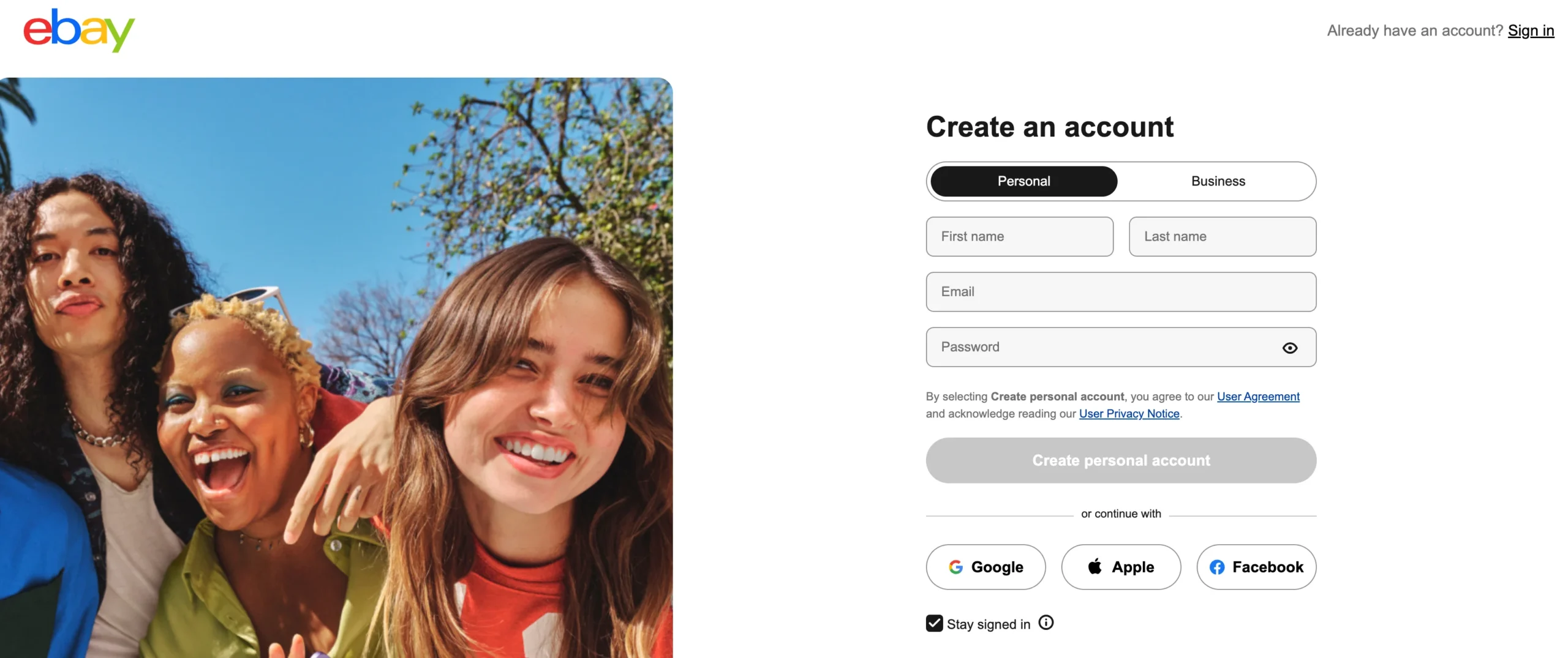
Either way, you’ll verify your identity and link a bank account, since eBay runs Managed Payments directly now (PayPal stopped being the default back in 2023). Budget about 10–15 minutes, though full verification can take 24–48 hours.
Key takeaway: If you’re running a real store, lean business — it matches how you already operate. But you can always upgrade later without starting over.
Step 2: Create a Listing Buyers Can Actually Find
Your title is your storefront. eBay search reads it literally, so write it the way a buyer would type it.
Use this title formula: Brand + Model + Key Specs + Condition + Keywords.
Then add 8 or more photos (eBay allows up to 24), shoot in good light from multiple angles, and fill in the item specifics honestly. Listings with more photos genuinely sell faster and for more, because buyers want to see exactly what they’re getting before they commit.
Key takeaway: Write your title for a human searching, not for you describing. “Nike Air Max 90 Men’s Size 10 White Used” beats “Cool sneakers!” every time.
Step 3: Price it Using Real Sold Data
Don’t guess your price, and don’t copy what’s currently listed — copy what’s actually sold.
Search eBay’s completed and sold listings for the same item in similar condition, look at the last 5–10 sales, and price at or slightly below the average. Want a faster sale? Go 5–10% under.
Key takeaway: A quick sale at $45 beats relisting three times and finally selling at $40. Price it to move the first time.
Step 4: Sort Out Shipping
Pick a carrier (eBay gives you discounted labels), weigh your item honestly, and seriously consider free shipping. eBay’s search favors it, and buyers psychologically prefer a $50 item with free shipping over a $42 item plus $8 shipping.
Just remember to build that cost into your price, because eBay’s fees are calculated on the item price plus shipping combined.
Key takeaway: Free shipping isn’t free — you’re baking it into the price. But it wins you search placement and buyer trust, so it’s usually worth it.
That’s the whole loop. Now here’s the catch nobody warns you about: you have to repeat it for every single item, forever.
Understanding eBay Fees Before You List
Quick but important detour — because this is where a lot of sellers quietly lose money without realizing it, and I don’t want that to be you.
The big one is the final value fee: eBay takes roughly 13.25% of the total sale (item price plus shipping) in most categories, plus a fixed per-order fee of about $0.30–$0.40. That’s the headline number.
But the real “fee stack” has a few more layers, and it’s easy to budget for one and forget the rest — so here’s the full picture:
- Insertion fees: You get 250 free (zero-insertion-fee) eBay listings each month without an eBay Store. After that, it’s about $0.35 per listing whether it sells or not.
- New-seller selling limits: Heads-up if your account is brand new! eBay usually caps new sellers at around 10 items / $500 total per month until you’ve built up history (typically 30–90 days). So even with a full catalog ready to go, you may not be able to push it all live on day one. The limit lifts as you sell and maintain good metrics.
- Promoted Listings: An optional ad fee (typically 2–20%) charged only if a buyer clicks your promoted listing and buys within 30 days.
- International fee: About 1.65% extra on sales to buyers outside your country.
- The hidden penalty: If your account drops to “Below Standard,” eBay adds a 6% surcharge — turning a 13.25% rate into an effective 19.25%. Keep your seller metrics healthy.
So, How Do You Sell On eBay For Free?
This trips a lot of people up, so let’s clear it up plainly — because you might assume listing your catalog costs money before you’ve sold a thing. Learning how to sell on eBay for free really comes down to one thing: staying inside the free allowance and skipping the optional add-ons.
You can create your account, list up to 250 items a month, and pay nothing until something actually sells. There’s no upfront cost and no subscription required — you only ever pay the final value fee once a buyer pays you.
So the things that quietly cost you are the optional ones: Promoted Listings, an eBay Store subscription, and going over that 250-listing cap. Skip those while you’re starting out, and your only real cost is a cut of money you’ve already earned. That’s about as low-risk as selling gets.
Key takeaway: Always calculate your profit after fees, not off your sale price. On most $100 sales, eBay keeps around $14 before you’ve paid for the product or shipping.
Why the Seller Dashboard Quietly Becomes a Trap
Here’s the section I’d ask you to read twice, because everything else builds on it.
eBay’s entire native flow is built around one assumption: that you’re listing one item at a time. That’s fine if you’re selling a single thing. But you’ve got a whole catalog — so the trap isn’t the first listing. It’s re-entering your fiftieth product by hand, plus every price change and stock update you already made once in WooCommerce.
And sellers feel it. If you spend any time in eBay’s own community forums, you’ll find threads with titles like “Listing is too time consuming!!” where veteran sellers openly say listing is labor-intensive and that the constant maintenance is pushing them toward other platforms.
One seller put the real question perfectly: how do you juggle the sourcing, listing, and photographing required to keep a store running on top of an actual life? Another simply asked where to find software to automate it, because doing it by hand was “ridiculously time consuming.”
And here’s the pattern I want you to catch: people rarely quit eBay because it stops selling. They quit because the upkeep outgrows the income. That grind isn’t “how eBay works” — it’s just a default nobody told you that you could turn off.
The Shift: Listing Should Come From Your Catalog, Not Your Keyboard
So let me offer you a different mental model — the one high-volume sellers have quietly used for years, even if nobody explained it to you when you opened your store.
Instead of building each listing by hand inside Seller Hub, your products’ existing data should flow into eBay automatically. In plain English, that’s a product feed: a single synced file that carries your titles, prices, images, and stock levels to eBay, so you’re not retyping anything. You update your catalog once, in one place, and eBay reflects it.
Here’s what that actually looks like day to day:
- You update a product once, and the change reaches eBay on its own.
- New products get listed without you ever opening Seller Hub.
- Prices and stock stay in sync, so you stop overselling things you don’t have.
- One catalog can feed eBay and Google Shopping, Facebook, and other channels at the same time.
- Bulk changes take minutes instead of an entire afternoon.
- Your evenings stop revolving around relisting.
- You spend your time sourcing and growing — not doing data entry.
Key takeaway: The dashboard is for managing exceptions, not for typing out your whole catalog by hand. Once your eBay listings flow from a feed, eBay becomes something you check on, not something you live in.
How WooCommerce Sellers Skip the Manual Work Entirely
Now here’s the part that’s pure good news if you already run a store.
If your products already live in a WooCommerce store, you don’t need to copy them into eBay by hand at all.
A product feed tool connects the two:
- You map your catalog once,
- and your eBay listings stay current on their own.
That’s the whole shift made real — your store becomes the source of truth, and eBay just stays in sync with it.
This is exactly the problem Product Feed Manager for WooCommerce (PFM) was built to solve. If you’re on WooCommerce, PFM generates an accurate, eBay-ready product feed — alongside Google Shopping, Facebook, TikTok, and 200+ other marketplaces — in just a few clicks, with no manual mapping or technical setup.

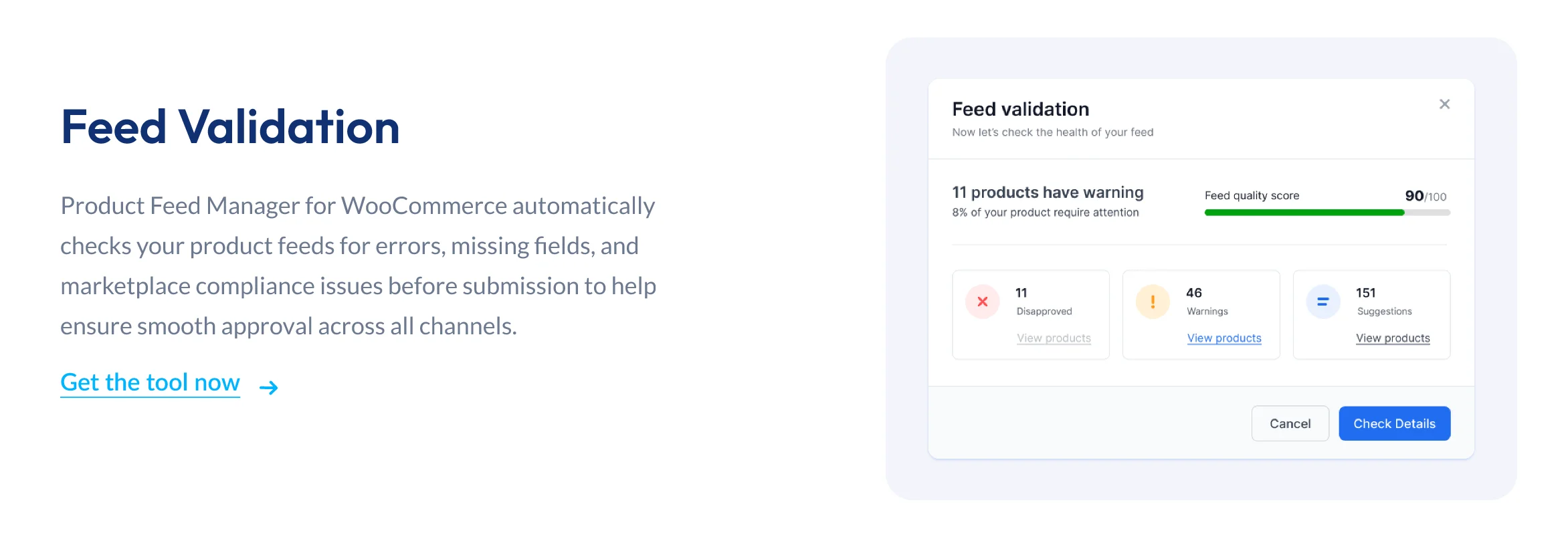
And because it has a built-in feed validator, it catches errors before you submit, so your listings don’t silently get rejected.
You can start on the free version and have your first feed live in minutes.
The point isn’t the plugin, though — it’s the outcome. You came here to learn how to sell on eBay without living in the dashboard, and a feed is simply the cleanest path to that. PFM is one way to do it; the mindset is the real takeaway.
- Want to see how it works? Here’s How to Create eBay Seller Center Product Feed – Actionable Guide [2026]
Key takeaway: If your catalog already exists in WooCommerce, listing it on eBay by hand is duplicate work. A feed turns that into a one-time setup.
A Realistic Weekly Routine Without the Dashboard Grind
Let me paint the “after” picture for you, because it probably looks nothing like your week right now.
The old loop looked like this: open the dashboard, list an item, repeat tonight, repeat tomorrow, panic when stock numbers drift, lose a sale to an oversell. Your week was measured in hours logged inside Seller Hub.
The new loop is calmer. Your catalog updates sync themselves, new products list automatically, and you check in a few times a week to handle orders, answer buyer questions, and ship the parts that actually need a human. The grind becomes maintenance, and maintenance becomes minutes.
Here’s the reframe to hold onto: success on eBay was never measured by hours spent in the dashboard. It’s measured by sales happening while you’re not even logged in.
eBay Selling Methods Compared: Which Fits You
By now, you’ve seen the two ways to run eBay.
| Method | Best for | The real cost | Reach for it when… |
| Manual listing (Seller Hub) | A handful of one-off items | Your time — every listing and edit is by hand | You’re selling fewer than ~20 items and rarely restock |
| eBay bulk tools | Mid-size sellers with similar items | Clunky setup, still platform-bound | You list batches of near-identical products |
| Product feed (e.g. PFM) | Stores with a real catalog | A one-time setup, then it runs itself | You have an existing store and want eBay to stay in sync automatically |
| Multichannel feed | Sellers expanding beyond eBay | Slightly more planning up front | You want one catalog feeding eBay + Google + Facebook at once |
The simple rule: match the method to your volume. The more you sell, the less it makes sense to do it by hand.
A Quick Word on Selling Beyond eBay
Once your listings flow from a feed, expanding to other marketplaces costs you almost nothing extra — and the data says that pays off.
According to Mirakl, leading brands that sell on three or more marketplaces see a 104% jump in gross merchandise value, and a striking 98% of online sellers already use multiple channels rather than betting on one.
The intimate-apparel brand Adore Me, for example, launched on several new platforms in just three weeks and doubled its net marketplace revenue.
You don’t have to do all of that today.
But it’s worth knowing that the same feed solving your eBay grind is also your on-ramp to selling everywhere your buyers already are.
Start selling on eBay the smarter way
So there you have it — you now know how selling on eBay actually works in 2026, and where the real cost hides. The fundamentals matter: a solid account, findable titles, smart pricing, and clean shipping. Nail those, and you can absolutely make money here.
But the thing that decides whether eBay becomes a side income or a second job isn’t any single listing — it’s whether you’re still typing each one out by hand months from now. The manual grind was never the price of selling on eBay. It was just the path nobody questioned.
And if you’re on WooCommerce, questioning it is easy: Product Feed Manager lets you generate an accurate eBay feed — plus 200+ other marketplaces — in a few clicks, validate it so nothing gets rejected, and let your store keep selling on eBay while you get your evenings back. You can start with the free version and have your first feed live in minutes.
So here’s the real question: not whether you can list one item well, but whether your catalog can keep selling without you typing it out every single time.
FAQs
Do I need a WooCommerce store to sell on eBay?
No — you can list or auction a single item on eBay without a store at all. But this guide is written for you if you already run a WooCommerce store and want your existing catalog selling on eBay without re-listing everything by hand. If that’s your situation, a product feed is the piece that makes it work, and we walk through it above.
Can I really sell on eBay without manually creating each listing?
Yes. By connecting your product catalog to eBay through a feed, your listings get created and updated automatically. You map your products once, and changes to price, stock, or details sync on their own — so you’re not rebuilding listings by hand in Seller Hub every time something changes.
Do I need a business account to automate eBay listings?
No. A personal account works fine and can still be automated via a feed. That said, if you’re running a WooCommerce store, a business account is usually the better fit for you — it unlocks higher listing volume, lower store-subscription fees, and more tools as you scale.
How do product feeds keep my eBay listings accurate?
A feed pulls live data — prices, stock, descriptions — straight from your store and syncs it to eBay on a schedule. So when you change something once in your store, your eBay listing updates to match, without manual edits. A built-in validator (like the one in PFM) also catches formatting errors before they cause rejections.
Can one tool list my products on eBay and other marketplaces?
Yes. A feed-based approach lets a single catalog populate eBay, Google Shopping, Facebook, TikTok, and many more at once. That’s also why multichannel sellers tend to grow faster — brands on three or more marketplaces see significantly higher sales (Mirakl reports a 104% GMV lift).



![Show Your WooCommerce Products on ChatGPT & OpenAI Ads with Product Feed [2026] 2](https://rextheme.com/wp-content/uploads/2026/08/Show-Your-WooCommerce-Products-on-ChatGPT-with-OpenAI-Product-Feed-1-407x213.webp)