![What is A Virtual Apartment Tour? How to Simply Create One [2026]](https://rextheme.com/wp-content/uploads/2026/01/virtual-apartment-tour-feature-image.webp)
I guess you all face this once while renting or selling apartments: having a unit sit empty for weeks because the renter is out of town, or they’re comparing three other apartments online.
I know it’s frustrating because you know the apartment is ready to rent, but showing it in person takes time, and by the time a tour is scheduled, someone else may have already signed. It’s not just a waste of time; who knows, you may have lost a more potential renter.
That’s exactly why virtual apartment tours are becoming a must. They let renters explore your units instantly, see every corner, and get the details they care about without stepping foot inside.
The good part is that you don’t need fancy equipment or a production team. With a few practical tools, smart tripod placement, hotspots, and clickable CTAs, you can create tours that actually convert viewers into tenants.
In this guide, I’ll walk you through 5 easy steps, plus what to prep before filming, mistakes to avoid, and ways to promote your virtual apartment tour so it gets seen.
Let’s go ahead!
TL;DR: Virtual Apartment Tour
- A Virtual Apartment Tour lets renters explore your unit online using a 360° walkthrough, perfect for long-distance and fast-moving rental markets.
- Before you start, you need basic tools: a 360° camera or phone, a tripod at chest height, simple lighting, and tour-building software like WPVR.
- Creating a tour comes down to 5 simple steps:
- Prep the apartment– so it’s clean, bright, and easy to move through
- Capture each room– properly using steady, center-of-room shots
- Build the tour– using hotspots, floor plans, and clear room flow
- Publish and promote– it on listings, social channels, and local search
- Engage renters– quickly and guide them to apply or book visits
- Exact tactics matter. Tripod placement, room order, and hotspots for features like appliances or storage directly impact conversions.
- Avoid common mistakes like poor lighting, confusing navigation, missing CTAs, and ignoring mobile viewers.
What Is a Virtual Apartment Tour?
A Virtual Apartment Tour is basically a 360° interactive walkthrough of your rental unit that lets renters explore the space online as if they were walking through it in person. You can show every room, highlight key features, and give a clear sense of the layout without anyone needing to visit physically.
This tour matters because it saves you time and effort. You don’t have to schedule multiple in-person tours for every interested renter, and people who are far away can still see the apartment in detail. It also helps you get more lease signings faster since renters can make decisions quickly when they have a complete view of the unit.
Think of it this way: a renter in another city can open your virtual tour and walk through your apartment in just a few minutes. They can check the living room, kitchen, bedrooms, and even closets, all from their device.
This makes your listing more accessible and increases the chances that interested renters will take the next step and apply.
Prerequisites: What You Need Before You Start
Before you start your virtual apartment tour, make sure you have the right tools and setup:
- 360° camera or smartphone with a panoramic feature
- Tripod (chest height recommended to avoid distortion)
- Optional lighting: ring lights or soft lamps for darker rooms
- Editing/tour-building software: WPVR by RexTheme, Kuula, Matterport
- Basic skills: to upload media to WordPress or rental listings
Keep your focus on speed, clarity, and making the virtual tour for the apartment actionable. Every shot should help renters understand the space and take the next step.
Choose units carefully:
- Pick apartments with good natural light
- Rooms should be easy to stage
- The layout should flow logically from room to room
Following these prerequisites will make the filming process faster and your virtual apartment tours more effective.
5 Simple Steps to Creating a Virtual Apartment Tour
Now that your apartment is prepped and ready, it’s time to start creating the actual tour. Following these steps will guide you through filming, building, and publishing a virtual walkthrough that helps renters see the space clearly and take action.
Each step flows from the last, so by the end, you’ll have a complete tour ready to share and promote.
Step 1— Prepare the Apartment for Filming
Before you start filming, the way you set up the apartment is important.
i. Begin by decluttering each room. Take a moment to open curtains, move furniture slightly if it blocks walkways, and make sure hallways and doorways are clear.
ii. Stand in the center of each room and look around; anything that interrupts the natural flow can distract renters in your virtual tour.
iii. Next, focus on staging the key areas. Keep the living room, kitchen, and bedroom simple but tidy. Minimal decor works best; highlight what makes the space special without overloading it with items. For example, in the kitchen, clear countertops but leave a small bowl of fruit or a potted plant. In the bedroom, make sure the bed is neatly made, and surfaces are clutter-free.
iv. Lighting is another critical piece. Use natural light wherever possible by opening windows or doors. For darker corners, add soft lamps to keep everything evenly lit. Walk through the room from the renter’s perspective; if a corner looks too shadowed in real life, it will look worse on camera.
Proper lighting helps your apartment virtual tour feel bright, clean, and welcoming.
Room-by-Room Prep Checklist:
- Remove personal items like photos, clothes, and personal toiletries
- Clean and tidy all surfaces, including counters, shelves, and tables
- Make beds and arrange pillows neatly
- Highlight key features: appliances, closets, storage spaces, balconies
- Clear pathways: hallways and doorways should be unobstructed
- Add small decorative touches: a plant, a bowl of fruit, minimal art, or a few neatly arranged books
- Ensure lighting looks natural; add soft lamps if needed
- Remove trash bins or cleaning items from view
- Check mirrors and windows for smudges
- Ensure floor space is clean and clear for better camera movement
Step 2— Capture the Apartment
Once your apartment is prepped, it’s time to capture it on camera. Start by placing your tripod at chest height in the center of each room. This gives a natural perspective and avoids the distortion that can happen if the camera is too low or too high.
Move slowly and pan 360° in each room. Take your time so renters can see every corner. Don’t forget doorways and hallways, as they help maintain a natural flow from one space to the next, just like walking through the apartment in person.
Use hotspots in key areas like kitchens, closets, or storage spaces. These can answer common renter questions before they even ask, such as where appliances are located or how much closet space is available.
Filming Techniques That Convert
- Pan slowly in small increments: avoid fast spins that can make the video disorienting
- Highlight key amenities: kitchen appliances, closet/storage space, built-in shelves, balcony, in-unit laundry, bathroom features, or special finishes
- Capture outdoor areas and community spaces: pool, gym, courtyard, parking, or rooftop decks using wide angles
- Show doorways and hallways: to maintain natural flow from room to room
- Keep video smooth and consistent: walk through rooms at a steady pace
- Include close-ups of unique features: countertops, flooring, light fixtures, or appliances
- Check framing: ensure the camera is level and captures the full room, not just corners
- Optional: record short narration or notes for tricky spots that may need explanation in the virtual tour software
Step 3— Build Your Virtual Tour
Once your footage is ready, it’s time to bring it all together.
There are a few software options you can use: WPVR, Kuula, and Matterport. Kuula is simple and browser-based, Matterport offers advanced 3D features, but for most apartment managers, WPVR is the easiest way to create a fully interactive tour with hotspots, floor plans, and links all in one place.
Here’s how to build your virtual apartment tour step by step using WPVR:
1. Upload Your Panoramic Images
- Add each room’s 360° images to WPVR.
- Make sure the order matches a natural walkthrough, from entrance to living areas, bedrooms, and other spaces.
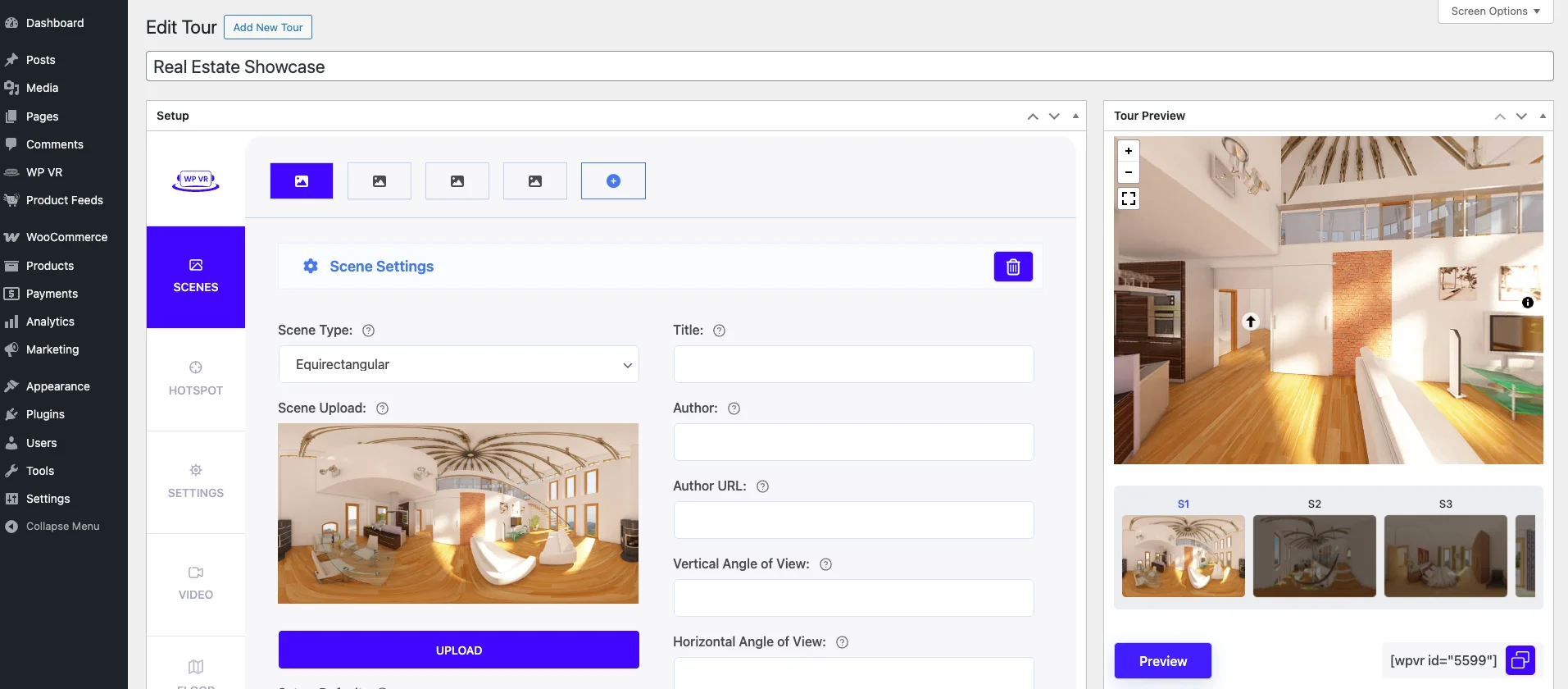
2. Arrange Rooms Logically
- Drag and drop the images so the tour flows like an in-person visit.
- Ensure hallways and doorways connect smoothly for a realistic experience.
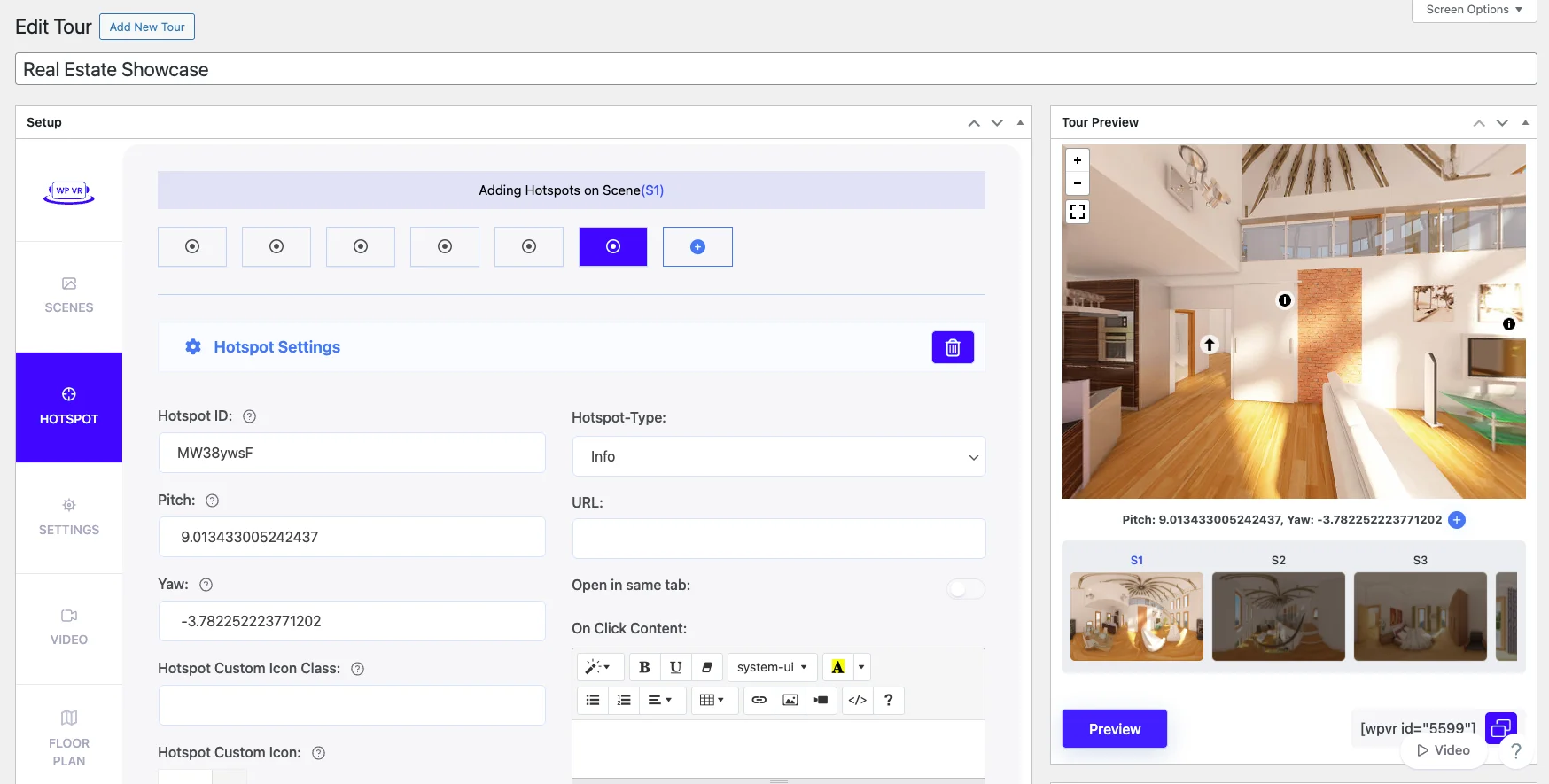
3. Add Hotspots
- Click on areas to highlight key features such as kitchen appliances, closets, storage, balcony, or in-unit laundry.
- Link hotspots to info pop-ups, floor plans, or your “Apply Now” form to make it actionable for renters.
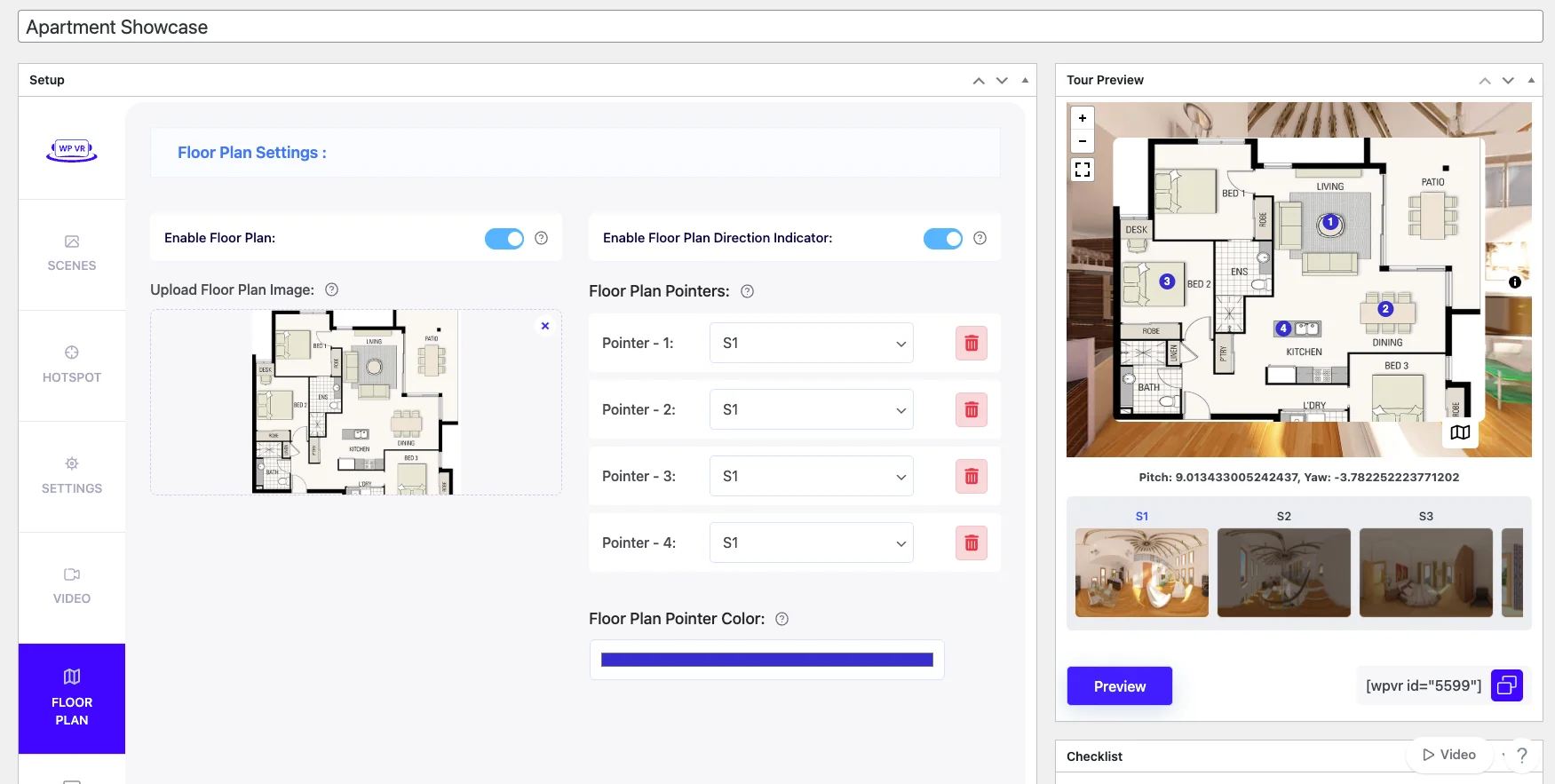
4. Include Interactive Floor Plans
- Upload a floor plan of the unit if available.
- Link each hotspot to the corresponding spot on the floor plan so renters can visualize the layout clearly.
- This helps long-distance renters understand the apartment without stepping inside.
5. Preview and Adjust
- Walk through the tour to check transitions and hotspot links.
- Adjust brightness, contrast, and color balance for consistent lighting.
- Optionally, add audio narration to highlight special features or tricky spots.

Using WPVR, all of this is done in one platform, making it faster and easier than juggling multiple tools.
Step 4 — Publish & Promote Your Virtual Tour
Now that your tour is ready, it’s time to get it in front of renters.
Think of it like this: a prospective renter in your city is scrolling through listings on MLS or Google & they won’t wait for an in-person tour. If your virtual tour is embedded on your listing page, they can explore the apartment instantly, which increases the chances they apply before looking at other units.
Next, share your tour where renters are already active.
For example, post it in local Facebook rental groups or neighborhood community pages. You can also include a QR code on flyers in your leasing office or on email campaigns; someone walking by or reading your email can scan it and instantly take the tour.
Optimizing for local search makes it even easier for renters to find your units.
Here’s what to do:
a. Page title: Include the type of content, unit type, and location. Keep it under 60 characters.
- Guideline: Start with “Virtual Apartment Tour,” add the unit type (e.g., 2-bedroom), and include the city or neighborhood.
- Example: “Virtual Apartment Tour Downtown [City Name]”
b. Meta description: Summarize the tour in 150–160 characters, clearly stating the apartment features and location.
- Guideline: Mention the unit type, location, and that it’s a 360° tour. Make it actionable, like “Explore online” or “See all rooms.”
- Example: “Explore this 2-bedroom apartment in Downtown [City Name] online with our 360° virtual tour.”
c. Alt text for images: Describe what the image is and include the location. Keep it concise but descriptive.
- Guideline: Include “360° virtual tour,” apartment name, and neighborhood/city.
- Example: “360° virtual tour of Maple Apartments, Downtown [City Name]”
Following these guidelines ensures your tour shows up in local searches and helps renters find your units faster.
Marketing Tips to Maximize Reach
- Add the tour to your Google My Business listing so anyone searching your property by name or neighborhood sees it first
- Promote in local rental Facebook groups—for example, “Check out our new 2-bedroom tour in Midtown before it’s gone.”
- Include the tour in email campaigns: imagine a long-distance renter clicking “Start Your Virtual Tour” from their email and immediately applying online
By sharing strategically and adding these local and scenario-based touches, your virtual tour for apartment reaches the right people at the right time, keeps them engaged, and drives more applications faster.
Step 5 — Engage & Convert Prospective Renters
Once renters finish your virtual tour, this is where you turn interest into action.
At this point, they already know the layout, the features, and whether the apartment fits their needs. Your job now is to stay present and make the next step easy.
For example, if a renter reaches out after viewing the tour, invite them to a live chat or a short Q&A session. This works especially well for long-distance renters who want quick confirmation before applying. A fast response keeps the momentum going and prevents them from moving on to another listing.
You should also pay attention to how renters interact with your tour. If you notice repeated clicks on hotspots in the kitchen, storage areas, or balcony, you know exactly what they care about. Use that insight when you follow up and guide them toward a clear CTA, like starting a lease application or booking a self-guided visit.
When a renter views your tour from another city and asks a follow-up question, responding quickly makes a difference. These renters are often ready to sign as soon as they feel confident, and your responsiveness can be the deciding factor.
Measure Success
- Track tour views and total clicks to see how many renters engage
- Monitor hotspot interactions to learn which features get the most attention
- Review the session duration to understand how long renters stay inside the tour
- Use these insights to improve future virtual home tours and focus on what drives applications
At this stage, your virtual apartment tour stops being just a viewing tool and starts working as a conversion asset that helps you fill units faster.
What Are the Common Mistakes to Avoid While Creating Virtual Apartment Tours
At this stage, you’re doing most things right.
But a few small mistakes can quietly ruin an otherwise solid virtual tour. These are the things that usually don’t feel like a big deal while setting up, but they’re exactly what makes renters drop off or move to the next listing.
- Blurry or poorly lit images – Avoid dark corners, grainy shots, or uneven lighting. Renters need to clearly see floors, walls, and features.
- Skipping hotspots on key features – Don’t leave appliances, storage spaces, balconies, or built-in shelving unexplained. Hotspots answer questions before a live tour.
- Overcomplicated navigation – Too many buttons, jumps between rooms, or confusing menus frustrate renters. Keep clicks minimal and flow natural.
- Ignoring mobile optimization – Tours that don’t resize or work smoothly on phones turn off long-distance renters who can’t view on a desktop.
- No links to lease or inquiry forms – If a renter finishes the tour but has nowhere to apply or ask questions, you lose them. Every tour needs a clear CTA.
- Rushing or skipping room prep – Untidy surfaces, personal clutter, or blocked pathways make the space feel smaller and unappealing.
Avoid these, and your tour stays clear, professional, and conversion-ready.
Wrap Up
By now, you’ve seen how virtual apartment tours can save you time and help fill units faster. Instead of waiting for in-person showings, renters can explore your apartments instantly, which means less vacancy and more applications.
Using a DIY, low-cost approach works just fine. You don’t need expensive equipment or a production team. With a few practical tools, careful tripod placement, and well-placed hotspots, your virtual home tours can turn casual viewers into serious applicants.
Following the steps in this guide ensures your tours are clear, actionable, and designed to convert. Set up your tour thoughtfully, promote it properly, and respond quickly to interested renters, and you’ll see the difference in how fast your units get leased.
FAQs
What questions to ask during a virtual apartment tour?
Focus on details that impact your daily living: ask about appliance age and condition, storage space, noise levels, and utility costs. Confirm any amenities or shared spaces, like laundry, parking, or gym access. Also, ask about the lease terms, pet policies, and maintenance response times so you know what to expect before signing.
How to check if someone is a good tenant?
Check their rental history to see if they paid rent on time and respected previous leases. Request a credit report and background check to ensure financial responsibility and reliability. Ask for references from prior landlords or employers to confirm they’re responsible, communicative, and respectful of property.
What to ask during a virtual apartment tour?
Ask about room dimensions, storage options, and natural lighting to visualize how the space works for you. Check for appliance and system conditions; heating, cooling, plumbing, and electrical. Clarify neighborhood details like safety, parking, and nearby amenities, since you can’t walk the area in person.
What is a virtual house tour?
A virtual house tour is a digital walkthrough of a home, usually 360° or video-based, that allows prospective renters or buyers to explore rooms online. It shows floor plans, key features, and the flow of the house without visiting in person. This helps long-distance prospects evaluate the property and decide if it’s worth pursuing.
How does virtual property work?
Virtual property uses 360° images, videos, or interactive software to replicate a real property online. Renters or buyers can move through rooms, click on hotspots, and view details like appliances, closets, or amenities. Many tours also link directly to applications, booking forms, or property info, making the process faster and more convenient.