![Generate eBay MIP Product Feed – A Complete Guide [2026]](https://rextheme.com/wp-content/uploads/2025/09/eBay-MIP-Product-Feed.webp)
I’ve been helping WooCommerce store owners for many years, and one thing I’ve seen is that many stores never reach their full potential because they rely only on their website traffic.
I’ve seen sellers lose sales even when their products were great. That’s why you should sell on marketplaces like eBay, Amazon, or Google Shopping, as they have huge traffic.
According to Similarweb, eBay alone gets 642 million visitors every month
But a common problem I’ve noticed is that many store owners struggle to create an optimized eBay MIP product feed. It seems simple, but a bad feed can cost you time and sales.
In this guide, you’ll learn a full guide to generate a proper eBay MIP feed from your WooCommerce store and upload it to Seller Central.
So let’s get started,
TL;DR – eBay MIP Product Feed
- eBay MIP lets you bulk upload and manage products instead of adding them one by one.
- Over 132M active buyers means more visibility and sales.
- To optimize your feed, include key details: SKU, Title, Price, Quantity, Variations, Brand, Category, Images, Condition, VAT.
- Add dimensions & weight for accurate shipping and business policies (shipping, payment, return) for smooth transactions.
- Use sample feeds as templates to avoid errors.
- Best option: automate with Product Feed Manager for WooCommerce to create optimized eBay MIP feeds.
- A well-structured eBay MIP feed means faster listing, fewer errors, and more sales.
What is eBay MIP Product Feed, and How does It Work
The eBay MIP product feed is a file that holds all your WooCommerce product details, like titles, prices, and images. It helps you list many products on eBay quickly.
For example, if you sell 50 phone cases, the feed lets you upload all of them at once instead of adding them one by one. This saves you a lot of time.
The feed connects your store to eBay MIP, so updates like price changes or new products automatically sync to your eBay listings.
Why You Should Promote on eBay
- Global Reach: eBay serves customers in 190 countries with native-language sites. This means you can reach buyers all over the world without extra effort.
- High Traffic: eBay.com had 642 million visits monthly (SimilarWeb). Promoting here can put your products in front of millions of potential buyers.
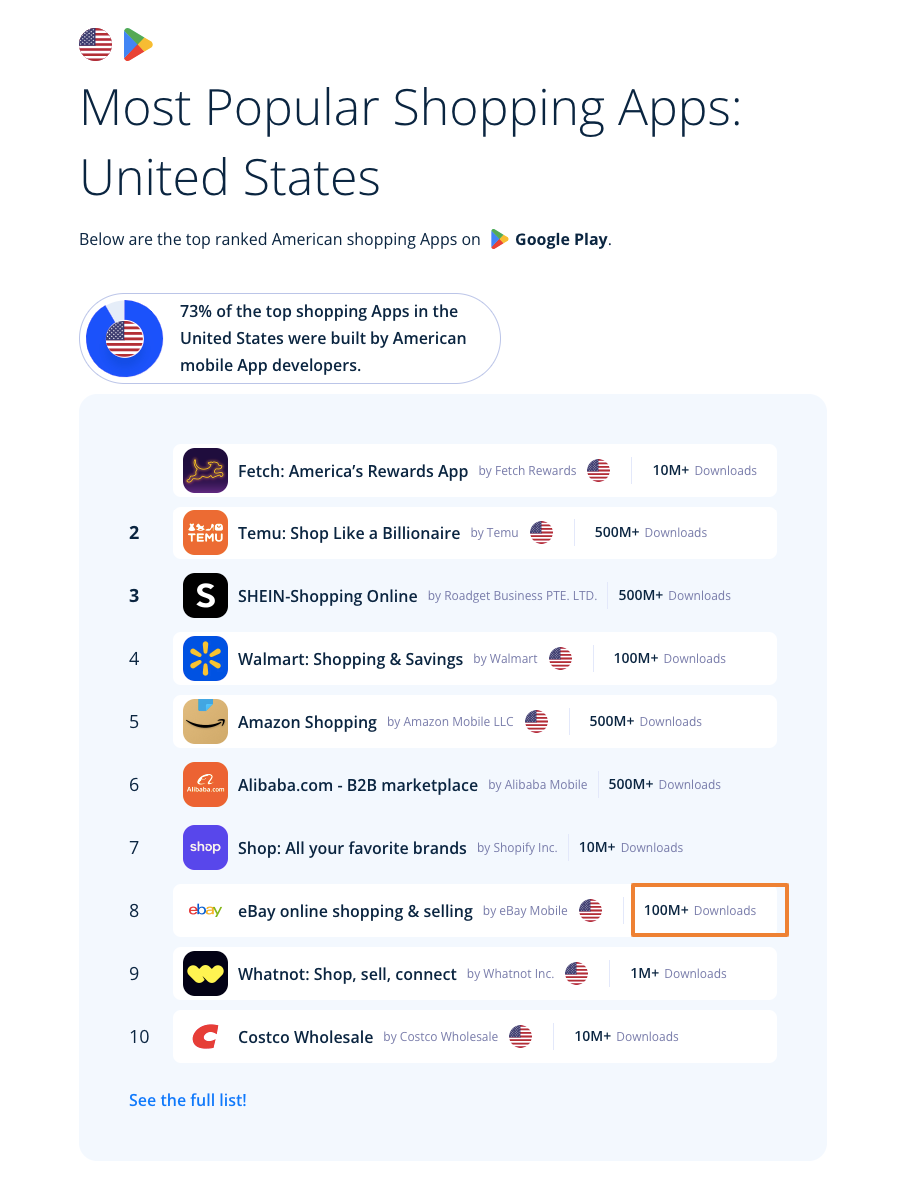
- App Downloads: The eBay app has 100M+ downloads and is listed among the most popular shopping apps, making it easy for you to reach customers worldwide.
- Large User Base: eBay has over 132 million active buyers worldwide. You get a better chance of making sales compared to relying only on your website.
- Mobile Presence: The eBay app has 66 million regular users. You can reach customers on their phones anytime, anywhere.
- Buyer-Friendly Policies: eBay’s shipping and dropshipping options make it easier for customers to shop with confidence. This helps you build trust and encourages repeat purchases.
- Two Platforms for Sellers: You can sell via eBay MIP or eBay Seller Central, each with its own benefits. Choosing the right platform lets you optimize your workflow and sales.
Let us look into generating accurate product feeds for each of the platforms below.
Guide to Product Feed for eBay Merchant Integration Platform
eBay Merchant Integration Platform (MIP) is een eenvoudig te gebruiken platform dat ideaal is voor kleine en middelgrote bedrijven of ondernemingen.
It is an eBay platform to upload and organize your products, in order to handle product viewing and marketing across targeted locations and audiences.
Once you log in to your eBay account, you can access one of the 11 eBay MIP sites, depending on your preferred locality and language.
eBay MIP-kanalen (Sites)
Once you enter your desired eBay MIP site, you will find all the instructions required to set up a channel for your business and implement proper strategies with your products.
Hiermee kunt u uw productfeed uploaden om uw onlinewinkelproducten via dit platform te promoten.
Setting Up Product Feed for eBay MIP In The Most Optimized Way
Wanneer u uw producten uploadt, zal eBay op zoek gaan naar enkele specifieke gegevens.
Now, eBay suggests several feed types.

Voor het uploaden van producten op eBay is de ideale voersoort de Combined Feed Type. De overige voersoorten worden gebruikt voor situationele doeleinden.
Let us look at the data you must include on your feed, along with examples, for each data point, so that you know the most optimized way to generate the product feed for the eBay Merchant Integration Platform.
You can submit the product feed in CSV or XML format. I recommend using the CSV format, as the XML format for eBay MIP is very complicated compared to most other merchants.
A product feed (in CSV format) of a single product for eBay MIP usually looks like this:

You can see how a single product is normally listed, whereas a variable product is listed with its variations, identified through a Variation Group ID.
Nu, eBay MIP vereist de volgende attribuutwaarden voor elk van uw producten.
Noodzakelijke producteigenschappen
Below is a more detailed explanation with examples of how each of these attributes should be assigned on your eBay MIP product feed for maximum output.
You will get samples of eBay MIP product feed later on in this article, after I go over detailed instructions on the attributes and some tips.
Laten we de details bekijken om te begrijpen welke waarden je aan elk attribuut moet toekennen.
1. Product SKU
| Attribuut | SKU |
| Voorbeeld | SK-01X |
De SKU is een unieke waarde die aan elk product wordt toegekend om ze afzonderlijk van de rest van de producten te identificeren.
Elk product, ook de varianten, moet een unieke SKU hebben.
2. Localized For
| Attribuut | Gelokaliseerd Voor |
| Voorbeeld | en_US |
This attribute indicates the language your feed is presented in and the country it will be sold.
Since eBay MIP is available in limited countries, here are the accepted values:
- en_US
- en_GB
- de_DE
- fr_FR
- es_ES
- en_CA
- en_AU
- de_AT
- it_IT
- ru_RU
- en_IN
3. Variation Group ID
| Attribuut | Variatie Groep ID |
| Voorbeeld | SK-01GX |
For a variable product, each variant is submitted as a separate product. So a unique Variation Group ID is set, which indicates that a group of variants is of the same product.
Alle varianten van hetzelfde product moeten dezelfde Variatiegroep-ID bevatten.
4. Variation Specific Name
| Attribuut | Variatie Specifieke naam 1 |
| Voorbeeld | Kleur |
In the case of a variable product, you need to specify the Variation Specific Name to indicate what attributes the product has variants for, for example, Color or Size.
You can add up to 5 variation factors and include the attribute columns Variation Specific Name 1, Variation Specific Name 2, and so on, till Variation Specific Name 5.
Als een product bijvoorbeeld variaties heeft voor zowel de kleur als de grootte, dan moet u een kolom voor Variatie Specifieke Naam 1 toevoegen met de waarde Kleur, en een andere kolom voor Variatie Specifieke Naam 2 met de waarde Grootte.

5. Variation Specific Value
| Attribuut | Variatiespecifieke waarde 1 |
| Voorbeeld | Hemelsblauw |
In the case of a variable product, use a Variation Specific Value to define the variation of a product in reference to the Variation Specific Name.
You can add up to 5 variation factor values and include the attribute columns Variation Specific Value 1, Variation Specific Value 2, and so on, till Variation Specific Value 5 (depending on the number of Variation Specific Names you provided).
For example, if a product has variations for Color and Size, then you will need to add an attribute column for Variation Specific Value 1 with the color value, such as ‘Sky Blue’, and another column for Variation Specific Value 2 with the size value, such as ‘XL’.

For each variation value, a separate row of the product data has to be included.
6. Product Title
| Attribuut | Titel |
| Voorbeeld | T-shirt met lange mouwen |
Het is de naam van het te tonen product. Het is beperkt tot 80 karakters.
If you want, you can add one of its distinguishing features or variants (in the case of a variable product) to the title. For example, Leather High Trainers or Red Velvet Skirt.
7. Product Description
| Attribuut | Productbeschrijving |
| Voorbeeld | Dit is een rood T-shirt. Het is alleen gemaakt voor testdoeleinden. |
Add a proper description of the product you are selling. Make sure to highlight all the major features it may have that will attract buyers.
Make sure any details you provide here are accurate. You can also include multiple paragraphs to make it more readable.
8. Brand Name
| Attribuut | Merk |
| Voorbeeld | Rex-ontwerpen |
This attribute defines the brand name of a product. If you are selling retail goods, then you can provide the original brand name of the product. If you are the manufacturer yourself, then you can include your company name as the brand name.
The product brand is not mandatory to submit, but we recommend you use it to appear more credible to prospects.
9. Custom Attribute Name
| Attribuut | Attribuutnaam 1 |
| Voorbeeld | Type kraag |
Dit attribuut wordt gebruikt om extra aangepaste functies of details voor een product toe te voegen.
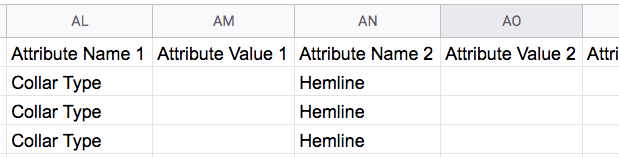
Let’s say you sell shirts and they have different types of collars. So you can add a column with the attribute ‘Attribute Name1‘ and the value ‘Collar Type’.
You can add up to 30 custom attribute names and include the columns Attribute Name 1, Attribute Name 2, and so on, till Attribute Name 30.
Als u bijvoorbeeld voor een product twee kenmerken wilt opnemen, Kraagtype en Hemline, dan moet u een kolom voor Attribuutnaam 1 met de waarde Kraagtype toevoegen en een andere kolom voor Attribuutnaam 2 met de waarde Hemline.
10. Custom Attribute Value
| Attribuut | Attribuutwaarde 1 |
| Voorbeeld | Type kraag |
Gebruik dit attribuut om de waarde van een aangepaste Attribuutnaam te definiëren die u voor een product hebt opgenomen.
U kunt tot 30 aangepaste attribuutwaarden optellen en de attribuutkolommen Attribuutwaarde 1, Attribuutwaarde 2 enzovoort opnemen, tot Attribuutwaarde 30 (afhankelijk van het aantal attribuutwaarden dat u hebt opgegeven).
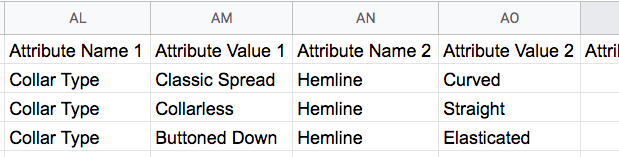
For example, for a product, if you included two custom attribute names, Collar Type and Hemline, then you will need to add an attribute column for Attribute Value 1 with the collar type value, such as ‘Classic Spread’, and another column for Attribute Value 2 with the hemline type value, such as ‘Curved’.
11. Product Condition
| Attribuut | Voorwaarde |
| Voorbeeld | NIEUW |
Gebruik dit kenmerk om de huidige toestand van het product aan te geven.
Dit zijn de geaccepteerde waarden voor de conditie:
- NIEUW
- NEW_OTHER
- NIEUW_MET_DEFECTEN
- FABRIKANT_GEREVISEERD
- VERKOPER_GEREVISEERD
- GEBRUIK_EXCELLENT
- GEBRUIKSDOOD
- GEBRUIK_GOED
- GEBRUIKT_AANVAARDBAAR
- VOOR_DELEN_OF_NIET_WERKEN
12. Condition Description
| Attribuut | Voorwaarde Beschrijving |
| Voorbeeld | 6 maanden gebruikt, maar op topconditie |
Dit attribuut wordt gebruikt om extra informatie te geven over de toestand van een product.
Even if it is not mandatory to use it, I recommend you use it if you are selling any product that is used or refurbished.
13. Dimensions & Weight
In the case of some of your products, you might wish to provide certain measurements for dimensions or weight.
For example, if you are selling luggage, then people would like to know the dimensions and weight.
In deze gevallen kunt u de gegevens in de Productbeschrijving verstrekken of deze waarden via de juiste attributen doorgeven.
The latter is ideal for better results on eBay.
Hier zijn de attributen:
Meetsysteem
| Attribuut | Meetsysteem |
| Voorbeeld | ENGELS |
Als uw product of verpakking een bepaalde afmeting of gewicht heeft die u in het voer wilt opnemen, dan dient u dit attribuut op te nemen om de eenheid en de meetwaardetypes te definiëren.
Het heeft twee geaccepteerde waarden:
- ENGELS
- METRIC
Hier is een grafiek om de METRIC- en ENGLISH-meetwaarden te begrijpen.
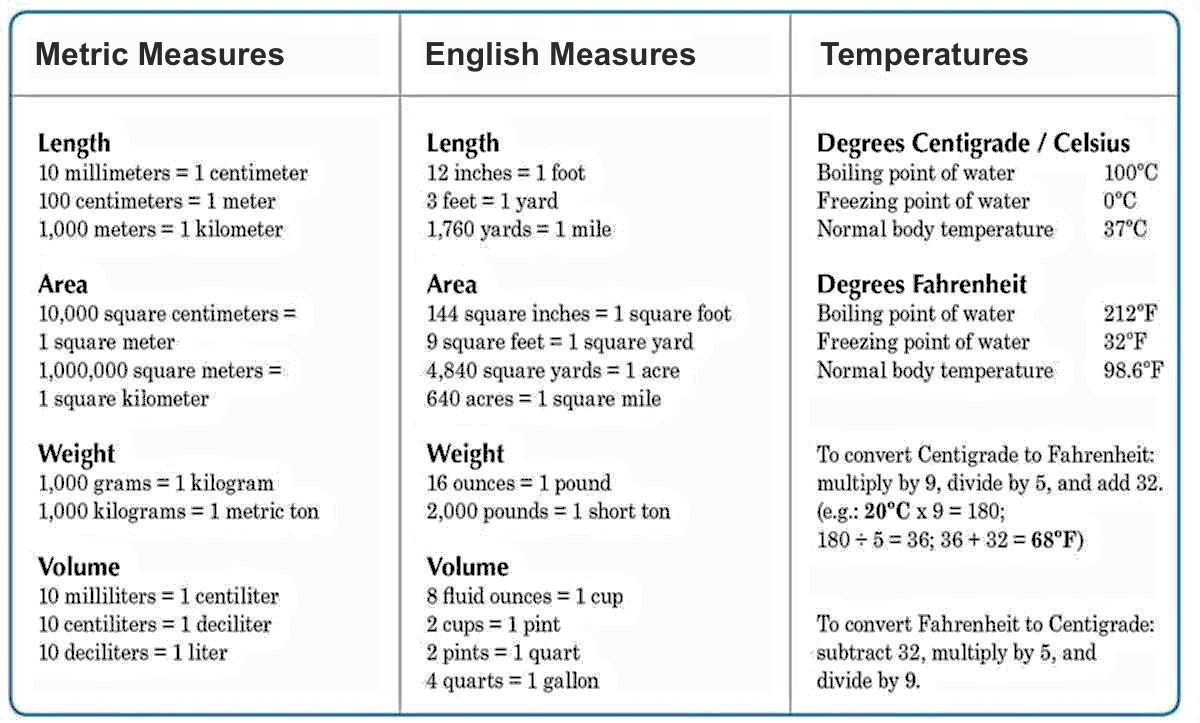
eBay stelt voor om gebruik te maken van
- lb (pounds) and in (inches) for the English measurement system
- kg (kilograms) and cm (centimeters) for the Metric measurement system
**Zorg ervoor dat u dit meetsysteemattribuut in de voeding opneemt als u de volgende attributen wilt gebruiken: lengte, breedte, hoogte, gewicht en gewicht.
Als deze attribuutwaarde leeg/ontbreken is, dan wordt de rest van de meet- en gewichtsattributen door eBay genegeerd.
Afmetingen
You can include any of the 3 dimensions, Length, Width, and Height as attributes for the dimensions of a product.
Lengte
| Attribuut | Lengte |
| Voorbeeld | 10 cm |
Gebruik dit attribuut om de afmeting van de langste zijde van een product of verpakking te bepalen.
Breedte
| Attribuut | Breedte |
| Voorbeeld | 5 cm |
Gebruik dit attribuut om de afmeting van de kortste zijde van een product of verpakking te bepalen.
Hoogte
| Attribuut | Hoogte |
| Voorbeeld | 15 cm |
Gebruik dit attribuut om de afmeting van de hoogte (van boven naar beneden) van een product of verpakking te bepalen.
Gewicht
To specify the weight of a product, you need to include two attributes, weight major and Weight Minor.
Laten we eens kijken hoe het werkt.
Gewicht Majoor
| Attribuut | Gewicht Majoor |
| Voorbeeld | 11 |
Let’s say you have a product with a weight of 11lbs 5oz. Then you will need to provide the whole high number value of the weight; in this case, 11.
Gewicht Minor
| Attribuut | Gewicht Minor |
| Voorbeeld | 5 |
Let’s say you have a product with a weight of 11lbs 5oz. Then you will need to provide the low whole number value of the weight; in this case, 5.
Productbeeld
| Attribuut | Afbeelding URL 1 |
| Voorbeeld | https://www.yourwebsite.com/productimage.png |
De Picture URL is de link naar de afbeelding(en) voor een product.
U kunt tot 24 productafbeeldingen toevoegen en de attribuutkolommen Afbeelding URL 1, Afbeelding URL 2 enzovoort, tot Afbeelding URL 24.
U moet ten minste één productafbeelding opnemen voor elk product dat u in de feed opneemt.
Groepsfoto URL
| Attribuut | Groepsfoto URL |
| Voorbeeld | https://www.yourwebsite.com/productimage1.png|https://www.yourwebsite.com/productimage2.png|https://www.yourwebsite.com/productimage3.png |
In the case of variable products, you can include an attribute column for Group Picture URL, which is used to provide a picture of each of its variants together, to display it in a unique manner on eBay.
For example, if you have a t-shirt with 3 color variants, and each of them has a unique Picture URL, you can include three of them together in a Group Picture URL by separating them with a ‘|’ (pipe symbol) and no spaces; similar to the example in the table above.
Neem deze attribuutwaarde alleen op bij het 1e product van de varianten.
Dit attribuut is geheel optioneel.
Kanaal-ID
| Attribuut | Kanaal-ID |
| Voorbeeld | EBAY_DE |
eBay geeft een lijst van producten op basis van verschillende kanalen die het heeft voor verschillende landen.
De Channel ID is een unieke identificatie van het eBay MIP-kanaal waarop u uw producten wilt laten verschijnen.
If you wish to sell on only one channel, then you can leave this column blank.
Voor meerdere kanalen moet u meerdere malen een product toevoegen en de kanaal-ID's voor de door u gewenste kanalen instellen.
For example, if you sell in both the USA and the UK, then you will need to add the same products twice in two rows. For one, assign the Channel ID value as EBAY_US, and assign the Channel ID value as EBAY_UK for the other.
Dan zal eBay de producten op de door u gewenste eBay MIP-kanalen weergeven.
Hier is een lijst van de geaccepteerde kanaal-ID's voor eBay MIP:
- EBAY_US
- EBAY_UK
- EBAY_DE
- EBAY_FR
- EBAY_ES
- EBAY_CA
- EBAY_AU
- EBAY_AT
- EBAY_IT
- EBAY_RU
- EBAY_IN
- EBAY_Motoren
Productcategorie
| Attribuut | Productcategorie |
| Voorbeeld | 11442 |
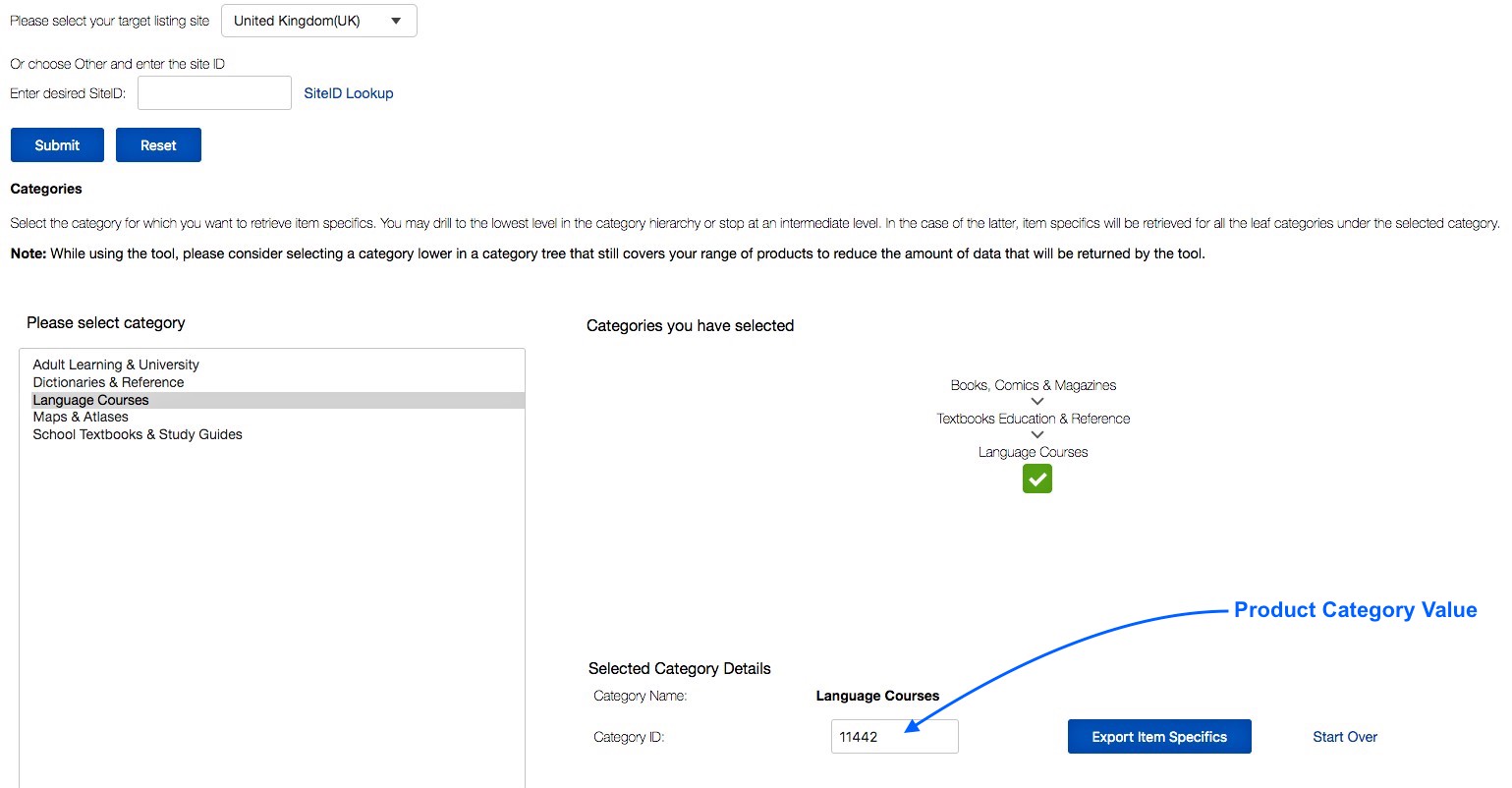
eBay MIP heeft een eigen categorielijst die u moet gebruiken om uw producten op eBay te categoriseren. U moet dit kenmerk instellen volgens hun vereiste taxonomie om uw ingediende productfeed goedgekeurd te krijgen.
They have a Category Lookup Tool where you can search for relevant category threads and collect the Category ID, which you have to provide as the value.
For example, if you are selling a book in the UK, which is an educational language coursebook, then on eBay Mip, it will fall under the category – GBooks, Comics & Magazines > Textbooks Education & Reference > Language Courses.
U kunt zijn ID ophalen uit de eBay Category Lookup Tool. In dit geval is de waarde van de productcategorie 11442.
Zakelijk beleid
Je moet een paar belangrijke zakelijke beleidsregels opstellen bij de verkoop op eBay.
However, if you have certain products for which you need to assign unique policies, then you can submit the attributes Shipping Policy, Payment Policy, or Return Policy, whichever is required.
De rest van de producten zal het standaard bedrijfsbeleid volgen dat u bij het aanmaken van de account op eBay hebt ingediend.
Hier zijn de attributen voor een apart zakelijk beleid:
i. Shipping Policy
| Attribuut | Verzendingspolitiek |
| Voorbeeld | verzending |
ii. Payment Policy
| Attribuut | Betalingsbeleid |
| Voorbeeld | betaling |
iii. Return Policy
| Attribuut | Retourbeleid |
| Voorbeeld | terugsturen |
These business policies have to be created by you on eBay. There, you will be able to collect the respective policy IDs from your eBay account preferences and use them as the values when creating the product feed.
Beschikbare hoeveelheid
| Attribuut | Totaal aantal schepen naar huis Hoeveelheid |
| Voorbeeld | 10 |
Dit kenmerk geeft de totale beschikbare hoeveelheid van een product aan.
Prijs van het product
| Attribuut | Lijstprijs |
| Voorbeeld | 20 |
Dit is de prijs van het product dat moet worden weergegeven wanneer het op eBay-kanalen wordt vermeld.
The currency will be automatically assigned based on the Channel(s) you are listing your products.
Maximale hoeveelheid per koper
| Attribuut | Maximale hoeveelheid per koper |
| Voorbeeld | 20 |
You might wish to restrict the number of certain products that a prospect can order. In that case, you can use this attribute so that a prospect won’t be able to order more than this many of the products within 10 days.
Hier is een voorbeeld.
Let’s say you sell handmade, fancy Gift Cards. Now, let’s assume you have a rule of investing around 3 hours per day for a single customer and can create a maximum of 20 cards in 10 days for a particular customer.
Then you can add an attribute column ‘Max Quantity Per Buyer’ and assign the value ‘20’ so that a customer cannot order more than 20 cards within a span of 10 days.
Oude prijs (Strike-Through)
| Attribuut | Strike Through Price |
| Voorbeeld | 25 |
This attribute is there to help you create more attraction to prospects by adding a price that will be struck through, to indicate that the current price is a discounted price.
Let’s say you are running a promotion to sell a Purse at $20, whereas the original price was $25. Then you can set this attribute value to 25 to display that the old price was $25.
Hier is een voorbeeld van hoe het eruit ziet op een eBay-productlijst:
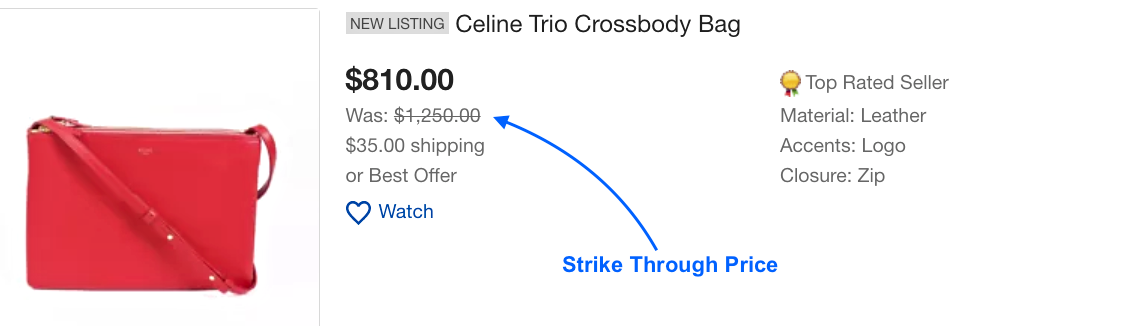
You can use this feature even when you are not running a promotion. You can post the original price as the List Price, and then assign a higher value as a strikethrough price. But we strongly advise you to use it only when you really run a promotion.
BTW-percentage
| Attribuut | VATPercent |
| Voorbeeld | 10 |
Dit kenmerk wordt gebruikt om het percentage van de belasting over de toegevoegde waarde van de verkoopprijs aan te geven. Dit is alleen noodzakelijk voor de EU-landen, maar niet verplicht.
eBay MIP Product Feed Sample(s)
Now that you know what details you require to generate a Product Feed for eBay MIP, let us look at a sample to understand the structure.
eBay MIP accepteert XML- of CSV-formaat om productfeed in te dienen. Het aanbevolen formaat is echter CSV.
Here’s a sample simple product feed:
Sample eBay MIP Product Feed of a Simple Product
Here’s a sample variable product feed:
Sample eBay MIP Product Feed of a Variable Product
Nu is het handmatig toevoegen van producten aan het productfeedbestand tijdrovend wanneer u veel producten in uw winkel heeft.
Rather, you can use a tool to generate product feed quickly and without much effort.
For a WooCommerce store, you can use the plugin Product Feed Manager for WooCommerce, with which you can generate an accurate product feed for eBay MIP in just a few clicks.

Zodra u het productfeedbestand hebt, kunt u het nu uploaden naar uw eBay Merchant Integratieplatform en worden uw producten op de door u gewenste eBay-kanalen vermeld.
- Learn more – How to Create A Feed for eBay MIP
Conclusie
Selling your WooCommerce products on eBay lets you reach millions of buyers worldwide. The platform’s traffic, app, and global reach give you more opportunities than your website alone.
Using eBay MIP or Seller Central makes managing your listings easier. A good product feed ensures your products look accurate and attractive to buyers.
With eBay’s shipping policies and dropshipping options, you can build trust and boost sales. The better your feed, the smoother your workflow and results.
To make it simple, use Product Feed Manager. It helps you create accurate eBay product feeds in minutes so you can focus on increasing sales.
** FAQs **
How do I create an eBay MIP product feed from WooCommerce?
You can use Product Feed Manager (PFM) to create optimized XML feed files in minutes. It supports description templates, price multipliers, and live data syncing so your eBay products stay accurate without extra hard work.
Can I sync updates automatically to eBay?
Yes. With workflow automation, updates like stock changes, new products, or price edits sync instantly. This saves you spare time and keeps customer reliability high while managing orders.
What if my products don’t match eBay’s categories?
PFM lets you map WooCommerce products to the right eBay categories. Whether you sell different products, print-on-demand items, or Walmart listings, it helps streamline your selling journey across the massive marketplace.
How can I avoid errors in my eBay feed?
Errors usually come from missing data or wrong XML feed formats. PFM fixes this by validating feed files, giving you one system to handle your entire fulfillment process and streamline product management.
Which platform should I choose: MIP or Seller Central?
MIP is better for advanced enterprise sellers with bulk eBay sales, flat rates, and automation. Seller Central is easier for smaller stores or early success with existing eBay listings. Either way, a platinum-certified WooExpert tool like PFM supports your ecommerce business with full control and app support.

![Show Your WooCommerce Products on ChatGPT & OpenAI Ads with Product Feed [2026] 2](https://rextheme.com/wp-content/uploads/2026/08/Show-Your-WooCommerce-Products-on-ChatGPT-with-OpenAI-Product-Feed-1-407x213.webp)
Hi, Thanks for the great post.
Can we upload/download feed files using API for eBay?
Hi, if you use a WordPress/WooCommerce plugin, right now there is no proper solution to eBay API integration. You have to upload the feed file manually.
There are various SaaS providers such as feed.biz, api2cart, etc, who offer you eBay API integration and let you sync your site to eBay via API. However, using SaaS services is a bit expensive as they charge a monthly fee.
I would recommend, if you do not have a very large store, it’s best just to generate feed and manually submit the feed file to eBay, as that would be cost-effective, and is not that complicated to do.
Thanks for the plugin and these blog posts!
Can you please provide a link to the page where we can submit a link to our feed to be fetched on schedule by Ebay. Their interface is crazy and I was not able to find such page anywhere, on main MIP page there’s only manual upload 🙁
Hi, to understand how that works, it’s best to reach out to their support team for assistance. You can find how to contact them here: Getting help for eBay MIP. They should help you out.
Bedankt.
MIP work with trading api to revise item?
Actually, we haven’t worked with API for eBay MIP. For now, you can simply submit your site’s products there using a CSV feed.
How a scheduled fetch can be initiated there? I don’t see anything related in MIP dashboard.
Hi, eBay doesn’t have too any guides on initiating a scheduled fetch but they have API guidelines. I would suggest reaching out to their support team to know more about it: Getting help for eBay MIP. They should help you out.
Bedankt.
Hi,
I’m trying to create a xlsx feed file for Ebay and it keeps telling me that at least one valid shipping service needs to be specified. I use USPS for all my shipments. What should I put in the feed file? Column Title & Value please if you can help?
Hoi,
For eBay MIP, the shipping attribute name is “Shipping Policy”
And regarding the value,
For USPS Domestic Services
==========================
USPSExpressFlatRateEnvelope
USPSExpressMail
USPSExpressMailLegalFlatRateEnvelope
USPSFirstClass
USPSMedia
USPSParcel
USPSPriority
USPSPriorityFlatRateBox
USPSPriorityFlatRateEnvelope
USPSPriorityMailLargeFlatRateBox
USPSPriorityMailLegalFlatRateEnvelope
USPSPriorityMailPaddedFlatRateEnvelope
USPSPriorityMailSmallFlatRateBox
USPSStandardPost
For USPS International Services:
===========================
USPSExpressMailInternational
USPSExpressMailInternationalFlatRateEnvelope
USPSExpressMailInternationalLegalFlatRateEnvelope
USPSFirstClassMailInternational
USPSPriorityMailInternational
USPSPriorityMailInternationalFlatRateBox
USPSPriorityMailInternationalFlatRateEnvelope
USPSPriorityMailInternationalLargeFlatRateBox
USPSPriorityMailInternationalLegalFlatRateEnvelope
USPSPriorityMailInternationalPaddedFlatRateEnvelope
USPSPriorityMailInternationalSmallFlatRateBox
I hope this will help you.