
![4 Best WooCommerce Product Feed Plugins [2026]](https://rextheme.com/wp-content/uploads/2025/08/WooCommerce-Facebook-Product-Feed-6.webp)
If you run a WooCommerce store, you’ve probably heard the same advice again and again get more traffic, run more ads, do more SEO.
And yes, getting traffic is hard. It takes time, money, and constant effort.
But here’s the part most people don’t realize. Even after you get that traffic, converting it is a completely different challenge.
Because the moment someone finds your product, they don’t just look at your site. They compare. They check prices on Google, scroll through listings, and expect everything to match.
Your price, your stock, your product details… all of it needs to be accurate everywhere, at the same time.
If it’s not, you don’t just lose a sale. You lose the buyer completely.
Imagine this: a shopper clicks your product from Google Shopping, sees a different price on your site, or finds it out of stock. That’s it—they leave.
And this isn’t a small issue.
Google reports that keeping your product feed updated can improve Shopping ad performance by up to 30%.
That means a messy or outdated feed is quietly wasting a big part of your ad budget. Now here’s
Where Most Store Owners Struggle
They try to manage everything manually -updating data, exporting feeds, uploading again and again. It works at first, but it doesn’t scale.
Once you start selling across multiple channels, it becomes overwhelming fast.
What you actually need is a system that keeps everything accurate and in sync without constant effort.
That’s why, instead of overwhelming you with options, I’ve narrowed it down to a few tools that actually solve this problem.
Let’s find the one that fits your store,
TL;DR – Best Product Feed Plugins for WooCommerce
- Product feed plugins list your WooCommerce products on Google Shopping, Facebook, TikTok, and 200+ marketplaces more without you doing it by hand.
- They save time, auto-update your product info, and boost visibility across multiple channels.
- Key features to look for include category mapping, smart filters, custom feed templates, and automatic sync.
| Plugin | Best For | Why It Fits |
|---|---|---|
| Rexfeed – Product Feed Manager for WooCommerce | Google Shopping & Facebook Marketplace | Easy setup with prebuilt templates and automatic syncing, making feed management simple |
| Product Feed Pro by AdTribes | Advanced users | Offers deep customization and full control over product attributes and feeds |
| CTX Feed by WebAppick | Scaling stores | Flexible feed management that supports growing stores across multiple platforms |
| Product Feed by WebToffee | Simple setups | Lightweight and easy to use, ideal for small catalogs and basic feed needs |
- Final Verdict: Choose based on your needs, but in my opinion, use the free version of Rexfeed from the WordPress repo, and if you get value, invest in the Pro version of Product Feed Manager for WooCommerce (Rexfeed).

What a Product Feed Plugin Actually Does
Let me keep this simple. A WooCommerce product feed plugin creates one file that holds all your product details, and then shares that file automatically with platforms like Google Shopping and Facebook.
For example, you want your products on Google Shopping. The plugin builds a feed and keeps your prices, images, and stock updated on its own. No manual work. Your listings stay accurate while you get on with your day.
That’s the whole point of product feed plugins: fewer errors, less busywork, and syncing that just runs in the background while you focus on selling.
- Learn more – What is a Product Feed? Everything You Should Know
Why Use Product Feed Plugins?

Now that you know what product feed plugins are, let me show you why using one can save you time and help increase your WooCommerce sales.
- Simplest Way: The right plugin is truly the simplest way to automate your product promotion, save hours, and even tap into affiliate marketing. Let the tool handle the heavy lifting while you focus on sales.
- Feed Generation: If you want to stop wasting time, a good feed generation plugin will automatically create and update your product feeds for Google Merchant Centre and Facebook Shops. This means less manual work and more focus on growing your store.
- Advanced Filtering: You can pick exactly which products or categories to promote using advanced filtering and custom templates. This helps you reach the right audience without cluttering your feeds with unwanted items.
- Faster Listing: If you want to expand faster, the right feed plugin will list your products in over 100+ marketplaces with just a few clicks. This means instant reach and effortless growth.
- Real-time Updates: Keeping your product info fresh is key. With real-time updates and automatic feed syncing, your ads will always show the latest prices, stock, and details without you lifting a finger.
- Product Titles: You’ll want to optimize your product titles and assign the right Google product categories to boost your visibility. This small tweak can make a big difference in attracting the customers you want.
- Facebook Ads: Integrating your WooCommerce store with Facebook Ads and Facebook Shopping becomes effortless when you use plugins that support content API methods. It makes ad setup simpler and helps you reach more buyers.
- XML Feed URL: You don’t have to juggle file formats; your plugin will generate XML, CSV, TXT, or XLS feeds for you. This makes it easy to submit your products to multiple marketplaces and affiliate networks.
- Bing Ads: Don’t just stop at Google and Facebook; connect with Bing Ads and other shopping networks to widen your reach. Managing feeds at the product level helps you highlight your best items.
What Makes the Best WooCommerce Product Feed Plugin?
Before the list, here’s what I actually judged these on, because “best” means nothing without a standard.
A strong WooCommerce Google product feed plugin should nail four things:
- automatic feed generation,
- real category mapping,
- smart product filtering, and
- automatic sync so your data never goes stale.
Everything below is measured against those.
4 Best Product Feed Plugins for WooCommerce
Here I’ve listed the 4 best product feed plugins with details you need to know. These plugins have high ratings and high installation rates.
I will start with the Product Feed Manager for WooCommerce by Rextheme.
1. Rexfeed – Product Feed Manager for WooCommerce (Best for Google Shopping & Facebook)
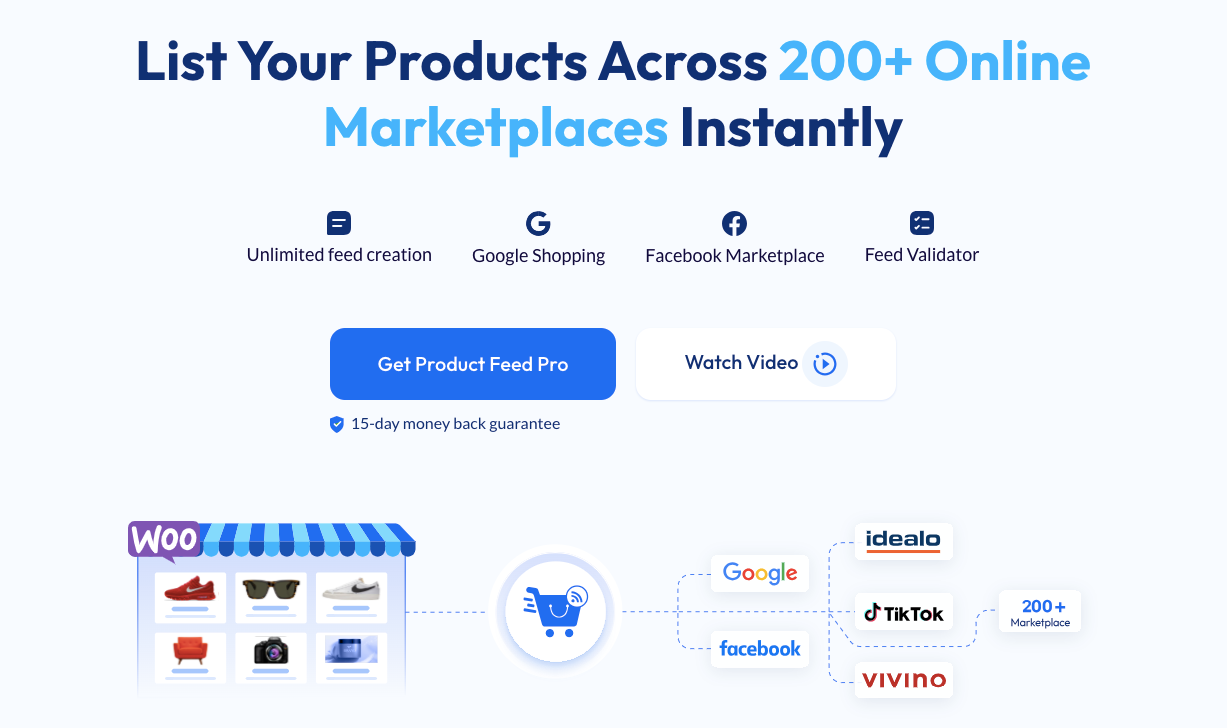
Rexfeed – Product Feed Manager for WooCommerce is best for Google Shopping & Facebook, with 200+ marketplaces. It has a 5-star rating and 10,000+ installations. It’s also regularly updated to keep your product feeds accurate and compliant.
The plugin features an easy-to-use interface and pre-built templates to help you create product feeds quickly.
For example, you can generate a product feed for 200+ marketplaces in minutes without worrying about formatting or missing details.
You can also automate feed updates whenever you add new products or change product details. This saves you time and ensures your feeds always reflect your latest inventory.
Additionally, it supports extra fields like Brands, GTIN, and UPC, plus right-to-left languages such as Arabic and Hebrew. This makes it a great choice for stores targeting global customers.
Major Features of Rexfeed
Here are some major features of the Rexfeed for WooCommerce that you will get :
i. Feed Format & Output Options
- XML, CSV, TEXT, TSV, RSS format support
- Generate a feed with top-selling products
- Add UTM codes to the feed URL
- Custom batch configuration
- A custom feed for any merchant
- Accurate structured data format
- JSON-LD bug fix
- Include tax & shipping information
- Option to exclude tax from structured data pricing
ii. Product Inclusion & Filtering
- Exclude “Out of Stock” products
- Include/Exclude parent products
- Include/Exclude hidden products
- Show only variable parent products
- Exclude products with no price
- Include/Exclude grouped products
- Product filter
- Product rule feature
- Category & tag filter
- Update the feed only when products have changed
iii. Automation & Scheduling
- Schedule auto update
- Auto-sync with Google
- Auto-sync with Google Merchant Center
iv. Product Data & Customization
- Google category mapping
- Combined attributes feature
- Advanced custom filter
- Dynamic pricing feature
- Custom fields (GTIN, Brand, etc.)
- Include shipping values
- Custom fields for unique identifiers
- Advanced category mapping
- Variable product support
v. Integration & Compatibility
- Track products with Facebook Pixel
- Google Dynamic Remarketing Pixel
- WPML-Unterstützung
- WCML support
- Multi-vendor compatibility
Now let’s talk about the benefits you will get from this plugin.

The Benefits You Will Get Using Rexfeed
In this section, you’re going to discover how Refeed can make managing your WooCommerce store easier, save you time, and improve your sales.
Here are the key benefits it brings:
- Formats & output: XML, CSV, TEXT, TSV, RSS, top-seller feeds, UTM tagging, tax and shipping info, accurate structured data.
- Filtering: exclude out-of-stock or no-price items, include/exclude parent, hidden, or grouped products, plus category and tag rules.
- Automation: scheduled auto-updates and auto-sync with Google Merchant Center.
- Customization: Google category mapping, dynamic pricing, combined attributes, custom fields, variable product support.
- Integrations: Facebook Pixel, Google Dynamic Remarketing, WPML, WCML, multi-vendor.
Why it wins for most stores: you manage Google, Facebook, Instagram, TikTok, and 180+ marketplaces from one dashboard, feeds stay accurate on their own, and you can launch the same day with ready-made templates.
It scales cleanly whether you sell 10 products or 10,000.
Preisgestaltung
Rexfeed – Product Feed Manager for WooCommerce offers 25 features in its free version. You can also take a live preview and get a preview now.
![4 Best WooCommerce Product Feed Plugins [2026] 1](https://rextheme.com/wp-content/uploads/2025/08/Product-feed-manager-for-WooCommerce-Pricing-.webp)
In the pro version, you will get almost 15 advanced-level features for just $79.99 in a yearly payment system for 1 site.
The price plan increases with the number of sites you buy.
2. Product Feed Pro by Adtribes

Product Feed Pro by AdTribes is best for advanced users who want full control. It lets you build unlimited product feeds with detailed customization for each field.
You can export feeds in formats like XML, CSV, TXT, and YML. This makes it useful for stores running multiple campaigns across different platforms.
It supports major channels like Google Shopping, Facebook Shops, and Bing. You can manage everything from one place without switching between tools.
With flexible templates and customization options, it adapts as your store grows. It’s a solid choice if you want precision and control over your product data.
Major Features of Product Feed By Adtribes
- Unlimited number of products & product feeds
- This plugin supports the usage of Custom Attributes, Dynamic Attributes, and Product Attributes.
- Google Analytics support
- Google Dynamic Remarketing Pixel supports.
- Fix for WooCommerce structured data bug (Elite version)
- Add critical Google Shopping Feed fields to your store (Elite version)
- Polylang support (Elite version)
The Benefit You Will Get Using Product Feed By Adtribes
If you’re wondering what real advantages you’ll get from using Product Feed Pro by AdTribes, here are the key benefits that can make a big difference for your store.
- Time-saving setup: Pre-made templates and auto-feed updates let you manage feeds for multiple platforms without repetitive work. You’ll spend less time setting things up and more time running your store.
- Unlimited feed support: Handle thousands of products and create as many feeds as needed without restrictions. It’s ideal if your store grows or you run ads on different channels.
- Smart filtering options: Easily include or exclude products using tags, categories, or custom rules. This helps you keep your feed clean, targeted, and optimized for better ad results.
- Custom feed creation: If you need more control, build feeds from scratch with exactly the fields and formats you want. Great when you’re targeting niche platforms or running a unique campaign.
- Built-in pixel tracking: Facebook Pixel and Conversion API are already integrated for accurate performance tracking. It helps you better understand customer behavior and improve your ads.
- Boosted visibility: Feeds are tailored for platforms like Google Shopping, Facebook, and Bing, increasing your reach. More exposure means more chances to convert potential customers.
Preisgestaltung
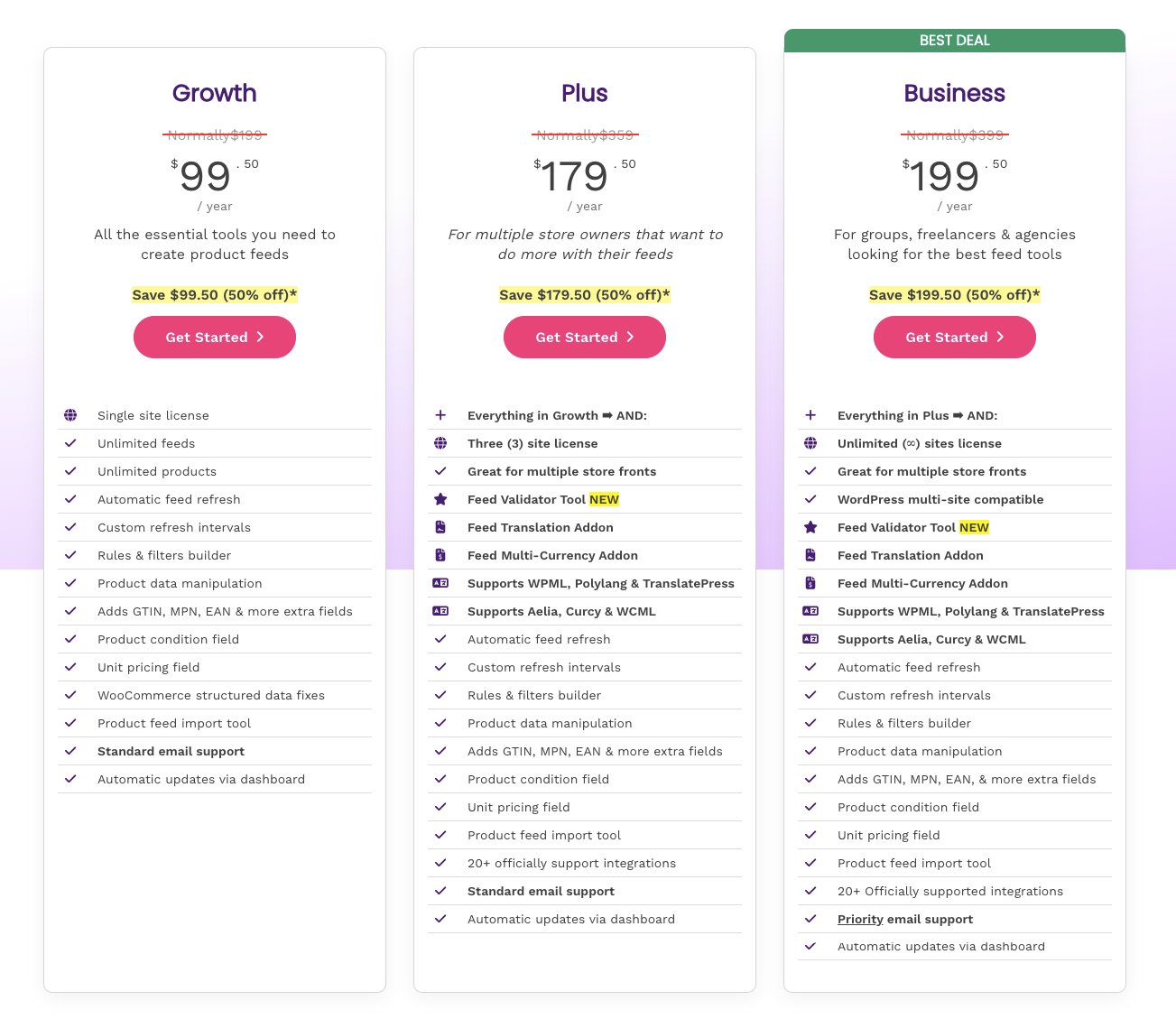
3. CTX Feed By WebAppick

CTX feed Pro is best for multi-channel scaling. It manages feeds for multiple channels, including Google Shopping, Facebook Catalog, and TikTok, with automated updates and flexible scheduling.
For example, if you sell custom mugs, the plugin can list your products on multiple platforms automatically. This way, your mugs appear on Google, Facebook, and TikTok without extra effort.
It keeps your feeds optimized and error-free for marketplaces, search engines, and comparison sites. Automated updates and flexible scheduling ensure your product info stays accurate everywhere.
With its user-friendly interface and wide compatibility, this plugin is a must-have for your store. You can expand your reach, show your products to more buyers, and grow your business faster.
Major Features of CTX Feed By WebAppick
Here are some major features of CTX Feed by WebAppick :
- Unlimited products & feeds
- 200+ pre-configured templates
- Output types to avoid errors
- Category mapping
The Benefit You Will Get Using CTX Feed by WebAppick
Let me share the key benefits you’ll enjoy with CTX Feed by WebAppick. These features can really simplify how you manage your WooCommerce data feed and boost your product reach.
- Flexible feed updates: The plugin lets you update your product information easily and frequently, ensuring your data is always accurate. This flexibility helps you stay competitive across all marketplaces.
- Multiple file formats: Export product feeds in XML, CSV, TXT, and more, so you can reach different platforms without hassle. It simplifies managing your WooCommerce data feed for various channels.
- Advanced attribute formatting: Customize product attributes to match marketplace requirements perfectly. This reduces feed errors and improves how your products appear in search results.
- User-friendly interface: Designed with real users in mind, the plugin offers an intuitive dashboard that makes feed creation straightforward. It saves time and reduces confusion even if you’re new to product feeds.
- Enhanced product visibility: By optimizing feeds for major platforms and marketplaces, CTX Feed helps your products reach more potential customers. Better visibility means more sales opportunities.
- Tailored solutions: Regular updates based on user feedback ensure the plugin evolves with your needs. This responsiveness makes managing your WooCommerce data feed easier and more efficient over time.
If you want to compare CTX feed with Rexfeed. You can see the comparison, may be it will help you with your decision.
Pricing Structure
![4 Best WooCommerce Product Feed Plugins [2026] 2](https://rextheme.com/wp-content/uploads/2025/08/CTX-Feed-Pricing.webp)
CTX Feed Pro offers 3 different price plans. For one single site, it will cost you $119/year. Their most popular one offers features for five sites for $199, and another one will cost you $229/year.
The plugin is good enough, but if for any reason you are looking for CTX feed alternatives, you can check out to fill your needs.
4. Product feed by WebToffee
![4 Best WooCommerce Product Feed Plugins [2026] 3](https://images.storychief.com/account_7122/screenshot-2024-08-29-at-14946-pm_0f309c769240ec7c1f01f9590c995708_2000.png)
Product Feed by WebToffee is best for smaller catalogs that need simplicity. It creates optimized feeds in XML, CSV, XLSX, and TXT with easy syncing to major platforms.
You can connect to Google Merchant Center, Facebook, Instagram, and TikTok Ads. It helps you turn multiple channels into sales sources without complex setup.
For example, if you sell jewelry online, you can list your products on Google Merchant Center, Facebook, Instagram, and TikTok Ads automatically. This helps your products reach more buyers without extra work.
You also get smart features like dynamic updates, filtering, and multilingual support. It keeps your feeds accurate while staying easy to manage.
Major Features of Product Feed By WebTofee
Here are some major features of the product feed by WebTofee :
- Dynamic Price & Feed Update
- Advanced product filtering options for generating product feed
- Supports WooCommerce Multilingual & Multicurrency for WPML
- Exclude out-of-stock products
- Server cron for managed hosting
- Auto-catalog sync for Facebook catalog
- Multi-vendor compatibility
The Benefit You Will Get Using Product Feed by WebTofee
This plugin is made to eliminate any complexities you face in generating WooCommerce product feeds. Here are some benefits you will get by using this plugin :
- Smart filtering: Easily select which product categories to include or exclude from your feeds. This lets you focus on the products that matter most for your marketing.
- Batch sync: Sync thousands of products at once with Facebook, Google, or Instagram shops. It reduces server load and keeps your listings updated smoothly.
- Category mapping: Quickly match your store’s categories with Facebook and Google Shops categories. Save your mappings to reuse and save time later.
- Edit mapping: Update your existing Facebook category mappings anytime. This keeps your product feed accurate as your store changes.
- Product sync log: See which products failed to sync so you can fix problems fast. This helps maintain smooth, reliable feed management.
Preisgestaltung
Product Feed by Web Tofee offers 3 pricing plans based on how many sites you need. For single sites, this plugin costs you $89.00/year.
Now I compared these 4 best product feed plugins for WooCommerce below based on the features you need :
Comparison Between the 4 Best Product Feed Manager Plugins
| Eigenschaften | Rexfeed – Product Feed Manager | Product Feed Pro By Adtribes | CTX Feed By WebAppick | Product Feed By WebTofee |
|---|---|---|---|---|
| Automatic Feed Generation | Ja | Ja | Ja | Ja |
| Customization | Ja | Ja | Ja | Ja |
| Automatic Updates | Ja | Nein | Ja | Ja |
| Number of Supported Plugins | 27 | 23 | ja | ja |
| Category / Taxonomy mapping | Ja | Ja | Ja | Ja |
| Pre-Configured Templates | 200+ | 250+ | 220+ | 25+ |
| Preis | Starting from $79.99 | Starting from $ 99.50 | Starting from $119 | Starting from $89 |
| Rating | 4.8/5.00 (252 reviews) | 4.7/5.00 (1061 reviews) | 4.6/5.00 (824 reviews) | 4.8/5.00 (27 reviews) |
Schlussfolgerung
Picking the right tool comes down to what your store actually needs. Focus on what helps you manage feeds easily, not on features you may never use.
Every store works differently, so the same plugin won’t fit everyone. Match your choice with your budget, workflow, and how many platforms you sell on.
The right setup saves you from constant fixes and rejected listings. It keeps your product data accurate so your ads show the right information at the right time.
If you want something simple that handles everything in one place, Rexfeed is a strong choice for most stores, especially if you are managing Google Merchant Center and Facebook Marketplace with 200+ platforms.
** FAQs **
1. How do I keep my product feed updated automatically?
Updating feeds by hand wastes time and invites errors. A good WooCommerce feed plugin refreshes your feed automatically whenever you change a price, stock level, or product detail, so your shopping ads stay accurate without you touching a thing.
2. Can I control which products appear in my feed?
Yes, and you should. You don’t have to send your whole catalog everywhere. Use custom templates and filters to push only featured products or selected categories, so you reach the right buyers and keep your feed clean.
3. What file formats do these plugins support?
Different platforms need different formats, usually XML or CSV. The best tools export feeds with all the Google fields required for a clean sync with Google Merchant Center and Facebook Shopping. A capable WooCommerce Google product feed plugin handles this for you automatically.
4. How do these plugins help with Facebook Shops and Ads?
Plugins with strong integrations format and sync your product data for Facebook Shopping and Ads on their own. That means less setup, fewer errors, and more of your budget reaching actual buyers.
5. Will these plugins work with product variations?
The right plugin handles data at the variation level, so each variant’s price, stock, and details are correct in the feed. That accuracy is what keeps your listings from getting disapproved and keeps buyers trusting what they see.