![How to Add Real Estate Floor Plans in Virtual Tours [2026]](https://rextheme.com/wp-content/uploads/2023/08/Real-Estate-Floor-Plans-.webp)
You know what’s interesting? Most buyers don’t walk away because of price. It’s the layout that turns them off.
They’re exploring your virtual tour, and something just doesn’t feel right. Maybe the rooms feel smaller than expected, or the kitchen placement is confusing.
So what keeps them engaged with your listing? An interactive floor plan.
According to Zillow, over 85% of millennials want to see digital floor plans before visiting. That’s a big deal.
Now you might be thinking, “I already have a floor plan.” But here’s the problem: those old 2D plans are hard to understand. Buyers don’t want to decode lines and measurements.
That’s why interactive floor plans work better. They’re simple, clickable, and let buyers switch between the layout and the virtual tour instantly, with no confusion.
So today, you’ll see how to add a real estate floor plan to your tour, with a few simple examples. Let’s get started.
TL;DR – Add Real Estate Floor Plans in Virtual Tours
- Agents think virtual tours are enough, but buyers still can’t figure out how rooms connect.
- Old 2D blueprints confuse people; lines and numbers don’t help anyone picture living there.
- That confusion costs you leads, showings, and closed deals.
- A good interactive floor plan should let buyers:
- See where they are in the house
- Check room dimensions and directions
- Click to jump between scenes
- Trust your listing as legit
- Embed a virtual floor plan inside your tour, not just a static image on the page.
- Final Verdict: Use WPVR to create the best interactive floor plan and virtual tour on WordPress.
At first, let’s see an interactive floor plan so that you can understand how it works well. Click on the floor map icon in the right corner below. Then use it as you want.
Floor plan is a pro feature, but you can start with other free features to create your virtual tour.
Real Estate Floor Plans with Virtual Tours – Step by Step
Though traditional floor plans are too confusing, virtual floor plans now give buyers an interactive way to explore your property and clearly understand the layout.
And when you combine a virtual tour with a floor plan, the experience becomes much more engaging and easy to follow.
Here are some key benefits of using 360 floor plans with virtual tours:
1. Plan A Clear Property Layout For Better Decision-Making
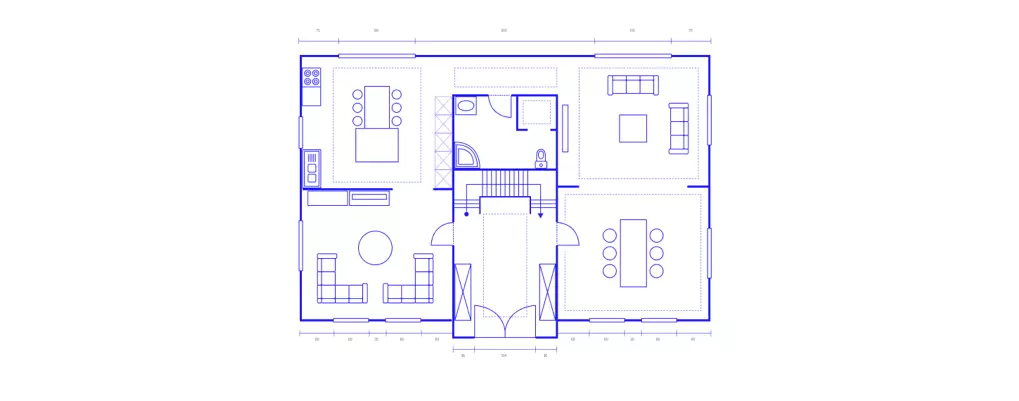
Let’s start with the obvious: a good floor plan helps home buyers actually understand your house.
Think about it. Photos and videos only show the place from one angle. You can’t really picture how it all fits together. That’s why those can’t increase your sales alone.
Virtual tours are better, sure. But even then, it’s tough to figure out how rooms connect. They still have some more questions:
- Where’s the kitchen compared to the living room?
- Are the bedrooms on the same floor?
After implementing 3d floor plan in your tour, your buyer can glance at it easily and instantly know exactly where they are in the house
For example, a family considering your property can better visualize if the bedrooms are located close to each other or apart, the kitchen is conveniently situated, and there’s a logical separation between private and communal spaces.
Hence, it will help buyers make decisions more confidently. And you are less likely to get a deal rejected due to the layout of the house.
2. Maps Out The Important Spots in Your Virtual Tour
![How to Add Real Estate Floor Plans in Virtual Tours [2026] 3](https://rextheme.com/wp-content/uploads/2024/05/Real-Estate-Floor-Plans.-.webp)
You can do something cool with your real estate floor plan – label everything.
Name each room and area right on the map. Drop pointers showing exactly where visitors will be standing when they look around. Like giving them a mini guide.
And you can also implement a neat trick, use different colors to highlight the spots you really want people to notice. Maybe it’s that gorgeous dining room, the swimming pool area, or a balcony with an amazing view outside.
This works especially well for furnished homes or luxury property listings where you want to show off specific features.
So basically, your floor plan becomes another way to grab attention and connect with potential buyers.
3. Makes Navigation Easier with Click To View Scene
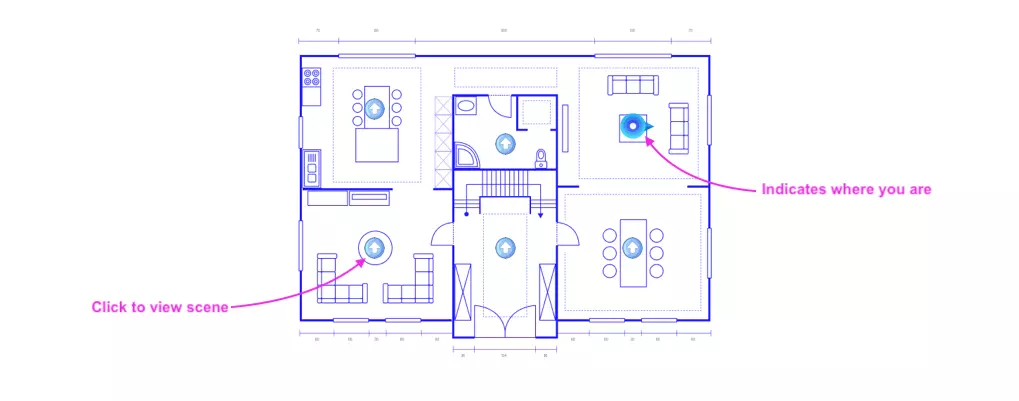
This helps to attract buyers who are more concerned about specific rooms in the house.
For example, many want to make sure they get a spacious kitchen before all else. Hence, you can allow them to visit the kitchen just by clicking on the map.
4. Avoid Misunderstandings with Room Dimensions & Directions
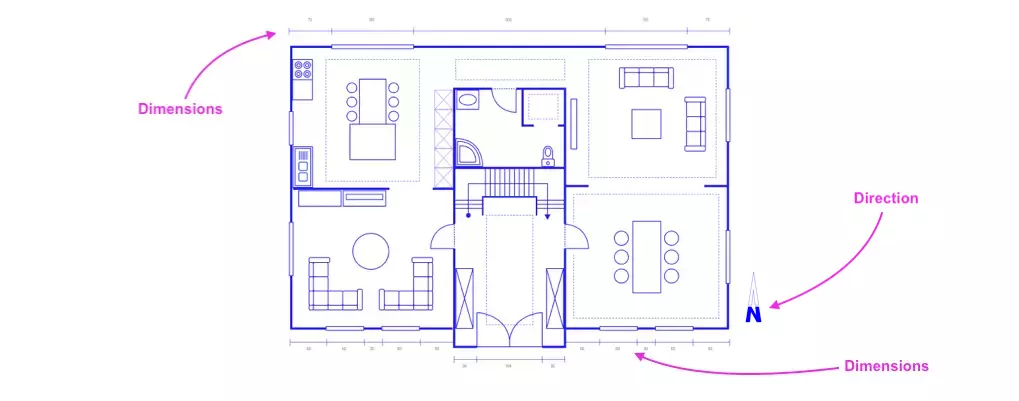
Virtual tours look great, no doubt. But they still leave some questions unanswered. Such as,
- How big is that bedroom actually?
- Will my couch fit in the living room?
- Is the kitchen facing south?
A virtual floor plan takes care of all that. You can add measurements for each room right on the map. So home buyers don’t have to guess if that master bedroom is really as spacious as it looks on the tour.
Some people also really care about which way the house faces, especially for natural light or ventilation.
- If you implement a floor plan, it will reduce unnecessary follow-up during the sale of a house
5. Define the Authenticity of Your Listings
This one’s more about psychology than anything else. When you add a floor plan to your virtual tour, it just makes you look more legit.
People see it and think, “Okay, this agent actually knows the property inside out.”
That sense of authenticity goes a long way. Buyers start trusting you more because you’re giving them details most agents don’t bother with. And when they trust you, choosing you over the competition becomes easy.
Pro Tip: Get the floor plan from the owner or have someone inspect the house and create one. Never use fake floor plans. That’ll cost you clients, faster than having no floor plan at all.
How to Add Real Estate Floor Plans to Your Virtual Tours
Alright, now I am going to say the most important part of this article, actually adding a floor plan to your tour depends on what tool you’re using.
Some have this built in. Others don’t, so you’d have to customize it or just place a floor map image below the tour on your page.
My recommendation is to go with a tool that has an interactive floor plan feature. One that connects the map to your tour through hotspots and shows which scene the viewer is currently looking at.
If you’re on WordPress, there’s a plugin called WPVR. It lets you create virtual tours with interactive floor plans baked right in.
Let me walk you through how to set it up.
1. Create A Virtual Tour Using WPVR
At first, you need a virtual tour before adding a floor plan to it. let’s see some steps:
- Upload your 360 panoramic images, and WPVR will turn your photos into a virtual tour.
- Connect the scenes so it feels like a complete walkthrough of your home.
- Customize it, add your company info, tooltips, extra details about the property, booking forms, whatever you need.
Watch this quick guide to create one in 7 steps:
2. Enable & Upload The Real Estate Floor Plan
Once you have your tour ready, it’s time to add the virtual tour house plans.
- First, go to WPVR settings and enable the floor plan feature.
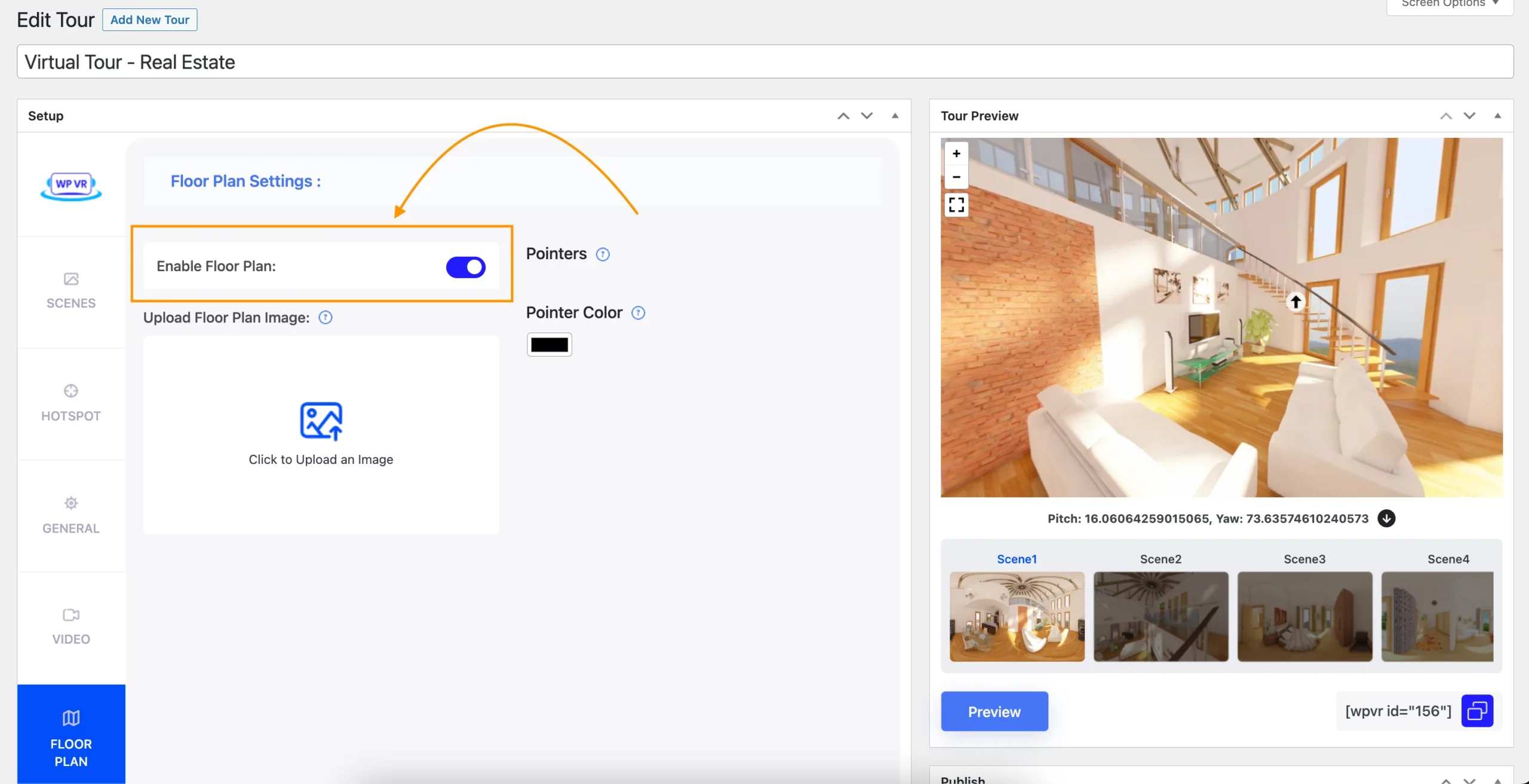
- Next, upload the real estate floor map.
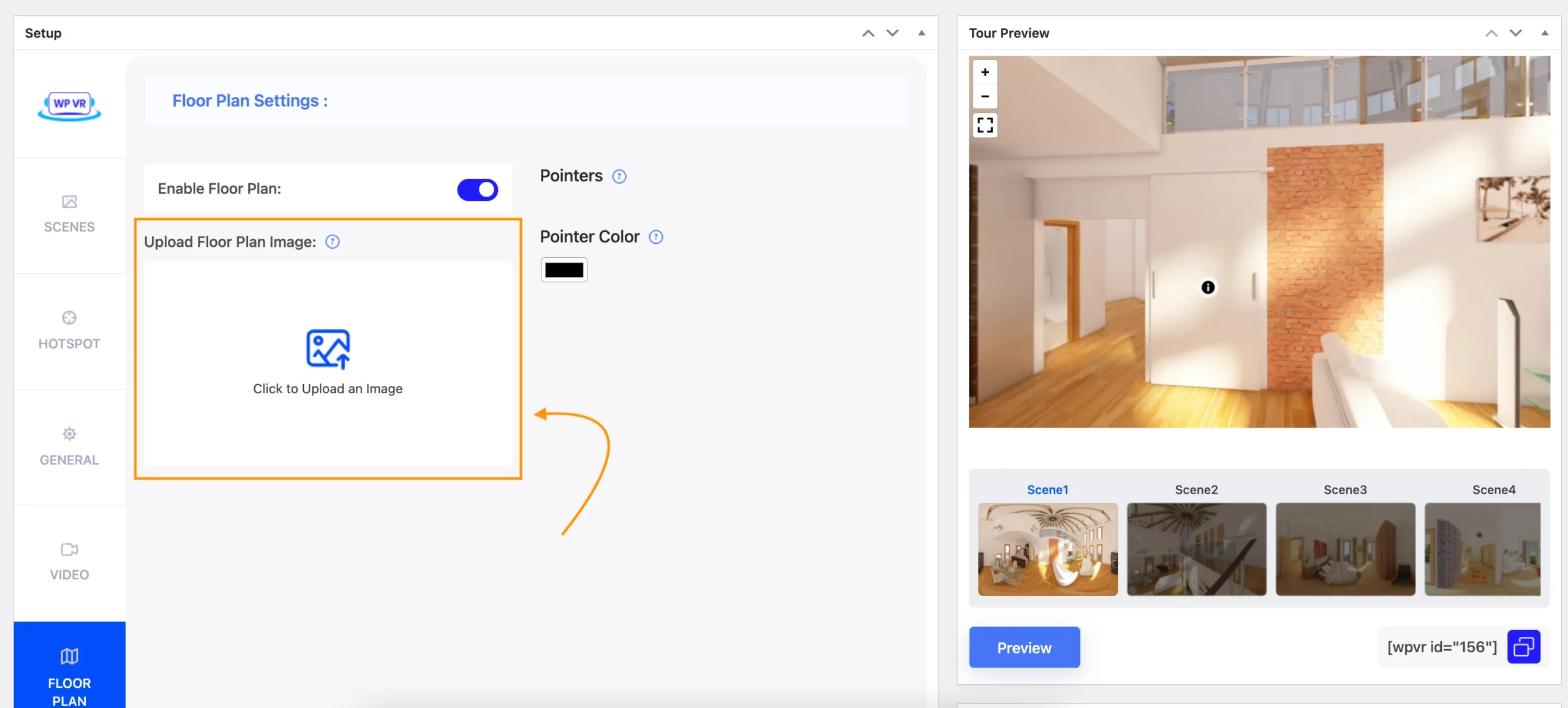
- Then, set up hotspots and connect them to the associated scenes in the tour.
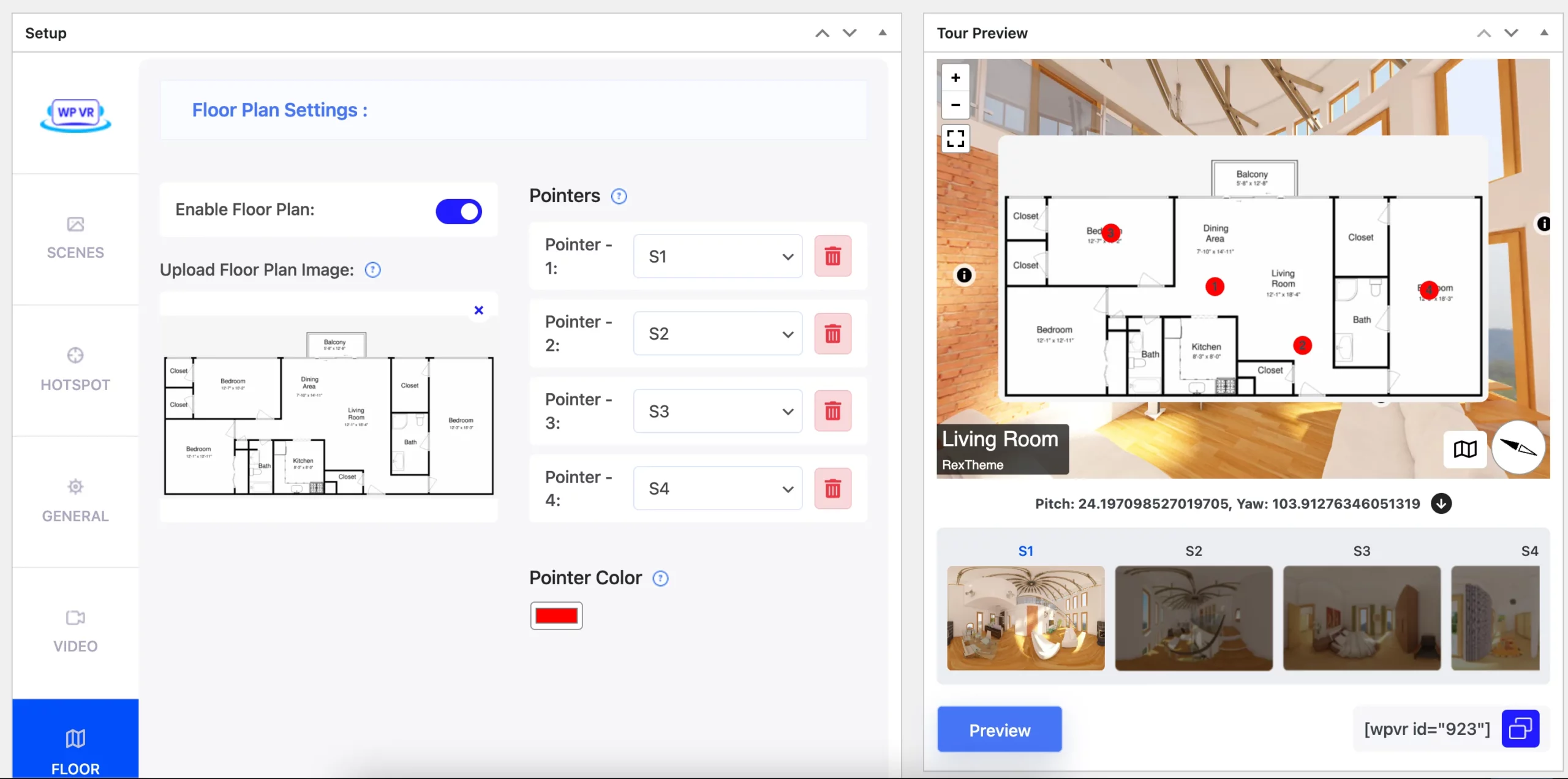
Here’s a video guide in case you need more help.
3. Embed Your Virtual Tour On The Website
Now that you have your floor plan ready, you can easily embed it on any page on your website using shortcodes or widgets in one of the supported page builders.
For example, if you use Elementor, you may use the WPVR widget from Elementor to place the tour on a page, which you may link to your listing page for the associated house for sale.
~Here’s how you can easily embed a WPVR virtual tour anywhere on your WordPress site.
Examples of Floor Plans With Virtual Tours
1. Interactive Floor Plan by WPVR
Following is an example of a virtual tour with a real estate floor plan that was created using WPVR. Go through the tour and explore how amazing this virtual tour is and how engaging this interactive floor map is.
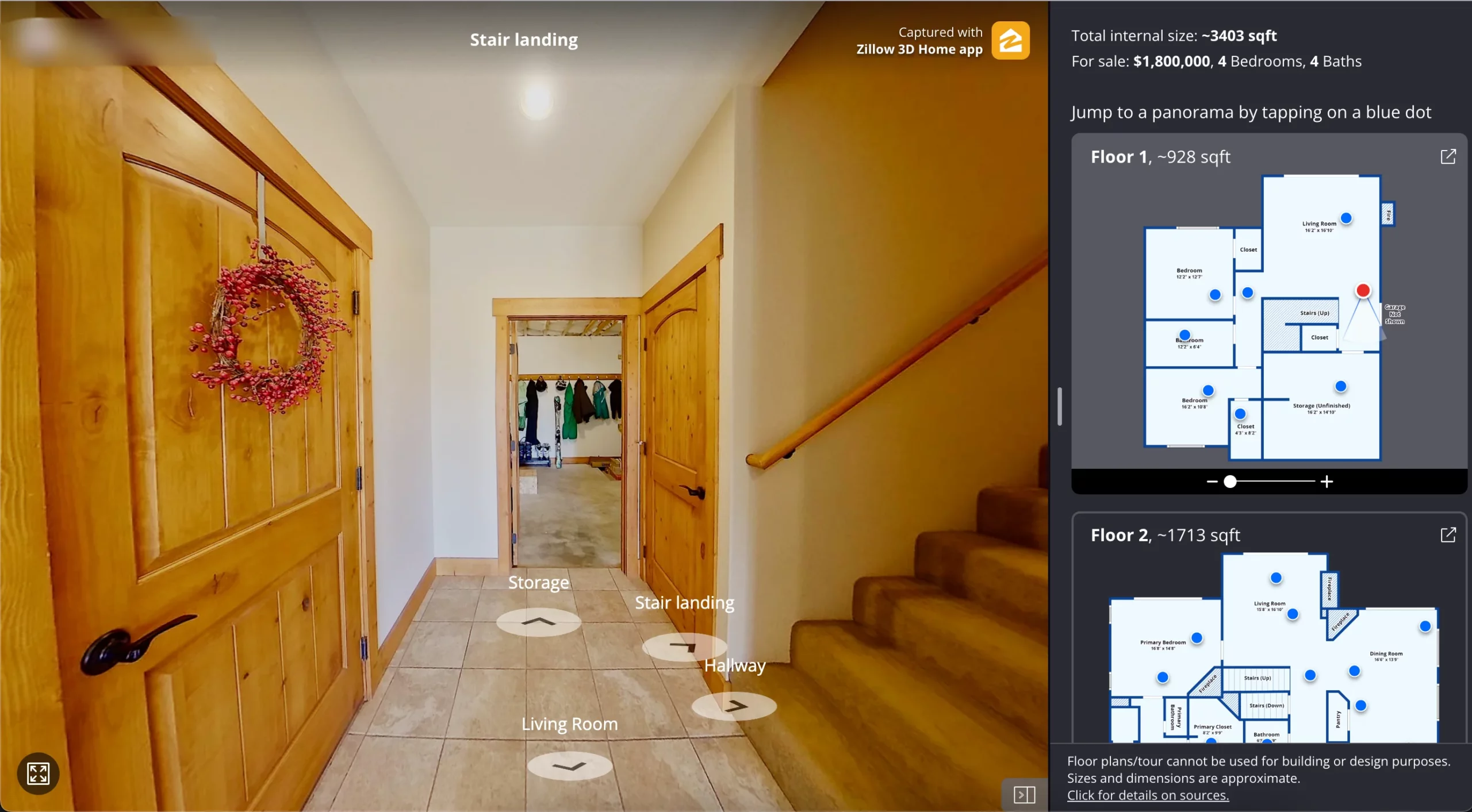
2. Property Map Showcase by Zillow
You’ve surely heard of Zillow. Here’s how they present the floor maps with virtual tours.
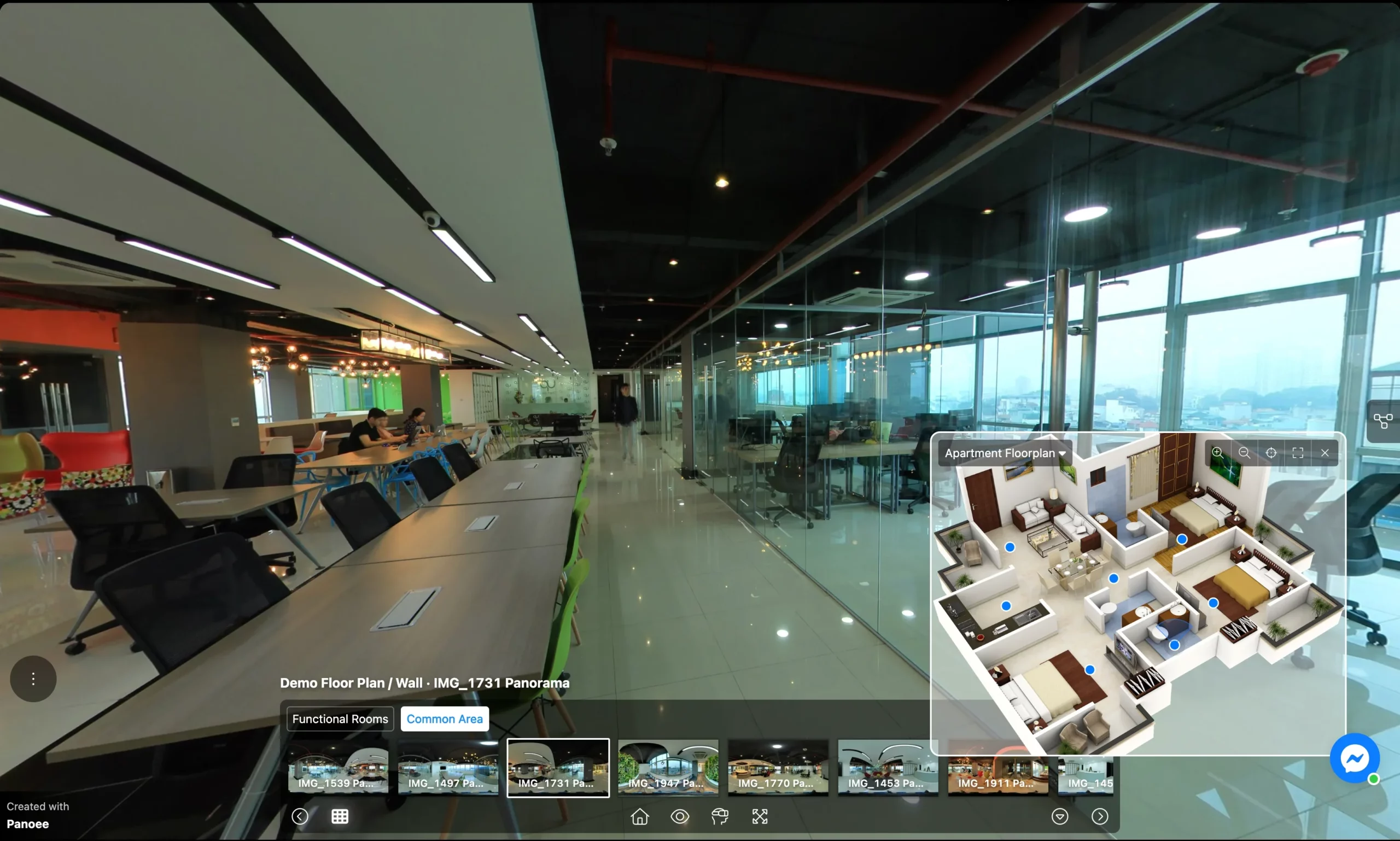
3. Basic House Plans With Virtual Tours by Panoee
4. 3D Floor Plan Virtual Tour by WayneHomes (created using Matterport)
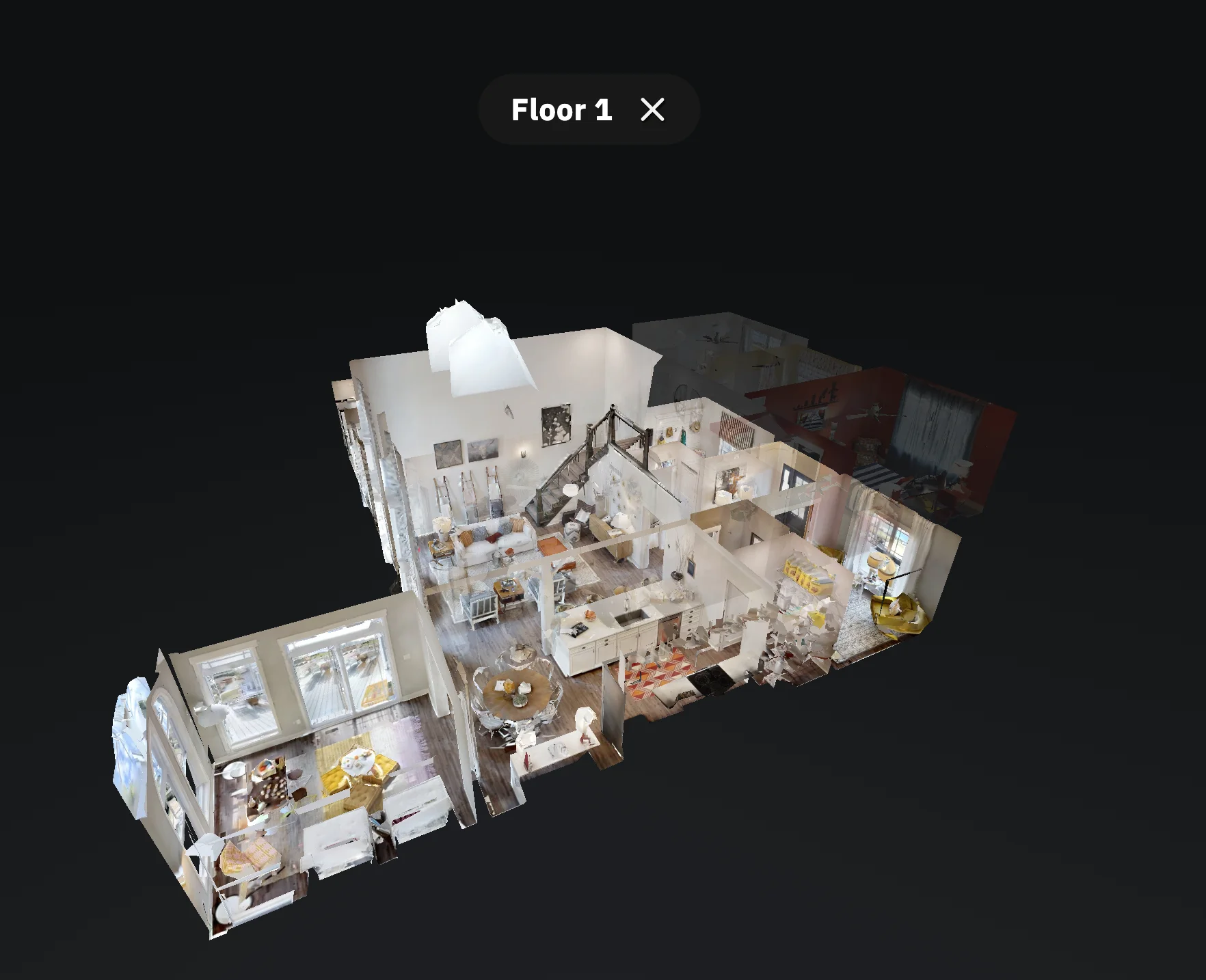
This one is a bit unique (and expensive). It’s the dollhouse effect by Matterport, which is probably not something most realtors would go for unless it’s for a very expensive luxury house.
Conclusion
Now you have understood that adding a floor plan to your virtual tour isn’t complicated at all. It’s a simple upgrade that makes a huge difference for your property listings.
Your buyers get clarity on your layout, room dimensions, and directions without any guesswork. That means fewer misunderstandings and more confident decisions.
Plus, it sets you apart from other real estate competitors who are still relying on photos alone. A small effort that gives you a real edge.
So don’t wait, grab the WPVR tool, start with the free plan, and when you are confident enough, get the pro and add your floor plan. It will help you to close deals faster, and your future clients will thank you.
** FAQs **
1. How do I make my virtual tour stand out from other agents?
Add a floor plan with labeled rooms, dimensions, and color-coded highlights for key areas of your home. Most agents skip this step, so just having it in your property listings instantly makes you look more professional and trustworthy to buyers.
2. Do floor plans really help sell a property faster?
Yes, when property buyers can see the exact layout of a house, they make decisions more quickly. No confusion about room sizes or how spaces connect and that means fewer rejected deals.
3. Can I use a 2D floor plan, or does it have to be 3D?
Both work, but 3D floor plans give buyers a much better feel for your space. A 2D plan is fine for basic layout, but if you want to impress potential buyers, go with an interactive one inside your virtual tour.
4. What if I don’t have a floor plan for my real estate listing?
Ask the property owner; they usually have one. If not, you can hire someone to inspect the home and create one for you. Just never use a fake floor plan, that’ll kill your credibility fast.
5. Are virtual floor plans worth the extra cost for my property listings?
Yes, the small investment pays off big time, and if you are using WPVR, the floor plan feature is already in the tool. Real estate professionals who use floor plans in their virtual tours build more trust, stand out from competitors, and close deals with more confidence.