Some days, I spend way too much time browsing online stores—just for fun.
And almost every time, I find myself shaking my head at one thing: the product pages. Half the time, pictures are tiny, descriptions are confusing, and prices… well, sometimes they disappear entirely.
That little chaos got me thinking: a product catalog isn’t just a list of products. It’s the backbone of how people experience your store.
And if you do it right, it helps them find what they want without guessing and makes your store feel professional, and even keeps your stock organized behind the scenes.
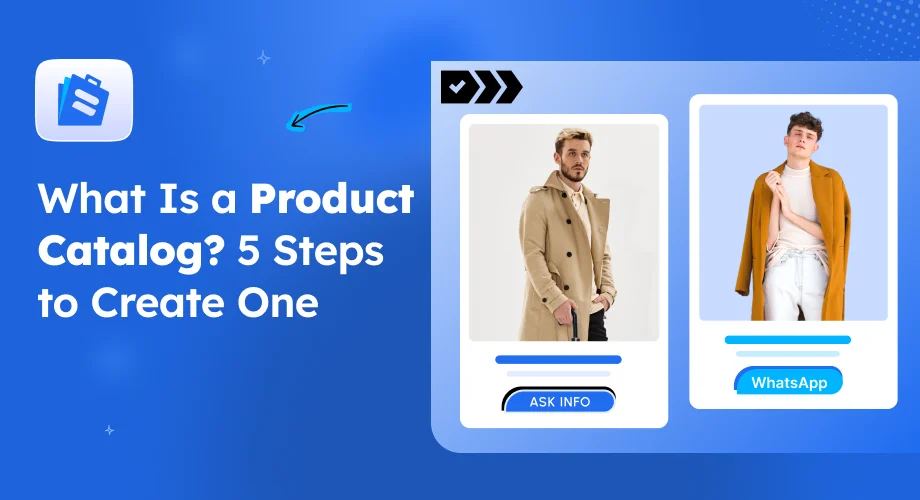
I’ll explain what exactly a product catalog is and why it matters. Also, I’ll walk you through 5 easy steps to actually create one, with real examples for WooCommerce users.
Let’s start!
TL;DR
A product catalog is a structured list of your products—either printed or digital—that helps buyers browse, compare, and make decisions without confusion. It’s essential for both retail and wholesale businesses because it organizes inventory, improves user experience, and makes marketing easier.
Here’s a quick summary of what you’ll learn:
- What a Product Catalog Is: A clear, organized showcase of your products that can exist as a brochure, PDF, or an online catalog in WooCommerce.
- Why It Matters: It supports marketing efforts, keeps inventory accurate, improves customer experience, and lets you personalize what different buyers see.
- How to Create One:
- Enable Catalog Mode and choose whether it applies to all or guest users.
- Select Products that should follow catalog-only settings.
- Hide or Replace Add-to-Cart Buttons to focus on inquiries instead of instant sales.
- Control Price Visibility for different audiences or roles.
- Add Inquiry Forms so potential buyers can easily reach out.
By the end, you’ll know how to turn your WooCommerce store into a clean, catalog-style experience that attracts serious buyers and generates qualified leads without complicating your sales process.
What Is a Product Catalog?
A product catalog is basically a structured list of all the products a business offers. It’s the place where you show customers what’s available, with details like descriptions, prices, images, and any other important information they need to make a decision.
Catalogs aren’t just for online stores; they’re used offline too, like printed brochures you might pick up in a store or mail to potential clients.
Product catalogs can take different forms depending on how they’re shared and used:
- Printed Catalogs: Traditional paper brochures or booklets that customers can hold, flip through, and reference.
- Digital Catalogs: PDFs or online pages that can be viewed on a computer or mobile device.
- Virtual or Interactive Catalogs: Online catalogs that let customers click, filter, or explore products interactively, often with extra features like videos or 360° product views.
For example, imagine you run an online store selling home office supplies. You could create a digital catalog that lists all your products with images, descriptions, and availability. Customers can browse categories, compare products, and even submit inquiries if they’re interested in something, all without leaving your website.
All of these formats share the same goal: making it easy for customers to find and understand your products.
Why a Product Catalogue Matters for Your Business
Once you understand what a product catalog is, the next step is realizing why it actually matters.
Let’s break it down.
i. Marketing and Promotion
A catalog makes it easier to show off your products during promotions. It keeps things focused so your audience sees exactly what matters.
For example, imagine you’re running a sale on office chairs. Instead of sending people to your full store, you show them a catalog page with just the discounted chairs. No clutter, no distractions. They can browse, check details, and submit inquiries if they want.
This way, you capture leads from people who are genuinely interested, without pushing them to buy instantly.
ii. Inventory Tracking
Keeping track of stock gets a lot simpler with a clear catalog. Digital catalogs update automatically, so you don’t have to worry about outdated listings or overselling.
Say you sell custom laptop desks online. One desk sells out quickly. Your catalog updates in real time, so visitors never see unavailable products. That keeps your customers informed and your team confident that the product info is accurate.
iii. Enhanced Customer Experience
A good catalog makes shopping easy. Clear categories, filters, and product details help visitors find what they want quickly.
Picture a visitor landing on your catalog. They go straight to “Ergonomic Chairs,” compare features, and see availability without scrolling endlessly. Everything feels simple and organized, which makes them trust your store and stick around longer.
iv. Personalization
Not all buyers are the same. Your catalog can adjust what they see based on who’s browsing.
For instance, retail customers might see prices and “Add to Cart” buttons, while wholesale buyers see product details and an inquiry form instead.
This ensures every visitor gets a view that fits how they buy, making it easier to turn casual browsers into leads.
5 Easy Steps to Create a Product Catalog
Turning your WooCommerce store into a product catalog can feel overwhelming at first, but it doesn’t have to be. With the right approach, you can organize your products, control what buyers see, and start capturing leads without forcing them to buy instantly.
Let’s look at a real scenario. Imagine you run a small handmade furniture store. Some products, like stocked chairs and lamps, are ready to sell immediately. Others, like custom-made tables or large office sets, need more discussion before a purchase.
In that case, you need your new visitors to browse freely, ask questions about custom pieces, and make wholesale buyers feel like the store is tailored for them.
And then comes Catalog Mode for WooCommerce that lets you do all of this without touching code.
Here’s how you can set it up in five easy steps:
Step 1 — Enable Catalog Mode and Decide Who Sees It
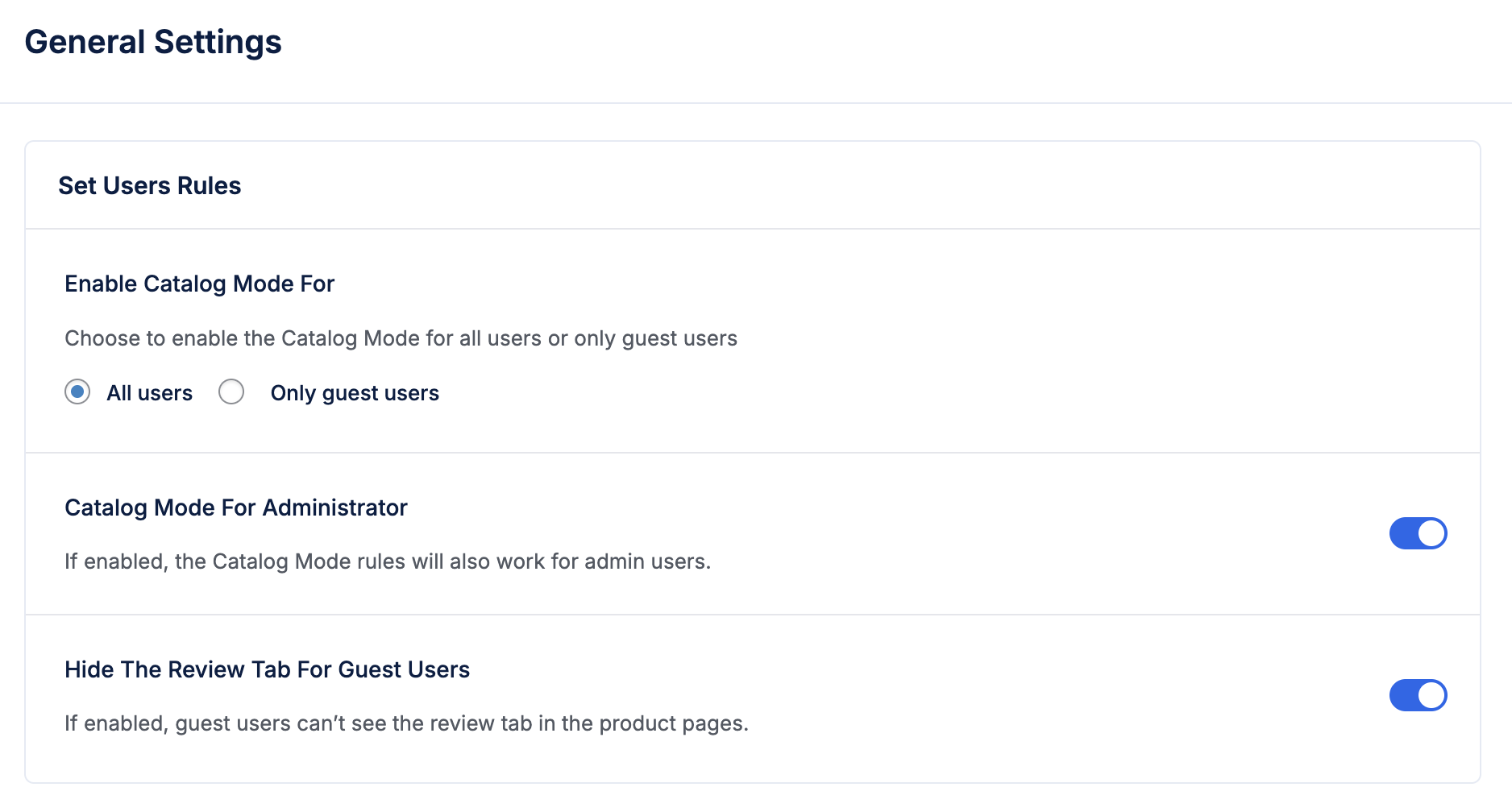
Start by setting up Catalog Mode in WooCommerce. This instantly removes “Add to Cart” buttons and, if needed, hides prices so visitors focus on browsing.
Apply Catalog Mode for guest users so new visitors see a clean catalog view. Keep the admin view normal while you test your settings. Optionally hide the review tab for guests to reduce distractions.
Step 2 — Choose Which Products Follow Catalog Rules
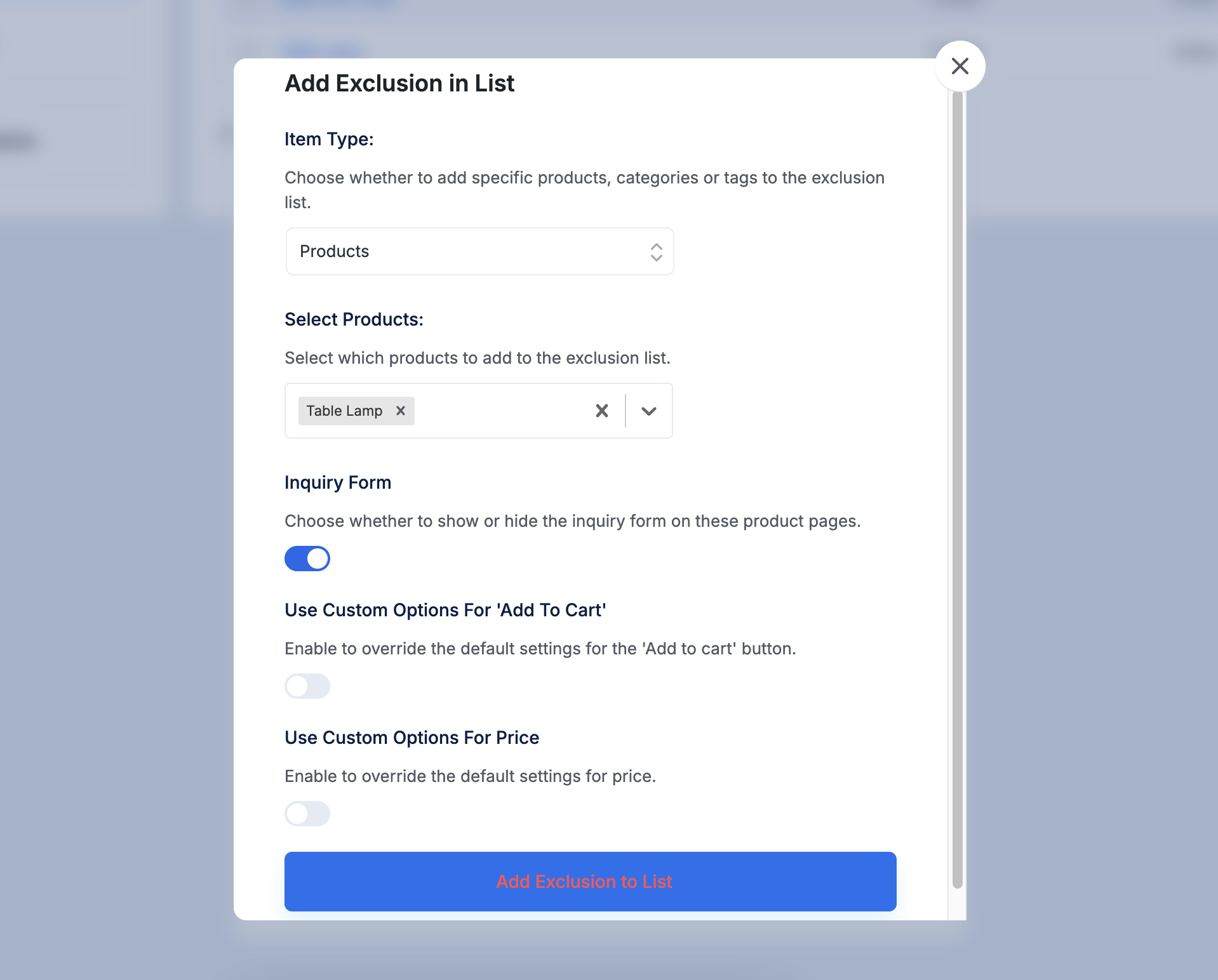
Use the Exclusion List to control which products still behave like a regular store.
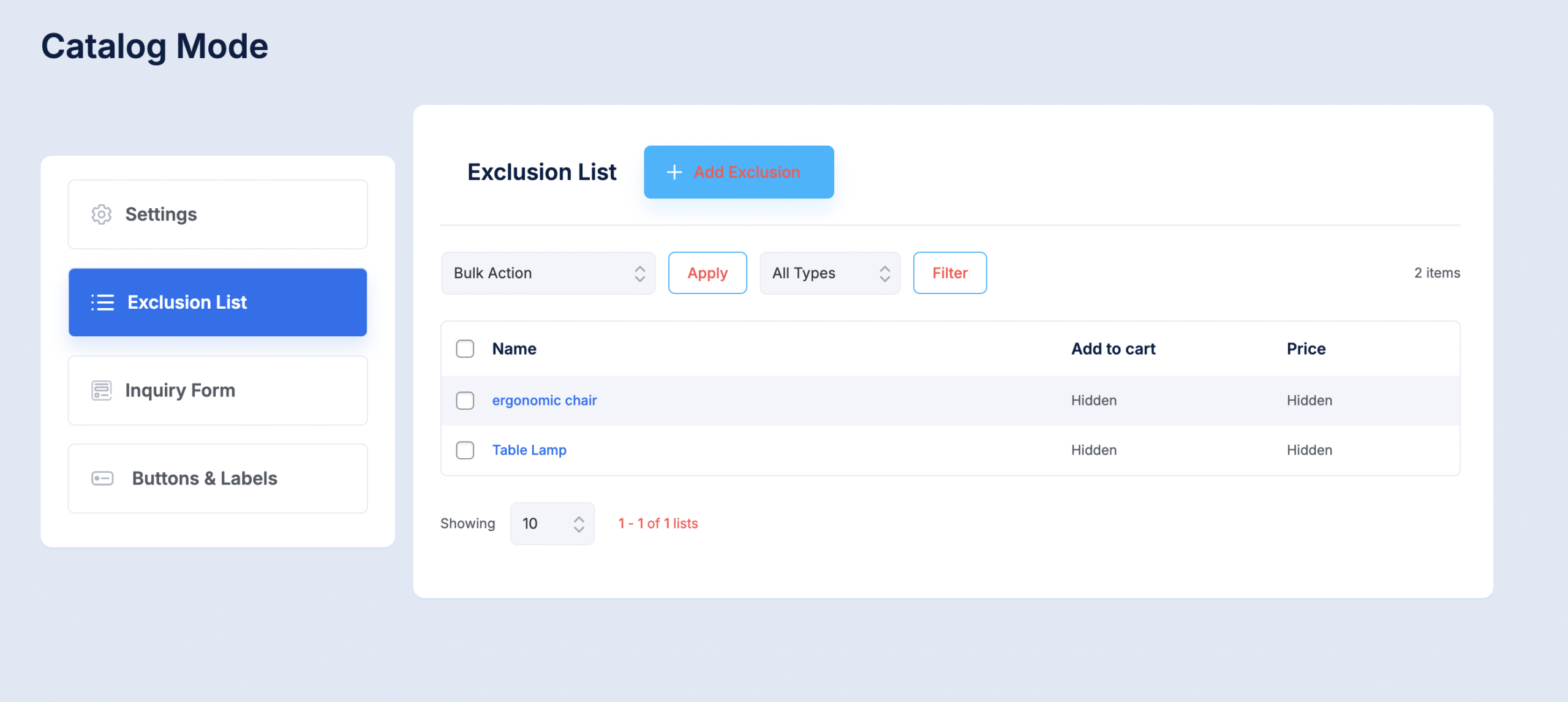
For the scenario, add stocked chairs and lamps to the Exclusion List so those buyers can purchase immediately. Leave custom tables off the list so they stay catalog-only.
Step 3 — Hide or Replace Add-to-Cart Buttons
Decide whether “Add to Cart” should appear and what should replace it for catalog items.
Here for the scenario: Hide “Add to Cart” for custom tables. Replace it with a “Request a Quote” button that links to an inquiry form.
In that case, you need to create a new button or label beforehand.
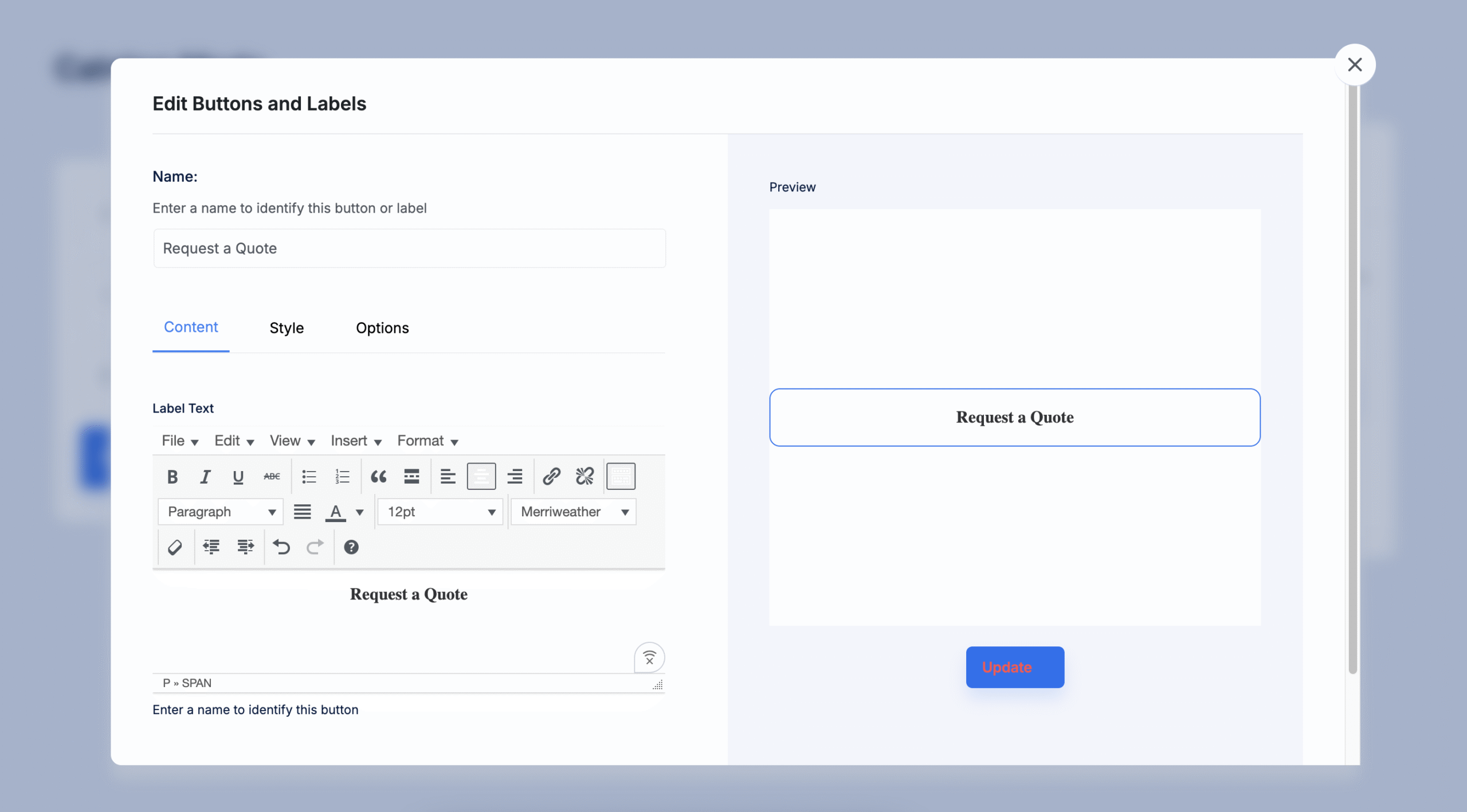
Stock items keep the standard Add to Cart button.
Step 4 — Control Price Visibility
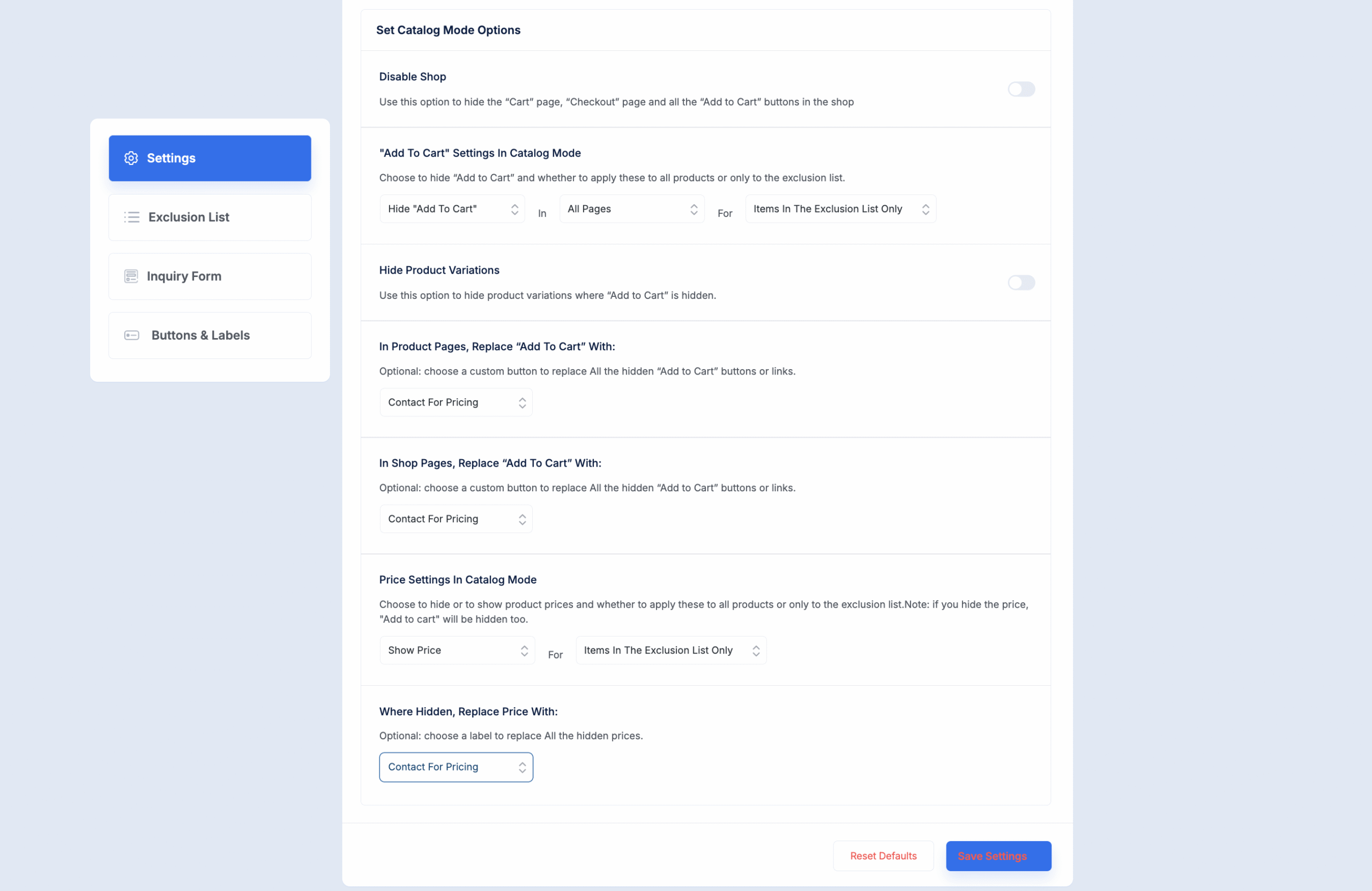
Decide who sees prices and where. You can hide prices for catalog items, guests, or everyone. Replace hidden prices with a label like “Contact for Pricing”.
In this instance, hide prices for custom furniture and display them for stocked chairs. Wholesale buyers logged in can see prices, while retail guests only see the “Contact for Pricing” label.
Step 5 — Add and Customize Inquiry Forms
Set up inquiry forms for catalog products so buyers can contact you directly.

You can choose placement (WooCommerce tab or short description area) and customize fields and text.
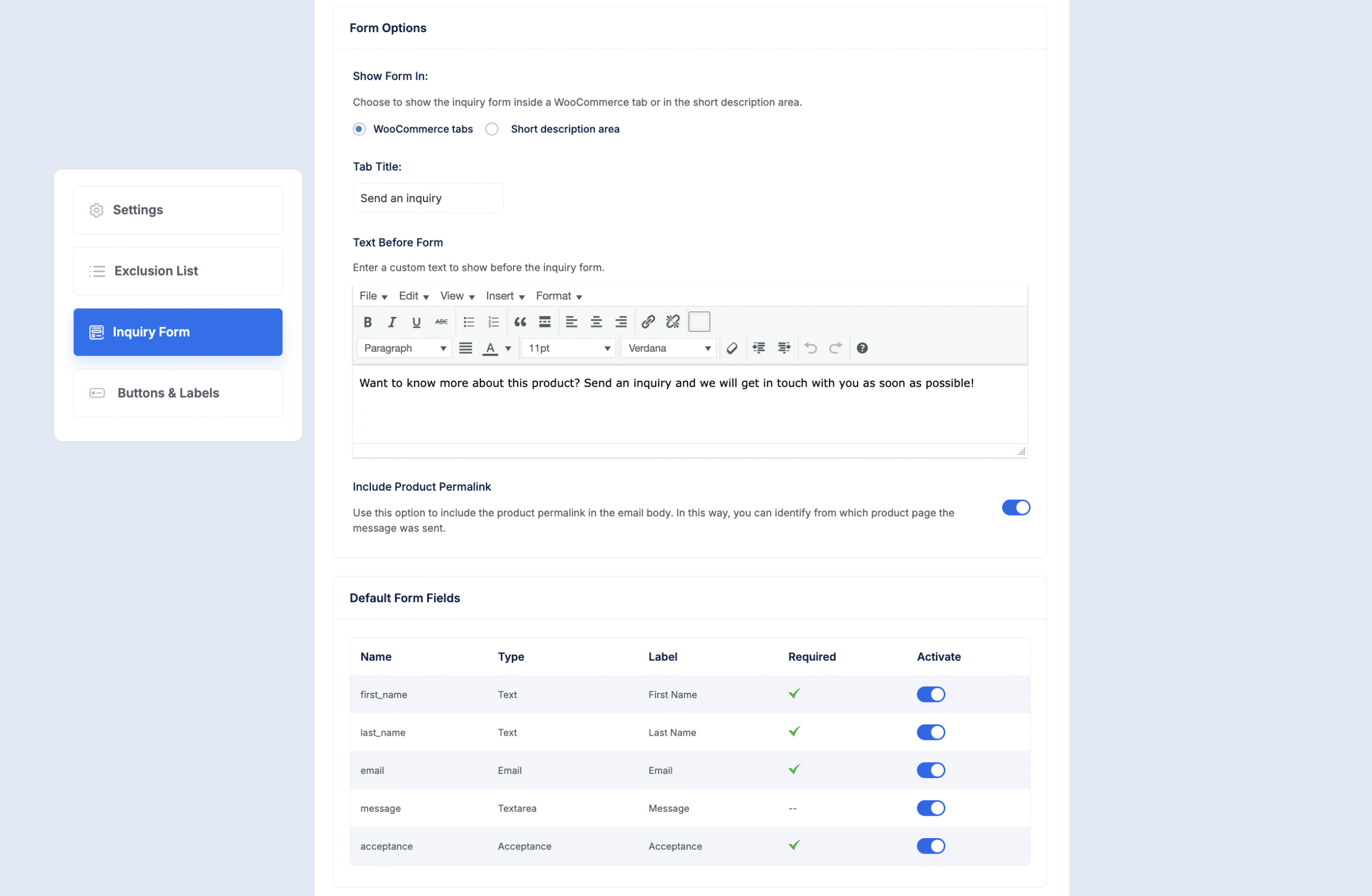
For this example, show the form only for custom tables. Include fields like name, email, message, and company size. Include the product Permalink automatically so you know which item the inquiry is about.
These five steps turn your WooCommerce store into a smart, flexible catalog that guides buyers, captures leads, and keeps wholesale and retail paths separate — all without making your site confusing or cluttered.
Next Steps
Creating a product catalog isn’t just about showing products; it’s about helping buyers browse comfortably and reach out when they’re ready. A clean, structured catalog builds trust, keeps your store organized, and turns browsing into qualified leads.
You’ve already seen how easy it is to do this in five steps. Now it’s time to apply them and turn your WooCommerce store into a focused, inquiry-driven catalog that fits your buyers’ journey.
FAQs
1. Can ChatGPT create a product catalog?
ChatGPT can help you plan and structure a product catalog by suggesting layouts, categories, and descriptions. While it can’t design or publish the catalog itself, it can guide you through what is a product catalog, how to organize your listings, and how to make them more appealing to your target audience.
2. What are the best product catalog examples?
Some of the best product catalog examples come from brands like IKEA, Amazon, and Apple. Each uses clean layouts, strong visuals, and clear product info. If you run a WooCommerce store, digital product catalogues can achieve the same effect by showing key details without overwhelming buyers.
3. How do I create a product catalogue?
To create a product catalogue, start by listing your products, organizing them into categories, and adding images and details that help customers decide. Tools like WooCommerce Catalog Mode make it easy to design and manage catalogs digitally while keeping full control over visibility and pricing.
4. What software is best for product catalog design?
For product catalog design, use tools like Adobe InDesign, Canva, or WooCommerce Catalog Mode for online stores. These help you create clean layouts and structured product listings so your buyers can easily browse and take action.
5. What are the types of product catalogs?
There are printed, digital, and interactive product catalogs. Printed ones are ideal for trade shows or offline marketing, while digital versions fit online businesses. Understanding what is a product catalog helps you choose the right format that matches how your buyers prefer to shop.

![Show Your WooCommerce Products on ChatGPT & OpenAI Ads with Product Feed [2026] 3](https://rextheme.com/wp-content/uploads/2026/08/Show-Your-WooCommerce-Products-on-ChatGPT-with-OpenAI-Product-Feed-1-407x213.webp)