![Best CTX Feed Alternatives for WooCommerce Product Feed Management [2026]](https://rextheme.com/wp-content/uploads/2025/11/CTX-Feed-Alternatives.webp)
I’ve read through plenty of reviews for CTX Feed – WooCommerce Product Feed Manager, and while it’s rated 4.6 stars, I noticed many store owners running into real problems.
Some users enjoy generating Google Shopping feeds, but I’ve seen many struggle with bugs and missing product info that slow their workflow.
Customer support comes up a lot – slow responses and unhelpful answers have frustrated quite a few store owners I’ve followed.
Dashboard pop-ups and spam notifications seem common, and I’ve even seen issues with WPML and certain servers causing headaches.
From my experience, CTX Feed works for some, but it’s not perfect for everyone. That’s why I’m sharing the best CTX Feed alternatives for WooCommerce that actually make managing feeds easier and faster.
So let’s get started,
What is CTX Feed and How it Works
CTX Feed is a WordPress plugin that helps WooCommerce stores create product feeds for Google Shopping, Bing, and Facebook Shops. It saves time by automating product data export instead of doing it manually.
For example, if you sell pet food, CTX Feed can automatically include product names, prices, images, and categories in a feed. You can then submit this feed directly to Google Merchant Center in minutes.
The plugin maps your WooCommerce product fields to each marketplace’s requirements. You can also customize feeds, schedule updates, and manage multiple channels from one dashboard.
Reasons to Consider an Alternative to CTX Feed
If you’ve faced these problems or just want an easier solution, it’s time to look at better CTX Feed alternatives for your WooCommerce store. Some reasons are given below:
- Limited Customer Support: Many WooCommerce store owners report slow or unhelpful responses from CTX Feed. This can delay feed setup and reduce efficiency.
- Plugin Bugs and Errors: Issues with feed generation and disappearing product attributes are common. These bugs disrupt your workflow and Google Shopping ads feeds.
- Pro Version Issues: The premium version of CTX Feed doesn’t always work as expected. This makes managing multiple marketplaces and large product inventories frustrating.
- Dashboard Spam and Pop-ups: Unclosable banners and notifications affect user experience. They make feed management pages harder to navigate.
- Compatibility Problems: Some users face issues with WPML or servers like OpenLiteSpeed. This can prevent exporting product feeds to Facebook Shops and eBay ads.
- Refund and Policy Concerns: Difficulties in getting refunds or policy support reduce trust. This impacts store owners relying on CTX Feed for unlimited product feeds.
- Limited Marketplace Options: Certain product categories or channels are restricted. This limits potential customers and the reach of your WooCommerce store.
- Frequent Updates Causing Problems: Too many plugin updates can break feeds or cause errors. This slows down feed generation time and overall efficiency.
5 Best CTX Feed Alternatives for WooCommerce Store Owners
Next, let’s take a closer look at each of these CTX Feed alternatives, highlighting their key features and what makes them a good fit for your WooCommerce store
1. Rexfeed – Product Feed Manager for WooCommerce

Rexfeed – Product Feed Manager plugin is one of the best CTX Feed alternatives for WooCommerce users. It lets you create and manage product feeds for 200+ marketplaces like Google Shopping, TikTok, and Facebook in just a few minutes.
For example, if you run a WooCommerce store with 500+ products, you can auto-generate and update all your feeds without manual work – saving hours every week.
It includes smart mapping, schedule automation, and error detection to keep your product data accurate. Perfect if you want a quick, reliable, and hands-free feed management system.
About Rexfeed – Product Feed Manager
- Rexfeed – Product Feed Manager for WooCommerce was launched on 07 February 2017 in the WordPress repository
- Built by Team RexTheme, it helps WooCommerce store owners sell effortlessly across 200+ marketplaces.
Key features of Rexfeed – Product Feed Manager
- XML, CSV, or Text Format: You can export your product feed in any format that suits your target platform.
- Exclude “Out of Stock” Products: Keep your ads clean by automatically skipping unavailable items.
- Schedule Auto Update: Save time – just set it once, and your feeds will update automatically.
- Google Category Mapping: Easily match your store categories with Google’s for better ad placement.
- Combined Attributes Feature: Combine multiple product details (like brand + title) into one clean feed field.
- Include/Exclude Parent Products: Choose if you want to show parent products or just their variations.
- Include/Exclude Hidden Products: You decide whether hidden products should appear in your feeds.
- Show Only Variable Parent Products: Show only the main variable product instead of every single variation.
- Auto-sync With Google: Let your feed auto-sync with Google Merchant Center — no manual uploads needed.
- Exclude Products With No Price: Automatically skip products missing price data to avoid disapproval.
- Advanced Custom Filter: Create custom rules to include or exclude products based on your needs.
- WPML Support: Run a multilingual store? No problem — your feeds can support multiple languages.
- Dynamic Pricing Feature: Make sure your live discounts or price changes are reflected in the feed.
- Include/Exclude Grouped Products: Choose whether grouped products should appear in your listings.
- JSON-LD Bug Fix: Keep your structured data clean so your products display properly in Google.
- Track Products With Facebook Pixel: Easily track views and conversions for your Facebook ads.
- Google Dynamic Remarketing Pixel: Retarget visitors with the exact products they viewed.
- Custom Fields (GTIN, Brand, etc): Add important product identifiers for better visibility and ad performance.
- Include Shipping Values: Include your shipping costs to make product data accurate.
- Product Filter: Quickly find and select the products you want to include in your feed.
- Product Rule Feature: Set your own conditions — like only including products over $30 or in-stock items.
- Category & Tag Filter: Filter products easily by category or tag before generating the feed.
- Add UTM Codes to Feed URL: Track where your sales come from by adding UTM tracking codes.
- Custom Batch Configuration: Adjust batch size for faster, smoother feed generation perfect for large stores.
- WCML Support: Manage multilingual feeds seamlessly if you use WooCommerce Multilingual.
- Update Feed Only When Products Changed: Save resources – update feeds only when product data changes.
- Generate Feed With Top Sold Products: Highlight your bestsellers to attract more buyers.
- Include Tax & Shipping Information: Give full transparency by including tax and shipping details in your feed.
Best Use Cases of Rexfeed – Product Feed Manager
- Promote on Google Shopping: Automatically list your WooCommerce products on Google Shopping to increase visibility.
- Run Dynamic Retargeting Ads: Show customers the exact products they viewed through Facebook or Google remarketing feeds.
- Sell on Multiple Marketplaces: Create optimized feeds for platforms like Bing, TikTok, Pinterest, and eBay.
- Automate Feed Updates: Keep your product data, prices, and stock always fresh with scheduled automatic updates.
- Personalize Feeds for Campaigns: Generate separate feeds for bestsellers, discounted items, or seasonal promotions.
- Manage Large Product Inventories: Handle thousands of products easily using batch processing and filters.
- Support Multilingual Stores: Create feeds in multiple languages and currencies with WPML and WCML support.
- Track Conversions Accurately: Use Facebook Pixel and Google Dynamic Remarketing to monitor and improve ad performance.
- Exclude Out-of-Stock or Hidden Products: Maintain clean feeds by skipping unavailable or hidden items.
- Highlight Top-Selling Products: Generate feeds focused on your bestsellers to boost conversions.
- Add UTM Tracking: Track which channels or campaigns drive the most traffic and sales.
- Include Tax & Shipping Data: Provide accurate product information to meet ad platform requirements.
Pros of Using Rexfeed – Product Feed Manager
- Saves you time by automating feed generation and updates.
- Keeps your product data accurate and always up to date.
- Simplifies managing large product inventories with smart filters.
- Supports multiple formats and marketplaces from one place.
- Reduces manual work and chances of feed-related errors.
Cons of Using Rexfeed – Product Feed Manager
- Initial setup may feel complex for beginners.
- Some advanced features are only available in the Pro version.
- Customization might take time if you have unique product structures.
Pricing
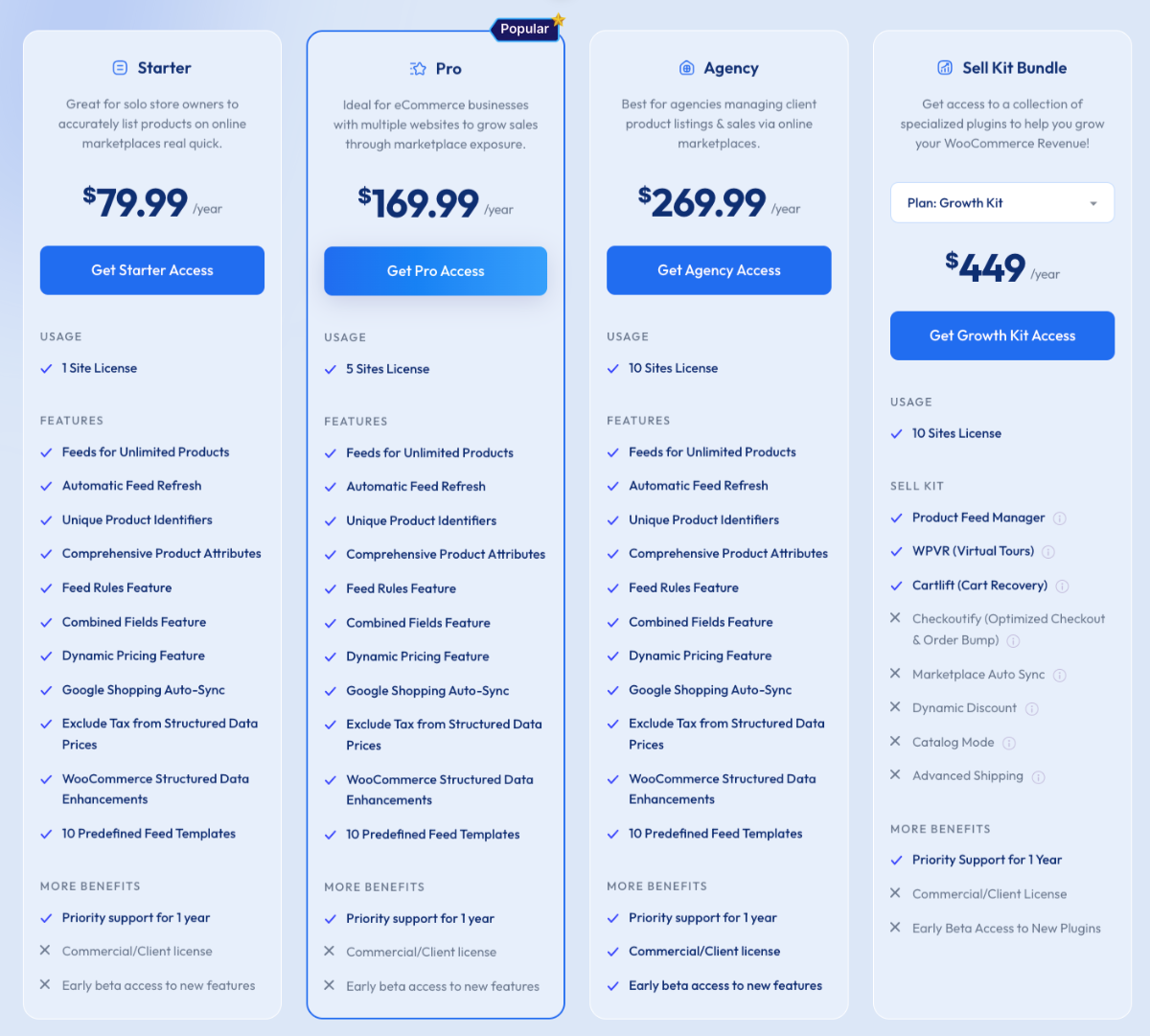
- Starter: $79.99 per Year for 1 website
- Pro: $169.99 per Year for 5 websites
- Agency: $269.99 per Year for 5 websites
- Sell Kit Bundle: $499 per Year for 3 plugins (PFM, WPVR, CartLift)
Customer Ratings
- 4.8 out of 5
Why Should You Choose Rexfeed over CTX Feed Alternatives?
- Easy Setup: Product Feed Manager has a clean, beginner-friendly interface that makes feed creation simple. You can generate a complete feed in just a few clicks without technical steps.
- More Templates: It offers a wide range of pre-made templates for different marketplaces. This saves you time and ensures your feed matches platform requirements.
- Handles Large Stores: PFM efficiently manages thousands of products with custom batch processing. Your store runs smoothly even with big inventories.
- Multilingual Support: It supports multiple languages and currencies for international stores. You can easily manage global product feeds without extra tools.
- Automated Updates: You can schedule feed updates, tax, and shipping info automatically. This keeps your product data accurate without manual effort.
- Learn More – Product Feed Manager vs CTX feed
2. WooCommerce Product Feed by WebTofee
![Best CTX Feed Alternatives for WooCommerce Product Feed Management [2026] 1](https://rextheme.com/wp-content/uploads/2025/11/2.-WooCommerce-Product-Feed-by-WebTofee-home-page.webp)
WooCommerce Product Feed by WebToffee helps you create and manage feeds for Google, Facebook, and other marketplaces. It makes listing your products online quick and organized.
For example, you can create a feed showing only best-selling candles for a holiday sale using its filters and custom rules. This lets you target specific products without including your entire catalog.
The plugin automates updates and handles large inventories easily, keeping prices and stock accurate without manual work.
Key features of WooCommerce Product Feed by WebToffee
- Sales Channels: Supports 25+ eCommerce platforms to expand product visibility and reach more customers.
- Unlimited Products: No restrictions on product count, allowing your entire WooCommerce catalog to be listed.
- Easy Setup: Quickly connect your store to Google, Facebook, Instagram, TikTok, Snapchat, and more.
- Smart Filtering: Include or exclude specific products or categories to optimize your feeds.
- Batch Sync: Sync thousands of products efficiently to multiple channels without server overload.
Pros of Using WooCommerce Product Feed
- Save time with automatic feed updates.
- Reach more customers on Google, Facebook, and Instagram.
- Handle large inventories easily, so you don’t worry.
- Show the products you want using filters and category mapping.
- Fix errors quickly with detailed feed logs.
Cons of Using WooCommerce Product Feed
- Some advanced features are only in the premium version.
- Initial setup can be confusing for beginners.
- Large inventories may occasionally cause errors or timeouts.
- Not all marketplaces have dedicated optimization options.
- Fixing feed errors may require technical knowledge.
Pricing
- Starter: $89 per Year for 1 website
- Pro: $199 per Year for 5 websites
- Agency: $399 per Year for 25 websites
![Best CTX Feed Alternatives for WooCommerce Product Feed Management [2026] 2](https://rextheme.com/wp-content/uploads/2025/11/2.-WooCommerce-Product-Feed-by-WebTofee.webp)
Customer Ratings
- 4.8 out of 5
Why Should You Choose Webtoffe product feed over CTX Feed Alternatives?
- Unique Multi-Channel Support: Handles 200+ platforms, including Google, Facebook, Instagram, Bing, and TikTok. Reach more customers across multiple marketplaces effortlessly.
- Unique Unlimited Feeds: Create unlimited product feeds and include your entire WooCommerce catalog without restrictions. Scale your store without limits.
- Unique Easy Setup: Set up feeds quickly and automate updates with scheduled refreshes. Spend less time managing feeds and more on sales.
- Unique Global Readiness: Built-in support for multiple languages and currencies. Expand your store’s reach to international customers smoothly.
- Unique Advanced Filtering: Include or exclude products with filters and map categories/attributes easily. Control exactly what appears in each feed.
3. Google Product Feed for WooCommerce by YITH
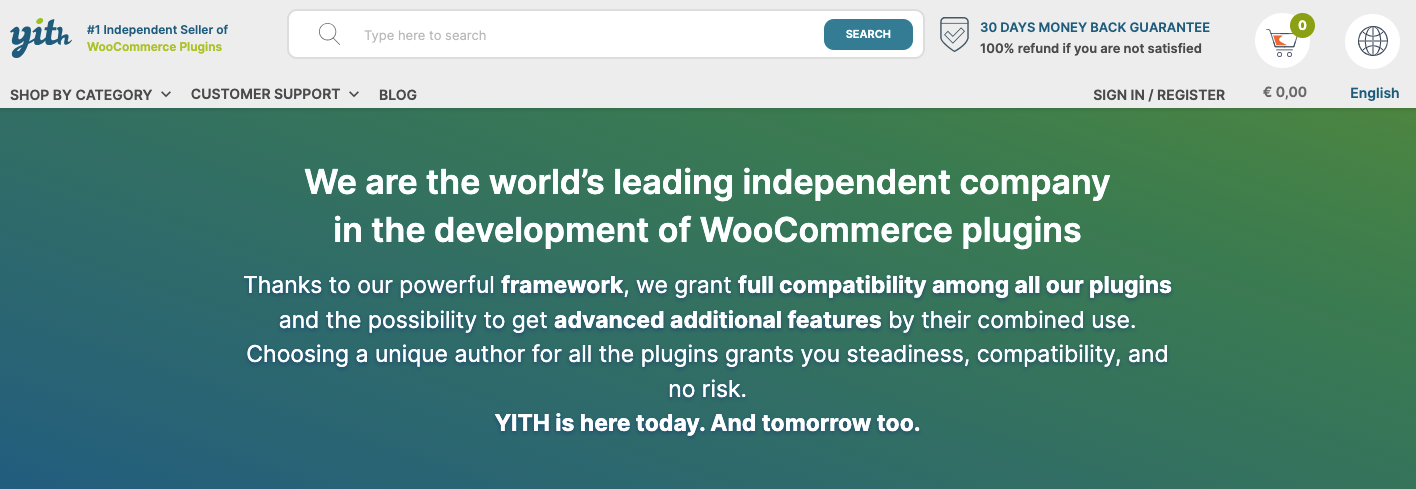
YITH’s Google Product Feed for WooCommerce helps you create feeds that meet Google’s requirements easily. Your products get approved faster without extra setup.
For example, you can map your products to Google categories so summer shoes appear in the right search results. This avoids feed errors and improves visibility.
The plugin also lets you filter products and add custom labels, so you control exactly what shows in your feed.
Key Features of Google Product Feed by Yith
- Unlimited Feeds: Create as many product feeds as you need, so you can showcase your entire store the way you want.
- Custom Templates: Choose which Google fields and product info to include, making each feed fit your campaign perfectly.
- Flexible Product Selection: Include all products or just the ones in specific categories or tags, so you reach the right customers.
- Custom Field Integration: Add information from custom fields and include prefixes or suffixes to make your listings stand out.
- Product-Level Overrides: Set global feed values and tweak them for individual products or variations, giving you full control over your listings.
Pros of Using Google Product Feed by Yith
- Easy to set up and integrates well with WooCommerce stores.
- Supports automated feed updates for Google Shopping.
- Allows custom field mapping and attribute control for accurate listings.
- Handles large inventories efficiently without slowing down your store.
- Compatible with multiple product types and categories for flexible feed management.
Cons of Using Google Product Feed by Yith
- Some advanced features require the premium version.
- Limited support for marketplaces other than Google Shopping.
- Filtering options are less flexible compared to some competitors.
- Can be tricky for beginners to map complex attributes correctly.
- Occasional feed errors may require manual troubleshooting.
Pricing
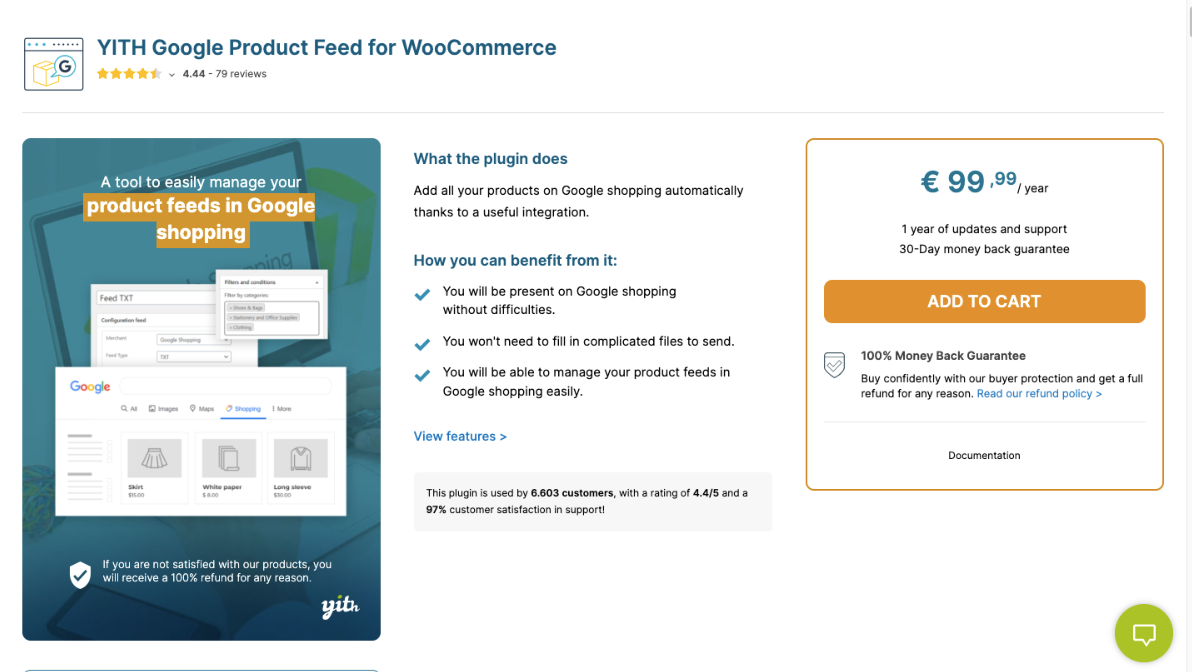
- €99.99 per year for a single website
Why Should You Choose Google Product Feed over CTX Feed?
- Google Compliance: Automatically generates feeds that meet Google Shopping requirements, ensuring your products are approved quickly and accurately.
- Flexible Product Selection: Include all products or filter by categories, tags, or attributes to showcase only what matters most for your campaigns.
- Custom Field Mapping: Map WooCommerce fields to Google attributes and include custom data for precise, optimized listings.
- Automated Updates: Schedule feed updates to keep prices, stock, and product info accurate without manual effort.
- User-Friendly Setup: Easy to install and configure, letting you create high-quality product feeds quickly even if you’re not tech-savvy.
4. Product Feed Pro by Adtribes
![Best CTX Feed Alternatives for WooCommerce Product Feed Management [2026] 3](https://rextheme.com/wp-content/uploads/2025/11/4.-Product-Feed-Pro-by-Adtribes.webp)
Product Feed Pro by AdTribes allows you to build fully customizable product feeds for multiple platforms from a single dashboard. It gives you complete control over how your products appear online.
For example, you can create separate feeds for bestsellers and discounted items to highlight specific products during promotions. This makes your campaigns more targeted and effective.
The plugin also supports advanced filters, custom attributes, and automated updates, keeping your feeds accurate and up to date without manual work.
Key Features of Product Feed Pro by Adtribes
- Structured Data Fix: Corrects WooCommerce variable product prices in JSON-LD so Google approves all products.
- Critical Google Fields: Adds required fields like Brand, GTIN, UPC, MPN, and product condition for Google Shopping compliance.
- Performance-Based Feed: Includes only products with sales in a given time range to improve campaign profitability.
- Custom & Static Fields: Let’s you add custom fields or static values to optimize your product feed.
- Category Mapping: Map WooCommerce categories to channel-specific categories, including subsets of products, for accurate listings.
Pros of Using Product Feed Pro by Adtribes
- Well-received by users, with most reviews rating it 5 stars.
- Supports critical Google Shopping fields and structured data fixes.
- Customizable feeds with options for filters, categories, and custom fields.
- Performance-based feed creation can optimize campaigns for profitable products.
- Compatible with multiple shipping plugins and supports large inventories.
Cons of Using Product Feed Pro by Adtribes
- Some users report slow feed updates and an unresponsive interface.
- Reports of incorrect custom price generation for product variations.
- Elite license issues and confusion over site limits or expiration.
- Support complaints, including slow response or lack of resolution.
- The plugin can be complicated or glitchy for some users, with occasional errors
- Need to buy a higher plan for feed validator, translator, and currency switcher compatibility that you will get free in Rexfeed.
Pricing
- Growth: $99.50 per Year for 1 website
- Plus: $179.50 per Year for 3 websites
- Business: $199.50 per Year for unlimited websites
![Best CTX Feed Alternatives for WooCommerce Product Feed Management [2026] 4](https://rextheme.com/wp-content/uploads/2025/11/4.-Product-Feed-Pro-by-Adtribes-Pricing.webp)
Customer Ratings
- 4.7 out of 5
Why Should You Choose Product feed Pro over CTX Feed?
- Broader Channel Support: Reach more customers on platforms like Google Shopping, Facebook, Instagram, Bing, and TikTok.
- Unlimited Products and Feeds: Create as many feeds as you need without worrying about product limits.
- Advanced Filtering and Rules: Include your best-selling products, exclude low-margin items, and map attributes exactly how you want.
- WooCommerce Integration: Ensure your product variations and custom attributes appear correctly in every feed.
- Global Readiness: Track your campaigns and reach international customers with multiple currencies, languages, and UTM support.
5. Google Product Feed by ELEX
ELEX Google Product Feed for WooCommerce helps you quickly create accurate Google Shopping feeds. It ensures your products meet Google’s requirements.
For example, you can include only in-stock items so customers see what’s actually available. This keeps your feed clean and reliable.
The plugin also supports custom attributes and automatic updates, keeping your product data up to date without extra work.
Key Features of Google Product Feed by ELEX
- Unlimited Feeds: Create as many feeds and templates as you need, so you can showcase all your products your way.
- Automatic Updates: Keep your prices, stock, and product info accurate without spending extra time.
- Category Mapping: Match your product categories to Google’s categories easily, so your products appear in the right place.
- Custom Attribute Mapping: Map any custom fields and set rules to show exactly what you want in your feed.
- Product-Level Values: Adjust values for each product individually, ensuring Google displays the correct info for every item.
Pros of Using Google Product Feed by ELEX
- Easy setup and integration with WooCommerce stores.
- Supports automated feed updates to keep product info current.
- Allows custom mapping of fields and attributes for accurate listings.
- Handles large inventories efficiently without performance issues.
- Compatible with multiple product types and categories for flexible feed management.
Cons of Using Google Product Feed by ELEX
- Some advanced features require the premium version.
- Limited support for marketplaces other than Google Shopping.
- Filtering options are less flexible compared to other plugins.
- Beginners may find mapping complex attributes challenging.
- Occasional feed errors may require manual troubleshooting.
Pricing
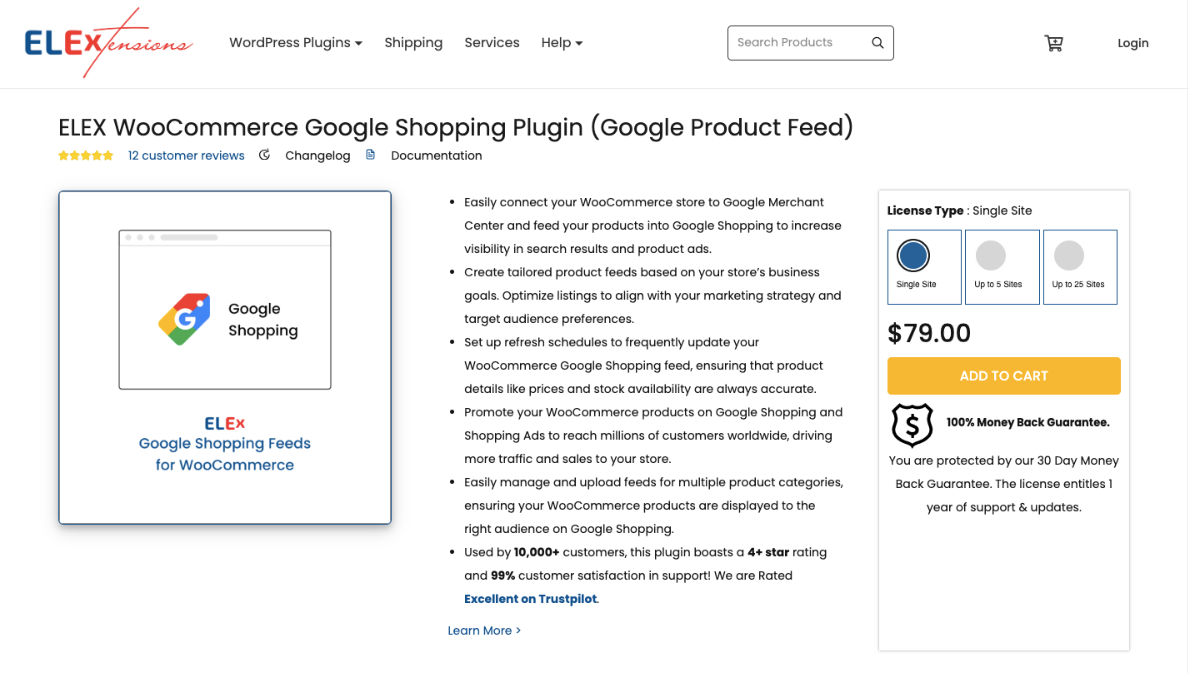
- Starter: $79 per Year for 1 website
- Pro: $169 per Year for 5 websites
- Agency: $399 per Year for 25 websites
Customer Ratings
- 3.8 out of 5
Why Should You Choose GPF over CTX Feed?
- Google Compliance: Ensure your products meet all Google Shopping requirements so you can advertise confidently.
- Flexible Product Selection: Include only the products or categories you want, targeting the right customers.
- Custom Field Mapping: Map WooCommerce fields to Google attributes and add custom data for accurate listings.
- Automated Updates: Keep prices, stock, and product info up to date without manual work.
- Easy Setup: Quickly set up high-quality feeds even if you’re not tech-savvy, saving you time and effort.
Conclusie
Managing WooCommerce product feeds can be tricky if done manually. A good plugin helps keep your products accurate and up to date across marketplaces.
Different plugins offer unique features like filters, category mapping, or automated updates. The right choice depends on your store size and needs.
Some focus on Google compliance, while others handle large inventories or multiple languages. Using the right tool saves time and avoids errors.
For an easy, reliable solution that automates updates and works with multiple marketplaces, Rexfeed – Product Feed Manager for WooCommerce is the best choice. It keeps your feeds accurate and optimized.
** FAQs **
How do I make my products show on Google Shopping?
You can create product feeds in the correct format and map product info to match Google Shopping Ads requirements. This ensures your listings are accurate and visible across marketplaces.
What if I have hundreds or thousands of products?
A good feed plugin handles large product inventories efficiently, generating feeds quickly. This saves WooCommerce store owners time and avoids slow feed generation.
Can I choose which products to include?
Yes! You can filter your feed to include only in-stock, seasonal, or bestselling items. This gives you control over product exporting across multiple marketplaces.
How do I keep my feed updated automatically?
You can schedule automatic updates for stock, prices, and attributes. This reduces manual work and ensures your feed is always up-to-date for different platforms.
How do I fix feed errors or missing info?
A reliable plugin provides validation tools and alerts for missing unique product identifiers or required fields. This helps maintain feed accuracy and improves user experience

![Show Your WooCommerce Products on ChatGPT & OpenAI Ads with Product Feed [2026] 6](https://rextheme.com/wp-content/uploads/2026/08/Show-Your-WooCommerce-Products-on-ChatGPT-with-OpenAI-Product-Feed-1-407x213.webp)