![Sending the Same Catalog Everywhere Is Quietly Costing Your Margins [2026]](https://rextheme.com/wp-content/uploads/2026/05/Sending-the-Same-Catalog-Everywhere-Is-Quietly-Costing-Your-Margins.webp)
Running a WooCommerce store and selling on multiple marketplaces means you’ve got a million things on your plate. And lately, you’ve probably noticed something odd.
Everything looks like it’s working. But your margins keep shrinking month after month.
And you can’t quite tell why.
Today, I want to address a misconception that’s probably the reason, and most multi-channel stores carry it without realizing. (It’s great if you don’t.)
The Misconception: One product feed is enough for every marketplace.
Here’s the part most store owners miss.
Marketplaces now command over 60% of global ecommerce sales and each one plays by its own rules.
So when your feed sends the same catalog everywhere across multiple marketplaces, the loss doesn’t show up in one big hit. It builds slowly across different places, keeps adding up over time, and you eventually start seeing it reflected in your margins.
Let’s dig into why one feed quietly bleeds margin across every marketplace it touches and how to stop it.
One Universal Feed Felt Right — Until Your Margins Stopped Adding Up
Here’s how this usually plays out in your store.
- You generate one product feed inside WooCommerce. (If you’re new to feeds, here’s a quick primer)
- You push it to Google Shopping, Facebook, Instagram, Pinterest, and a few regional marketplaces.
- You update your products in one place and assume every channel adapts the rest on its own.
For a while, this looks fine. Sales come in. Inventory syncs. The setup feels stable.
But over the next few months, you notice your ad spend creeping up while your margins keep getting thinner. And, you can’t point at one channel and say that’s the problem because it’s happening across all of them at once.
The disconnect is simple.
Each marketplace has its own audience, its own fee structure, and its own content rules. But your feed sends the exact same products, in the exact same format, to all of them.
And that’s where things break.
Some store owners assume the safe move is to keep everything uniform across channels. But uniformity for you isn’t the same as uniformity for the buyer.
90% of consumers expect consistent product information across channels, which means every marketplace expects your product data to fit its rules, not your single template.
So the real issue isn’t your products or your ads. It’s what your feed is telling each marketplace to do with them.
Every Marketplace Is a Different Game (And Your Feed Doesn’t Know That)
Once you look past the “one feed everywhere” setup, the difference between marketplaces becomes pretty obvious.
Each platform has its own algorithm, its own audience behavior, and its own buying patterns.
The way Google Shopping ranks your products has almost nothing in common with how Pinterest surfaces them, and neither one behaves like Meta or a regional comparison engine.
So when your feed sends the same catalog everywhere without adapting to the platform, the mismatch starts affecting visibility, clicks, conversions, and eventually your margins.
i. Google Shopping Rewards Catalog Breadth
Google Shopping works around intent. People already know what they want, so they search, compare options, and decide fast.

That’s why broader catalogs usually perform well here, as long as your product data is clean, usually strong titles, accurate attributes, correct categories, and structured properly.
It’s like someone types in “black running shoes size 10,” scrolls through a few options, picks one, and buys. That’s it.
So, if you sell 800 products and your feed is well-built, sending all 800 to Google is usually the right move. Google will figure out which ones match which searches.
This is the only marketplace where a “send everything” approach is okay. And that’s exactly why store owners assume the same thing works on every other channel.
ii. Meta (Facebook + Instagram) Penalizes Restricted Products
Meta works differently. It’s strict about what gets into its commerce platform.
Say you sell home, and lifestyle products, and a few of your essential oil listings describe benefits like “calming” or “helps with sleep.” Meta’s commerce policy treats those as health-related claims and flags them. Once that happens, the flagged products stop delivering — and depending on how many flags you accumulate, your other ads can take a hit too.
Instagram adds another layer. It’s a visual platform where presentation matters. A $400 lighting piece next to a $12 candle in the same Instagram Shop pulls down the perceived value of both.
Premium customers click less, and your AOV starts drifting.
iii. Pinterest Converts on Lifestyle, Not Utility
Pinterest works on a completely different motivation.
People don’t go to Pinterest to buy. They go to plan, maybe a wedding, a living room redesign or a wishlist for next quarter.
They’re not searching for specs, they’re looking for inspiration.
Your styled $180 throw blanket performs well because it fits into a moodboard. Your $15 utility hooks get clicks (cheap items always do on visual platforms), but those clicks don’t convert.
If your feed sends all your products to Pinterest, the algorithm spends your budget on whatever clicks most. And on Pinterest, that’s usually not what makes you money.
- If you sell on Pinterest and want a deeper setup walkthrough, read this.
iv. Regional Marketplaces Reward Niche Relevance
Regional marketplaces are the ones most store owners ignore. And that’s a mistake.
Idealo in Germany. Bol.com in the Netherlands. Kelkoo across the EU. Skroutz in Greece. These platforms work on precision, not volume.
Let me show you what that means.
Say you sell home decor and you list your entire 800-product catalog on Idealo. Most of those products don’t match what Idealo’s audience is actively searching for. So they get buried. The few products that do match get fewer impressions than they should, because your account is spread thin across hundreds of SKUs the marketplace doesn’t care about.
Now flip it. Send a tighter, regionally relevant catalog instead.
Say 200 of your most Idealo-relevant SKUs. The same marketplace responds with stronger placement and a higher ROI than Google can deliver on those same products.
That’s the pattern across every regional marketplace. Less is more. Relevance beats volume every time.
So that’s four marketplaces. Four completely different ecosystems. And one feed trying to serve all of them.
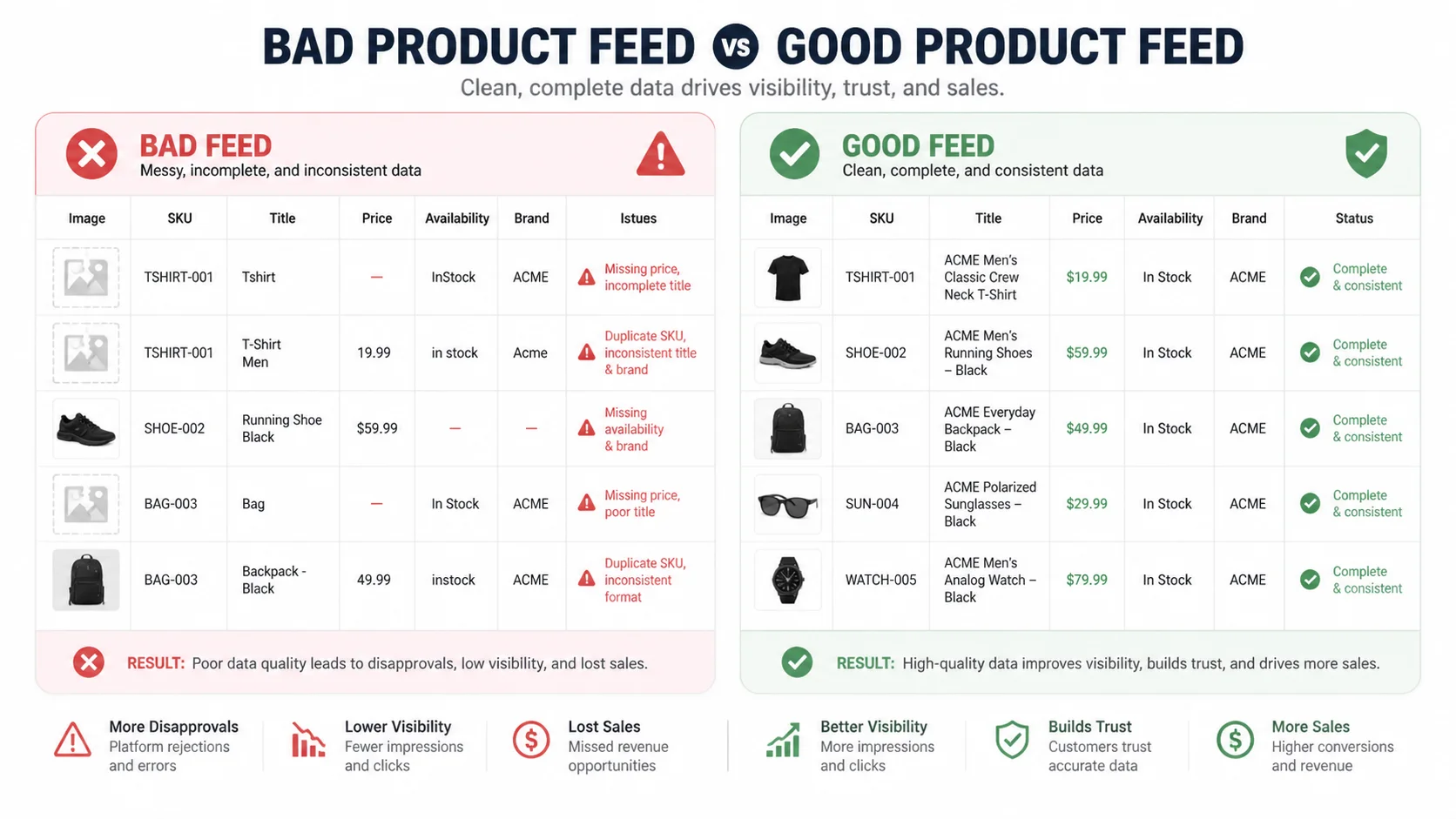
Sending the same catalog into all of these different ecosystems forces each one to respond differently — and that’s where margin leakage begins.
That’s the part most store owners eventually figure out. The harder part is what happens next.
Three Quiet Ways Your Margins Leak If You Send The Same Catalog Everywhere
These losses don’t show up one at a time. They run in parallel.
While Pinterest is spending its budget on the wrong products, Meta is flagging a few of your SKUs, and Instagram is quietly pulling down your AOV. All three at once. All three invisible on your dashboard.
That’s why this leak is so hard to spot. You can’t open Google Analytics and find a line that says “margin lost to feed mismatch.” You just see your overall numbers softening, and you start blaming the wrong things. The ads. The bids. The creatives. The season.
Around 8–12% of revenue disappears when buyers can’t find the products they’re actually looking for.
A universal feed is one of the main reasons that happens, because every channel ends up with the wrong slice of your catalog working the hardest.
Here’s where the three losses actually live.
i. Wasted Ad Spend on Products That Don’t Fit a Channel
This is the loss you’d catch first if your reports broke it out — but they don’t. You see channel-level ROAS. You don’t see which products inside each channel are burning your budget. So the wasted spend stays hidden inside an “underperforming channel” label that’s actually a feed problem in disguise.
ii. Ad-Account Penalties from Restricted Products
This one compounds in a way the others don’t. Every flag your account collects makes the next one cost more — in trust, in delivery, in approval times. A store that runs a clean feed for two years builds something close to a credit score with Meta. A store that quietly drips restricted products into the same feed every month is doing the opposite, without realizing it.
iii. Brand Dilution on Premium Channels
This is the slowest loss, and the one store notices last. The damage doesn’t show up in this month’s report. It shows up next quarter, when your repeat-buyer rate from Instagram is lower than it used to be, and you can’t trace why. By the time you connect the dots, two or three months of premium positioning is gone.
These three losses feel abstract until you see how they play out in a real store.
You Can’t Out-Optimize a Bad Feed
So right about now, you might be thinking something like this.
“Okay, I see the problem. But I can fix it with better ad targeting. Tighter audiences. Smarter bids. Cleaner creatives.”
That’s the instinct most store owners reach for first. And it doesn’t work. Not because ad optimization is bad, it’s because of where ad optimization actually happens.
Your ad platform optimizes within the feed you give it. It can’t optimize the feed itself.
If your Pinterest feed contains 800 products and only 200 of them genuinely fit Pinterest’s audience, no amount of targeting changes that. The algorithm still has 800 products to choose from. It still spends budget on whatever clicks most. You just end up paying a higher CPC for the same losses, because you’ve narrowed the audience without narrowing the catalog.
This is why feed problems look like ad problems.
What “Tailored Feeds Per Marketplace” Actually Looks Like
At this point, the idea usually sounds more complicated than it actually is. Most store owners assume it means rebuilding everything from scratch for each channel or managing multiple catalogs separately.
That’s not how it works.
You’re still working with one base WooCommerce catalog. The difference is that instead of sending the same full product set everywhere, you apply different rules for each marketplace. So each channel receives a version of your catalog that actually fits how it operates.
The Four-Feed Setup
Here’s how that setup typically looks in practice:
| Google-Shopping | Full catalog | High intent, broad reach, low policy risk |
| Facebook / Meta | Catalog minus restricted items | Protects ad account from flags |
| Instagramm | Premium products only ($50+) | Matches higher-AOV shopping behavior |
| Interesse | Lifestyle and décor categories only | Performs better with visual, inspiration-led products |
You’re not creating new products or new data. You’re just deciding what gets sent where, based on how each platform actually works.
The Five Filters That Do the Work
Most of this comes down to a small set of filtering rules inside your feed setup. Once these are in place, you can shape each marketplace feed without manual edits.
- Category — include or exclude specific product categories
- Price range — set minimum or maximum price per channel
- Tag — separate products using labels like premium, clearance, or seasonal
- Attribute — filter by things like color, size, or material
- Stock status — only push in-stock products to active campaigns
That’s the entire structure. One catalog, five simple filters, multiple tailored outputs.
At this point, the only real question is whether your current setup allows you to apply this kind of control without turning it into manual work every time you update your store.
The 5-Minute Reality: Setting Up Tailored Feeds Without Extra Work
That’s where most of the hesitation comes from, not the concept itself.
The workflow itself is straightforward.
You start with your base feed, usually your Google Shopping feed since that’s the broadest one. You duplicate it. You apply a filter or two. You save. That’s a tailored feed for a second marketplace, built in about five minutes.
From there, auto-sync handles the rest. When you update a product in WooCommerce — price, stock, image, anything — the feed updates on its own. You set it up once and walk away.
If you want to set this up without manual work, Product Feed Manager for WooCommerce supports 200+ marketplaces and lets you build tailored feeds with category, price, tag, and stock filters in a few clicks. You can install it for free and have your first tailored feed live in about 5 minutes.
- Look at how it works- Listing WooCommerce Products On Marketplaces Takes Minutes (Not Hours)
Once tailored feeds are running across your channels, the margin you’ve been quietly losing stops being a recurring leak. It turns into recovery you can actually see in your reports month after month, without adding any work to your week.
The Cost of One More Month of Untailored Feeds
By now, the pattern is clear. The issue isn’t your traffic, your products, or even how your ads are set up. It’s the fact that the same catalog keeps getting pushed everywhere, even though each marketplace responds to it differently.
So every month you continue with a universal feed, you’re not just keeping things “as they are.” You’re letting the margin leak continue in the background without interruption. A portion of your ad spend goes to products that don’t fit the channel, some listings get weaker delivery because of policy sensitivity, and some parts of your catalog underperform simply because they’re shown in the wrong context.
Nothing breaks at once, so it’s easy to overlook. But over time, that repeated mismatch turns into a steady loss that shows up clearly in your monthly margin.
Tailored feeds don’t change what you sell. They fix how your catalog is distributed so each marketplace works with the version it can actually perform with.
At that point, the decision isn’t about selling on multiple marketplaces anymore. It becomes about whether the channels you already use are getting a version of your catalog that can actually work for them.
FAQs
Do I need to send fewer products to each marketplace?
Not fewer — the right ones. Each marketplace performs best with a catalog matched to its audience and policies. Tailored feeds optimize fit, not volume.
Will tailored feeds hurt my Google Shopping reach?
No. Google Shopping usually receives the broadest version of your catalog. Tailoring mainly affects channels with stricter policies or distinct audiences.
How long does it take to set up tailored feeds?
About 5 minutes per marketplace once your base feed is ready. The filters are simple — category, price, tag, stock, attribute.
Does this work with a free feed plugin?
Yes, if the plugin supports per-feed filtering. Product Feed Manager’s free version supports core filtering with 200+ marketplace templates.
What if my products are mostly similar in price and category?
Even similar catalogs benefit — restricted-product filtering and stock filtering alone help protect ad account quality and reduce wasted spend, regardless of price range.

![Show Your WooCommerce Products on ChatGPT & OpenAI Ads with Product Feed [2026] 2](https://rextheme.com/wp-content/uploads/2026/08/Show-Your-WooCommerce-Products-on-ChatGPT-with-OpenAI-Product-Feed-1-407x213.webp)