In this guide, I’ll explain how to set up time-based shipping conditions in Advanced Shipping for WooCommerce plugin by RexTheme.
You can control when certain shipping methods are available based on Time of the Day or Day of the Week
For example:
- Enable Morning Delivery Shipping Fee only between 6 AM and 8 AM.
- Offer Evening Delivery Shipping Fee only between 5 PM and 9 PM.
- Apply a Weekend Shipping Fee for orders placed on Saturday or Sunday.
Time Based Shipping Condition: #
1. Go to Advanced Shipping Method Settings
Scroll down and you will get this option to add shipping cost calculation rules.
Click on the Add condition rule to set the price shipping condition for your WooCommerce store.

2. Select “Time of the Day“ condition by clicking on “When” field.
Select “is” to meet the condition.
Example 1: Lets set a Shipping Condition such that if there are any order to be delivered in the morning between 6AM and 8AM, there is will be an additional $5 Shipping Charge added.

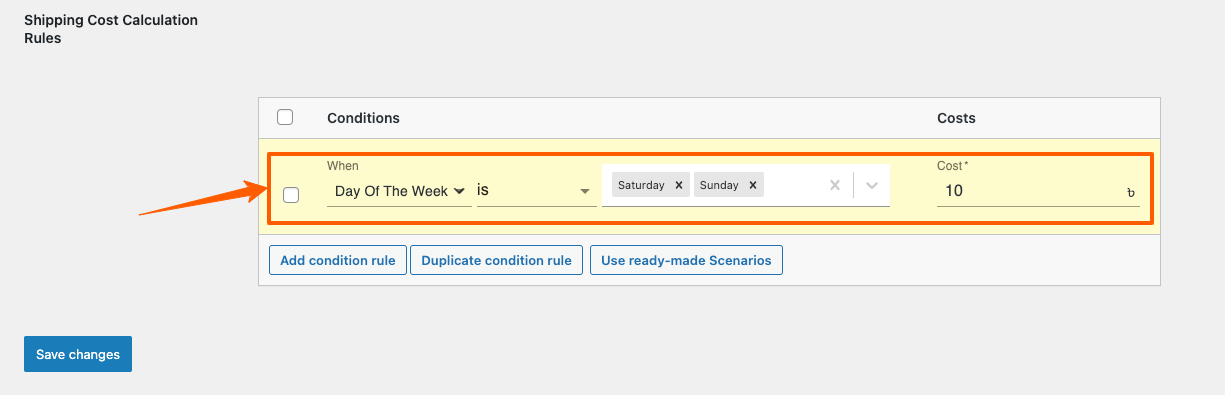
3. You can also select “Day of the Week“ condition by clicking on “When” field.
Select “is” to meet the condition.
Example 2: Lets set a Shipping Condition such that if there are any orders to be delivered on the weekend (Saturday and Sunday), there will be an additional $10 Shipping Charge added
So, this is how easily you can set your time based shipping conditions for your WooCommerce Stores.