---
title: How To Remove HTML Tags Or Shortcodes From A Feed
description: When you are generating a feed for your preferred merchant with the Product Feed Manager for WooCommerce plugin, sometimes you may find that your product description contains HTML Tags or Shortcodes. In this case, when you submit the feed to…
url: "https://rextheme.com/docs/how-to-remove-html-tags-or-shortcodes-from-a-feed-2/"
updated: "2023-09-24"
category: Product Feed Manager / Understanding Basic Feed Configuration
---
# How To Remove HTML Tags Or Shortcodes From A Feed
When you are generating a feed for your preferred merchant with the Product Feed Manager for WooCommerce plugin, sometimes you may find that your product description contains HTML Tags or Shortcodes.
In this case, when you submit the feed to your merchant, these HTML Tags or Shortcodes will be added to your product description and it could be an issue reading the description.
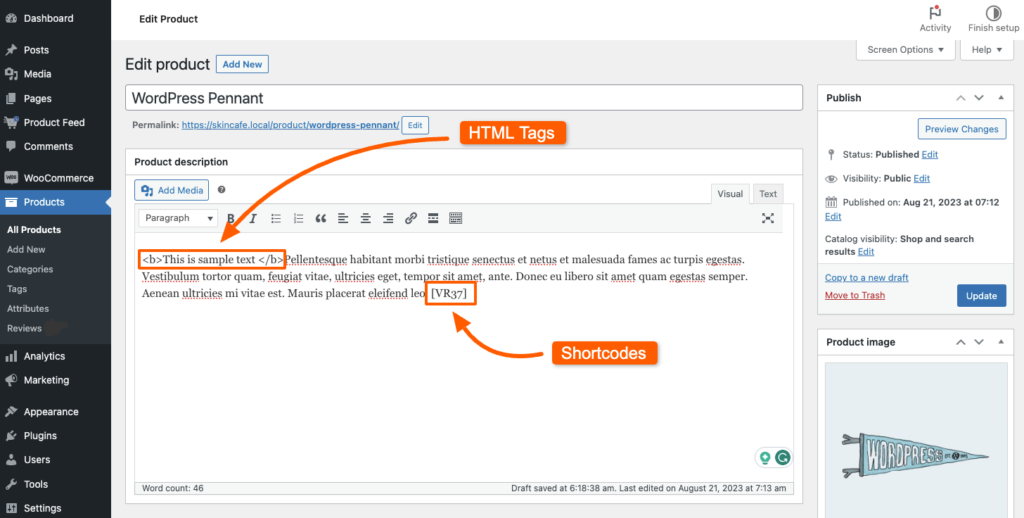
For example, here's a sample product that contains an HTML Tag and a Shortcode.
[](https://rextheme.com/wp-content/uploads/2023/09/Sample-product.png)
Now once you generate a feed with this product with the default Output Sanitization, you will get the following structure:
```
35
WordPress Pennant
<a> </a> Pellentesque habitant morbi tristique senectus et netus et malesuada fames ac turpis egestas. Vestibulum tortor quam, feugiat vitae, ultricies eget, tempor sit amet, ante. Donec eu libero sit amet quam egestas semper. Aenean ultricies mi vitae est. Mauris placerat eleifend leo. [VR37]
```
You can see that HTML Tag has changed to UTF-8 value, and the Shortcode [VR37] is still there.
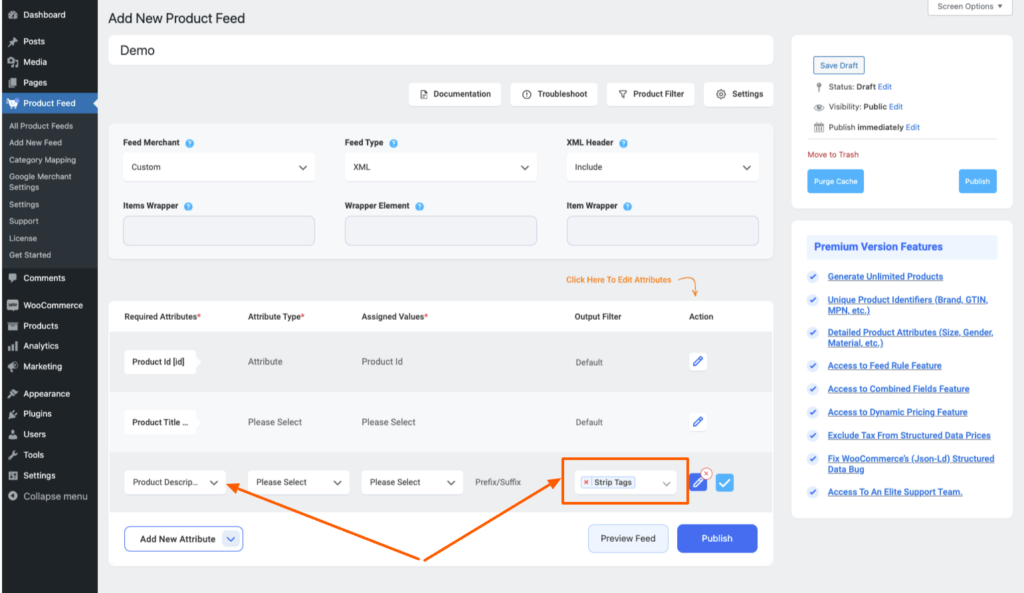
Now, to remove the HTML Tags, select Strip Tags as the Output Sanitization:
[](https://rextheme.com/wp-content/uploads/2023/09/Strip-Tags.png)
Now, once you publish/ update the feed, you will see that the HTML Tags are gone:
```
35
WordPress Pennant
Pellentesque habitant morbi tristique senectus et netus et malesuada fames ac turpis egestas. Vestibulum tortor quam, feugiat vitae, ultricies eget, tempor sit amet, ante. Donec eu libero sit amet quam egestas semper. Aenean ultricies mi vitae est. Mauris placerat eleifend leo. [VR37]
```
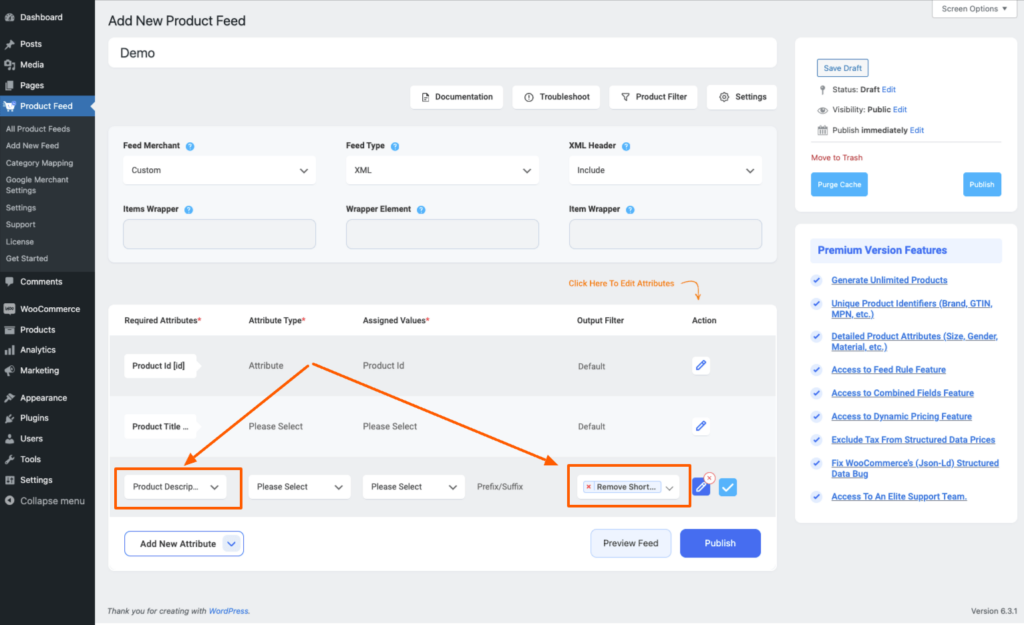
In the same way, if you want to remove the Shortcodes, just select Remove Shortcodes as the Output Sanitization,
[](https://rextheme.com/wp-content/uploads/2023/09/Remove-Shortcode.png)
And you will see that the Shortcodes are gone from the description:
```
35
WordPress Pennant
<a> </a> Pellentesque habitant morbi tristique senectus et netus et malesuada fames ac turpis egestas. Vestibulum tortor quam, feugiat vitae, ultricies eget, tempor sit amet, ante. Donec eu libero sit amet quam egestas semper. Aenean ultricies mi vitae est. Mauris placerat eleifend leo.
```
That's it, this is how you can remove HTML Tags or Shortcodes from your feed attribute.
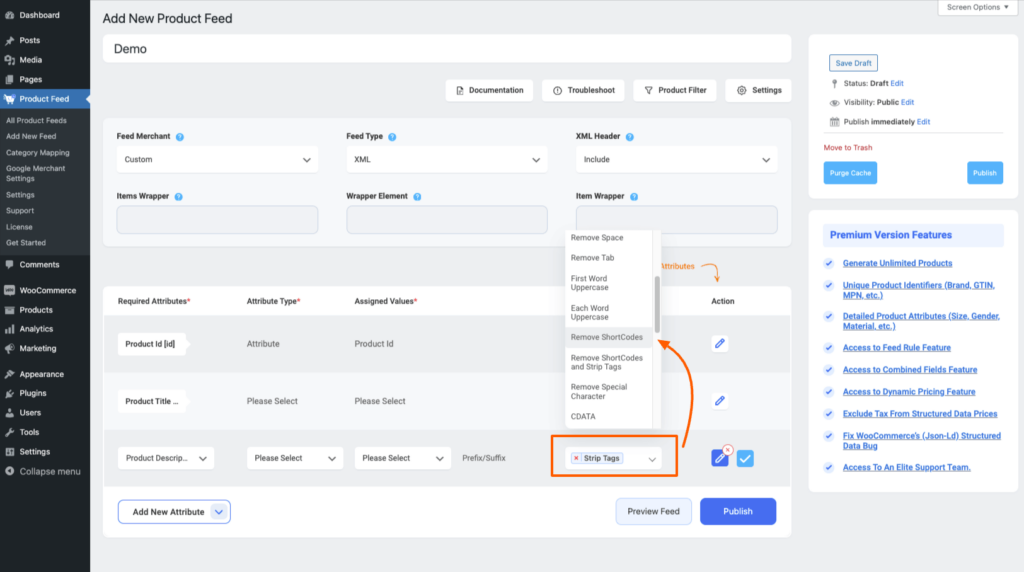
However, you can choose multiple filters altogether, which as Remove ShortCodes and Strip Tags.
[](https://rextheme.com/wp-content/uploads/2023/09/Choose-multiple.png)
Select this Remove ShortCodes and Strip Tags as the output Sanitization, and it will remove both Shortcodes and HTML Tags from your feed attribute.
```
35
WordPress Pennant
Pellentesque habitant morbi tristique senectus et netus et malesuada fames ac turpis egestas. Vestibulum tortor quam, feugiat vitae, ultricies eget, tempor sit amet, ante. Donec eu libero sit amet quam egestas semper. Aenean ultricies mi vitae est. Mauris placerat eleifend leo.
```
As you can see both the HTML Tags and Shortcodes are removed from your feed attribute.